TL;DR: After credential rotation, a worker still needs to load the replacement values before it can use them. This walkthrough explains a startup script that authenticates to Infisical, retrieves and validates selected secrets, revokes its temporary token and then starts one Node.js worker. A self-contained offline exercise shows how to keep bootstrap and unrelated credentials out of the child's environment. The setup still trusts the host, does not configure issuer-side or PAM rotation, and needs separate live application checks.
What happens after you replace a credential
You replace a credential at the service that issued it, save the new value in a vault, and then need your software to use it. The vault is a central secret store. A background worker is a program running jobs outside the web page a user sees.
This article covers that last delivery step for one Node.js worker. A trusted startup script retrieves selected secrets before launching the worker. It does not ask the worker to carry the credentials used to log in to the vault.
That is a narrower task than credential rotation itself. MITRE's definition includes changing or replacing authentication credentials. Infisical also has a native PAM rotation feature that changes target account passwords; this walkthrough does not configure that feature.
The pattern below is an author-supplied reference adaptation, separate from deployed application code. Its tests use simulated vault responses. You can reproduce a smaller, self-contained exercise later in the article without an Infisical account or a real key.
Choose the worker, environment and trust boundary
Start by naming one worker and the values it needs. In the reference adaptation, the required names are DATABASE_URL, OPENAI_API_KEY and FIRECRAWL_API_KEY. These illustrate separate service dependencies; your application should choose its own required set.
For real secrets management, decide which machine identity will read those values and which project contains them. A separate worker project can make that choice easier to inspect. It does not automatically restrict access to one environment inside the project.
The adaptation expects these settings in the trusted parent's environment:
| Setting | Purpose |
|---|---|
INFISICAL_PROJECT_ID |
Identifies the selected project |
INFISICAL_CLIENT_ID |
Identifies the machine identity |
INFISICAL_CLIENT_SECRET |
Protected credential used to log in |
INFISICAL_API_URL |
EU API location selected by this example |
EXAMPLE_WORKER_ENABLED |
Controls this demonstration's ordinary startup path |
Keep the client secret in your trusted configuration workflow, outside source code and command arguments. The Universal Auth guide explains how to create and assign the identity.
The offline exercise needs none of those settings. It was tested with Node.js 24.19.0 and uses only built-in modules. The broader adaptation has Linux-specific assumptions, including its /dev/null dotenv guard; it should not be transplanted unchanged to another platform.
Give the startup script permission to read secrets
Infisical's login reference describes exchanging a client ID and client secret for an access token. The startup script uses that token for API requests. The credential used to obtain the token remains a separate responsibility.
Assign the identity to the intended project and review its project role. Infisical's role documentation describes Viewer as read-only access to all resources in that project. Selecting one folder in a request does not change that permission.
The same applies to filtering secret names in JavaScript. A filter can decide what the child receives after retrieval; it does not prevent the parent from reading other values its identity is allowed to access. Infisical documents other permission mechanisms, and assigned roles are additive, so review the complete assignment.
The reference adaptation also chooses a token policy: returned TTL no greater than 900 seconds and maximum TTL no greater than 3600 seconds. Its configuration assumes periodic renewal is disabled. Those are choices in this example, not Infisical defaults or universal settings.
The Universal Auth documentation explains that a periodic-token configuration changes the lifetime model: TTL and Max TTL are ignored when a period is set. Review that setting separately. Revoking an issued token does not retire the client secret or prove that it cannot be reused.
Fetch, validate and launch in that order
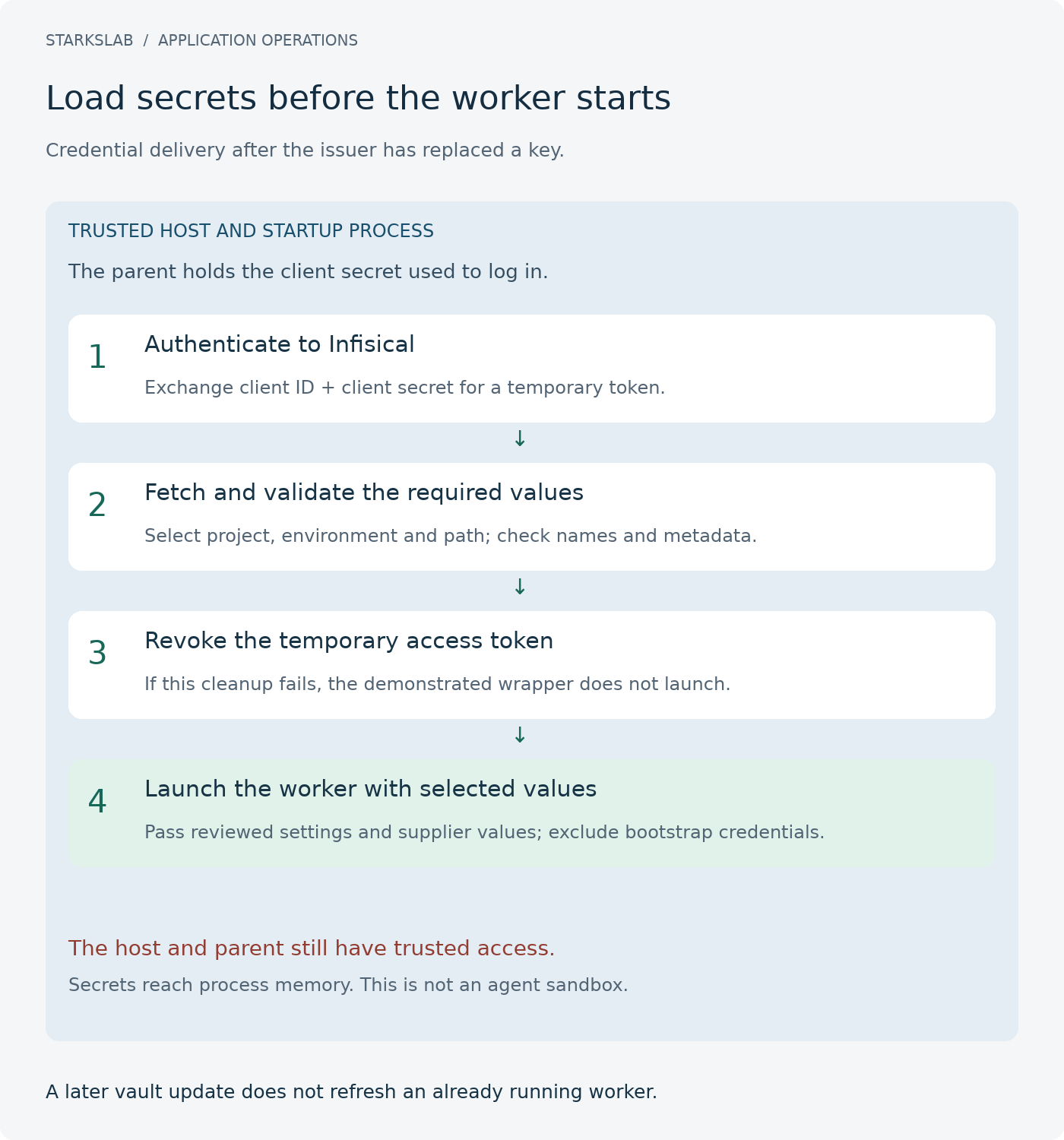
The startup script runs before business code. Its sequence is authentication, retrieval, validation, token revocation and child launch. The ordered steps below explain the inspected adaptation, rather than providing a complete production loader.
The secrets-list API supports selecting a project, environment and path. This is the adaptation's query shape:
const query = new URLSearchParams({
  projectId,
  environment: "prod",
  secretPath: "/",
  includeImports: "false",
});
The request selects a location; the identity's permissions determine what it can actually read. The reference script checks required values and returned project/environment metadata, and checks path metadata when present. It rejects missing, duplicate, empty or malformed required values instead of reusing a stale inherited value.
The child is launched only after the expected token-revocation result. It receives reviewed non-secret settings plus the selected supplier values. The host and parent still retain trusted access; this sequence is not a memory-erasure mechanism.
Changing a vault value later does not update this already running child. Its next adoption event must be deliberate: restart, redeployment or another reload mechanism implemented by the application.
Before you start
Choose one worker and review its project/identity scope, required names and token policy. The printed exercise needs only a trusted Node.js runtime; actual vault access is a separate deliberate step.
Authenticate the trusted startup process
Use the dedicated machine identity to exchange the client ID and client secret for a temporary token. The inspected adaptation accepts its selected EU origin and validates the returned lifetime fields against its configured policy.
Expected result
The parent has the expected token, or startup stops before worker launch.
Select the intended secret location
Request the selected project, environment and root path with imports disabled. Treat the query as a retrieval selection, not a new permission boundary.
Expected result
The requested response is available for validation without claiming narrower project permissions.
Validate the required values before handoff
Require exactly one usable value for each selected name. Check the expected project/environment metadata and path metadata when present. Reject a missing value instead of falling back to the inherited key.
Expected result
Only the expected values proceed; malformed or unexpected input stops the sequence.
Revoke the temporary token before launch
Attempt the adaptation's token cleanup and require its expected success response before launching the child. Do not describe this as retiring the client secret or erasing all copies of the token.
Expected result
Cleanup succeeds before launch, or the adaptation fails without a success result.
Sources: [17]
Launch with a reviewed child environment
Construct the child environment from an explicit non-secret settings allowlist and the selected validated supplier values, excluding bootstrap and unrelated credentials. Launch without a shell; keep the execution host and parent trusted.
Expected result
The child receives the selected values; later vault changes still require a new adoption event.
Verify the result
Reproduce the printed three-test exercise offline. Treat the separate 36-test adaptation result as supporting author work. Qualify a real identity, supplier request and application flow separately; none is proven by mocked input.
Troubleshooting
Inspect the fixed failure phase without printing response bodies or environment values. Correct the configuration or validation issue rather than restoring inherited stale credentials. Keep live secret-check mode distinct from disabled ordinary startup.
Try the child-environment boundary without a vault
You can inspect the child-environment policy without contacting a vault. Save the following complete exercise as startup-boundary.test.mjs. All values are fictional, and no function makes network requests or launches a business worker.
The exercise keeps just two inherited settings, then adds three explicitly supplied values. It is a teaching subset of the reference adaptation: it does not implement authentication, API response validation, token cleanup or process supervision.
import assert from "node:assert/strict";
import test from "node:test";

const settings = new Set(["NODE_ENV", "EXAMPLE_WORKER_ENABLED"]);
const required = ["DATABASE_URL", "OPENAI_API_KEY", "FIRECRAWL_API_KEY"];

// Exercise only: "fresh" stands in for validated vault results.
function workerEnvironment(inherited, fresh) {
  const result = Object.fromEntries(
    Object.entries(inherited).filter(([name]) => settings.has(name)),
  );
  for (const name of required) {
    const value = fresh[name];
    if (typeof value !== "string" || !value.trim() || value.includes("\0"))
      throw new Error("Required value missing or malformed");
    result[name] = value;
  }
  return result;
}

const fresh = {
  DATABASE_URL: "fictional-database-value",
  OPENAI_API_KEY: "fictional-ai-value",
  FIRECRAWL_API_KEY: "fictional-crawler-value",
};

test("selected fresh values replace stale inherited values", () => {
  const result = workerEnvironment(
    { NODE_ENV: "production", OPENAI_API_KEY: "fictional-old-value" },
    fresh,
  );
  assert.equal(result.NODE_ENV, "production");
  assert.equal(result.OPENAI_API_KEY, fresh.OPENAI_API_KEY);
});

test("bootstrap and unrelated settings are not handed to the worker", () => {
  const result = workerEnvironment({
    INFISICAL_CLIENT_SECRET: "fictional-bootstrap",
    NODE_OPTIONS: "--require unwanted.cjs",
    UNRELATED_SECRET: "fictional-unrelated",
  }, { ...fresh, UNREQUESTED_VALUE: "fictional-extra" });
  assert.deepEqual(Object.keys(result).sort(), [...required].sort());
});

test("a missing replacement cannot fall back to an inherited key", () => {
  assert.throws(() => workerEnvironment(
    { OPENAI_API_KEY: "fictional-old-value" },
    { ...fresh, OPENAI_API_KEY: "" },
  ), /Required value missing/);
});
Run it from the directory containing that file:
node --test startup-boundary.test.mjs
Expect three passing tests. They check that a fresh value replaces a stale one, unrelated/bootstrap settings are not handed over, and a missing replacement cannot fall back to an inherited key.
The exercise also makes the word “allowlist” concrete: settings are included because they are named, rather than merely excluding a few known secret names. That does not establish operating-system isolation. A real application must review which apparently non-secret settings can influence its runtime.
Command
env -i PATH=/usr/bin:/bin /opt/codex/runtimes/codex-primary-runtime/dependencies/node/bin/node --test research/startup-boundary.test.mjsActual output
ℹ tests 3
ℹ suites 0
ℹ pass 3
ℹ fail 0
ℹ cancelled 0
ℹ skipped 0
What the offline checks establish
Two different offline checks support this walkthrough:
| Check | Observed result on 25 October 2026 | Scope |
|---|---|---|
| Printed child-environment exercise | 3 tests passed under Node.js 24.19.0 | The self-contained policy shown above |
| Separate reference adaptation | 36 tests passed under Node.js 24.19.0 | Mocked vault requests, validation, cleanup ordering, child settings and subprocess behavior |
The printed exercise is the reader-reproducible example. The 36-test result belongs to a separate adaptation read through the author's private repository; it is not a public download or a claim that the entire wrapper is printed here.
That adaptation's suite checks failures as well as the successful path: missing or duplicate values, incorrect boundary metadata, unsuitable returned token lifetimes, redirects, request timeouts and token-revocation failure. It also exercises actual subprocess exit/signal behavior without running supplier operations.
Its ordinary disabled mode makes no vault requests. However, its explicit --check-secrets mode is a different action: with real configuration it authenticates and retrieves values even when the worker flag is disabled. Treat that as a live check requiring deliberate setup, not another offline test.
No live Infisical login, supplier acceptance check or production deployment ran for this article. Mock success cannot establish a real identity's permissions, a working database connection or successful application recovery.
A passed stage is not a recovered application
For example, a simulated response can contain the right secret names but identify the wrong project. The adaptation must reject that response before passing values to a worker. That check verifies how the script handles the metadata it receives; it does not independently establish which projects a real identity can access.
Conversely, a successful login establishes neither that all required names exist nor that their values work at a supplier. Those are separate questions. Keep the expected operation beside each result so that a successful earlier step cannot silently stand in for a later one.
If startup stops before the worker runs
The reference adaptation reports a fixed phase label on failure. That makes the stopping point visible without printing the response body or an arbitrary exception containing a credential.
| Phase | What to inspect |
|---|---|
| Configuration | Intended endpoint, required settings and exact mode values |
| Authentication | Machine identity, credential validity, membership and applicable login restrictions |
| Retrieval | Project, environment, path and permission to read the intended values |
| Validation | Required names, duplicate/empty values, returned metadata and token lifetime fields |
| Revocation | Whether the temporary-token cleanup request succeeded |
| Launch | Worker executable/path and the reviewed child environment |
Use the current login and secrets-list references to inspect API assumptions. Read-only access to a project and a successful authentication are different checks.
If startup stops, do not bypass it by restoring the old inherited key or printing all environment variables. Correct the identified condition and keep the failed attempt visible. In the inspected adaptation, failed revocation prevents the success path and worker launch.
An eventual production integration also needs its own process-management decisions. The example's behavior is evidence about that example, not a guarantee that your application's wrapper handles every signal, retry or shutdown case correctly.
What this pattern still trusts
This pattern changes how selected values reach a worker. It does not remove the need to trust the computer running it.
The parent starts with the bootstrap credential, retrieves application secrets into memory and constructs a child environment containing selected values. Excluding the bootstrap credential from that environment is useful to inspect, but does not establish a boundary against another process running under the same operating-system user.
Project permissions remain another boundary. A request for prod at / and a JavaScript name filter do not reduce a project-wide Viewer role to only those names. Keep unneeded secrets out of the identity's accessible scope and review its actual permissions.
Finally, API key rotation at an issuer, saving the replacement, starting the worker with it and completing the intended operation are separate events. This walkthrough checks the delivery design offline; provider acceptance and application behavior still need their own bounded qualification.
For the next secret rotation, choose one low-impact worker, identify its required values and inspect the handoff first. Run the offline exercise, then decide what a separate real-environment check would need to prove. Keep untested work explicit rather than treating the vault setup as a security all-clear.
Availability and recovery
The inspected adaptation has no secret cache, inherited-credential fallback or automatic request retry. If the selected vault request fails, it stops rather than starting with an older value. That is an availability tradeoff to review before adopting the pattern: an unavailable vault can prevent a fresh worker from starting.
Plan the operational response separately from the code example. Identify who can repair the identity or configuration, which jobs may wait, and which existing workers still hold earlier values. A restart plan and a human recovery route belong alongside the startup script; they are not supplied by a passing mock test.