TL;DR: To rotate API keys, replace the secret values your applications use to access external services, update every application or job that uses them, and check the intended operations. For planned maintenance, use a short overlap only if the issuer supports it, then retire the old key after the known consumers move. If a key may be exposed, follow the issuer's incident process promptly; revocation may come first and interrupt applications. Use the register below to track each consumer and keep unverified work visible.
What this checklist helps you rotate
This checklist concerns secret server-side API keys: values your server application or background jobs send to access an external service. Deliberately publishable keys and credentials designed for client applications have different handling rules. The issuer is the service that provides the key. A consumer is any program using it: a website, a background job, a scheduled script or another integration.
To rotate a key, you replace it and stop using the old value. The practical difficulty in API key rotation is getting every consumer to use the replacement before treating the work as complete.
Imagine a web application and a background worker both sending messages through the same external service. Updating the website's settings leaves the worker unchanged unless you update it too. This guide uses a fictional setup like that to show what to record.
The scope here is application API credentials. Database passwords, webhook-signing secrets and encryption keys can require different procedures. Also distinguish layers: OpenRouter documents that replacing an OpenRouter application key does not replace an upstream provider key supplied through Bring Your Own Key.
Before you change a key
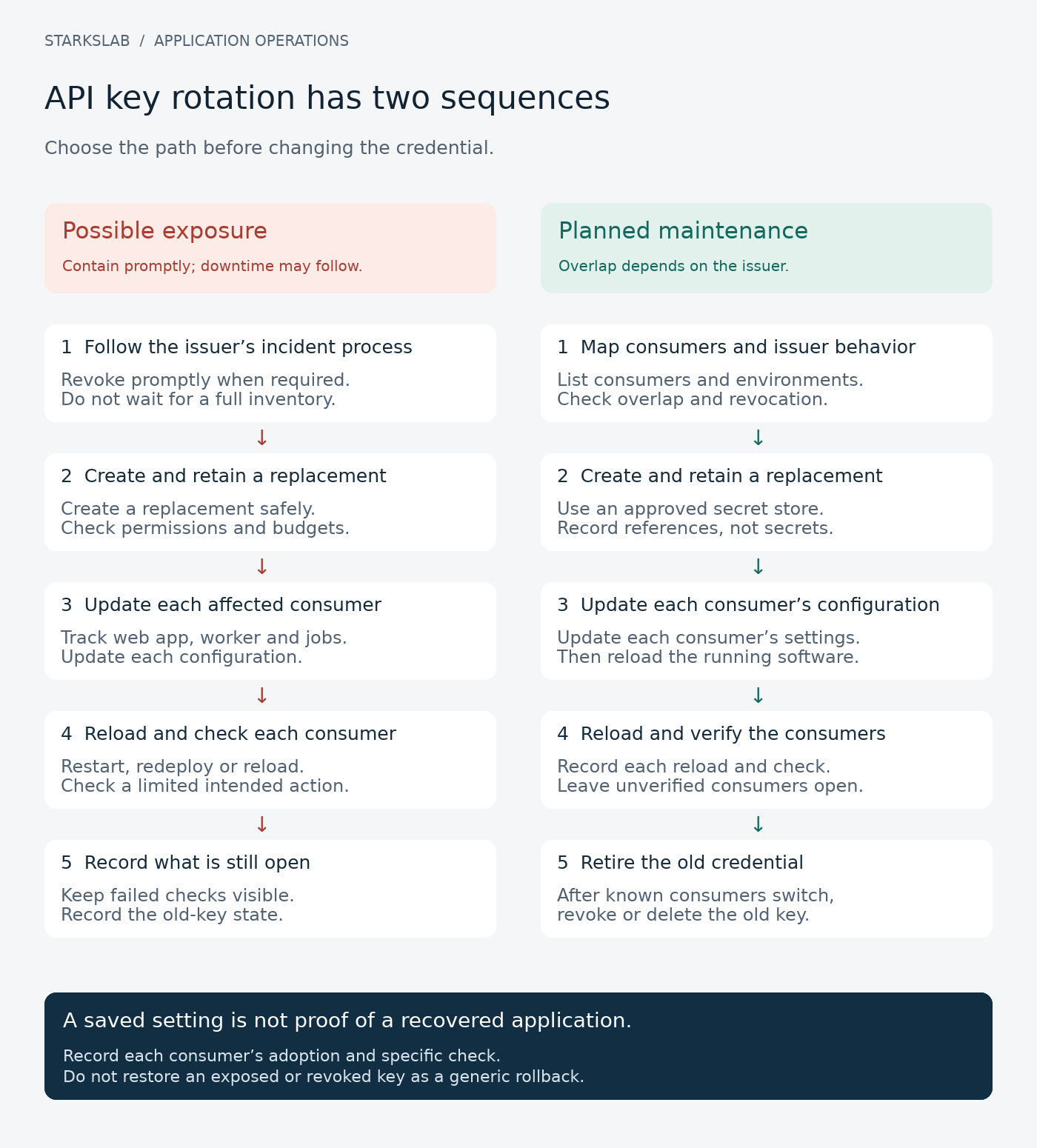
Start by deciding whether this is planned maintenance or a response to possible exposure. That changes the order of operations.
For planned rotation, your issuer may allow the old and new keys to work together briefly. OpenRouter's documented sequence uses that overlap to update applications before deleting the old key. Do not assume another provider offers the same behavior.
If a secret may be exposed, follow the issuer's incident instructions promptly. Stripe advises immediate rotation even without proof that someone saw the key. Do not keep a suspected compromised key active merely to finish an orderly checklist; containment may interrupt applications.
For the routine path, arrange access to the issuer account and your secret store, identify who can deploy or restart each consumer, and choose a limited operation to check afterward. Note the replacement's required permissions and spending limits. Do not broaden either simply to get a failing check to pass.
Make a register of the applications using each key
Create one row for each credential and consumer, rather than one row for the entire provider account. If two programs share a key, they need separate adoption and verification records.
Use descriptive references instead of secret values. API7's guidance recommends non-secret identifiers and lifecycle records; Stripe's guidance keeps actual secret values in secret-management tools.
Copy these fields into your own sheet or tracker:
| Field | What to record |
|---|---|
| Credential | Logical name and non-secret issuer ID, if available |
| Issuer and account | Which service issues this key; a non-sensitive account label |
| Environment | Development, staging or production |
| Consumer | The particular application, job or integration |
| Configuration reference | Where that consumer obtains the value; never paste it |
| Owner | Who can update and restart this consumer |
| Issuer behavior | Whether overlap is supported; what revocation does |
| Adoption action | Restart, redeploy or documented reload |
| Verification | Limited operation, expected result, actual result and time |
| Old-key state | Active, revoked, deleted or unconfirmed |
| Remaining work | Other copies, recovery tasks or unverified operations |
Fictional example: two consumers share demo-mail, while an indexer uses a separate demo-search credential. The fictional mail service allows overlap; the search issuer's behavior is unknown. Both use a demonstration environment and invented configuration references.
| Credential / consumer | Configuration reference | Adoption action | Recorded check |
|---|---|---|---|
| demo-mail / web app | example/mail/reference | Redeploy web app | Simulated message-preview flow |
| demo-mail / worker | example/mail/reference | Restart worker | Simulated queued-job flow |
| demo-search / indexer | example/search/reference | Not identified | Not recorded |
These are planning records, not functioning keys or provider instructions. A Microsoft Q&A example similarly treats inventory, service-specific behavior and dependent application updates as separate work.
Rotate API keys: the consumer-by-consumer checklist
Use the steps below once for each affected credential, tracking every consumer in the register. The default sequence is for planned rotation with supported overlap. The incident branch can require retiring the exposed key first and restoring applications afterward.
Stripe and OpenRouter illustrate why issuer-specific instructions matter: key capture, permissions, transition behavior and redeployment requirements differ. Follow the documentation for the credential you actually have.
Before you start
Choose the incident or routine path, arrange issuer/configuration access, identify consumer owners and define a limited check. See Before you change a key for the containment decision.
Choose the incident or routine path
Check why the key is changing. For possible exposure, follow the issuer's incident process and revoke or disable access promptly when required, even before consumers are ready. For maintenance, confirm whether a short overlap is supported.
Expected result
The urgency and permitted transition sequence are recorded; unsupported overlap is not assumed.
List consumers and issuer capabilities
List every known environment and consumer, including jobs and deployment pipelines. Record who owns each update, where values are obtained, whether replacement immediately invalidates the old key and how to retire it. If the inventory is incomplete, record that gap rather than calling the list exhaustive.
Expected result
Each known consumer has a row; provider behavior and unknowns are explicit.
Create and retain the replacement
Use the issuer's supported process. Retain the new value directly in the approved secret store and record only its reference or non-secret ID. Check required permissions and spending limits; Stripe's one-time display is one example of why capture belongs here.
Expected result
The replacement is safely retained with deliberately checked authority and limits.
Update each consumer's configuration
Update every relevant secret-store, deployment or pipeline reference. Keep development and production records distinct. Mark a setting as updated only after checking the intended location; do not publish values in the register or diagnostic output.
Expected result
Every known consumer's configuration update is accounted for, with remaining gaps visible.
Make the running consumer load the change
Restart, redeploy or invoke its documented reload mechanism. Record the consumer and action, not just that a settings screen was saved. Stripe's managed-key documentation notes redeployment is generally needed unless the hosting platform handles it automatically.
Expected result
The adoption action is recorded separately for every consumer.
Run the agreed limited check
Use the smallest authorized operation that demonstrates the intended behavior within its budget. Record a non-sensitive result and time. If authentication works but the intended job is blocked by a spending gate, record that distinction.
Expected result
The checked operation and its limit are clear; blocked operations remain unverified.
Retire the old credential according to urgency
For planned overlap, confirm the known consumers have moved, including infrequent jobs, and then revoke/delete the old key through the issuer. An idle key's last-used timestamp alone does not prove an unscheduled or infrequent consumer has switched.
For an incident, this may already have happened during containment. Record the actual issuer result; do not re-enable an exposed credential to undo an application failure.
Expected result
The old-key state is recorded without delaying incident containment or claiming an unknown state is retired.
Leave a usable recovery record
Record owner, replacement reference, consumer updates, check outcomes, old-key state and remaining copy/recovery tasks. Keep unfinished consumers open. Do not put the secret value in the record.
Expected result
Another rotation can start from operating metadata rather than rediscovering every dependency.
Verify the result
Record configuration changes, running-consumer adoption, bounded provider acceptance and intended operation results separately. For routine rotation, check known consumers before old-key retirement; urgent containment can reverse that order.
Troubleshooting
If a result fails, check the exact issuer, environment, configuration reference, reload action, permission and spending limit. Leave incomplete results open and follow provider recovery instructions; do not restore an exposed or revoked key.
Check the running application, then retire the old key
Keep these results separate in the register:
| Evidence | What it establishes |
|---|---|
| Replacement saved | The selected store/configuration was updated |
| Adoption recorded | A specified consumer was restarted, redeployed or reloaded |
| Provider request accepted | That credential worked for that limited request |
| Intended operation completed | The specific user flow or job checked worked |
| Old-key retirement recorded | The issuer reported the old credential retired |
A healthy homepage does not necessarily exercise a worker's external integration. Record which environment and consumer you checked, the operation, time and non-sensitive outcome. OpenRouter recommends checking migrated traffic, while the Microsoft discussion makes dependent application updates and post-rotation checks explicit.
For planned rotation, review all known consumers before retiring their shared old key. Include infrequent scheduled jobs: a quiet old key may mean a job has not run yet, rather than that it has switched. Record a suitable bounded check or leave that consumer unverified.
For an exposure, preserve the urgent-revocation decision even if some consumers remain broken. Confirm retirement through the issuer's documented controls; do not make unnecessary requests with an exposed credential merely to generate evidence.
What we checked for this article: on 25 October 2026, an offline Python 3.13.5 exercise checked the fictional register's consistency. Two entries had documented simulated adoption and operation results; the indexer remained open. A deliberately altered case correctly flagged routine retirement when the worker's adoption record was missing.
The exercise used no real credentials and made no network requests. It did not authenticate to an issuer, restart an application or verify a live rotation. In the fictional mail scenario, retirement was internally consistent only because both recorded consumer checks were complete; the search credential's retirement remained unconfirmed.
Command
env -i PATH=/usr/local/bin:/usr/bin:/bin python3 research/key-rotation-register/review_register.pyActual output
OFFLINE EDITORIAL CHECK - fictional metadata only
Runtime: Python 3.13.5
Records: 3; documented simulated checks: 2; incomplete records: 1
demo-mail: recorded retirement consistent with both simulated consumer checks
demo-search: OPEN - reload action and verification result missing
Negative case: unverified worker correctly blocks routine retirement
Network requests: 0; real credentials used: 0; live rotations performed: 0
Result: worksheet consistency checked; production recovery not assessed
If the new key still fails
A failed request is a reason to inspect the recorded sequence, not automatically to issue another key or expand permissions.
| Symptom | Next check |
|---|---|
| You missed the replacement display | Follow the issuer's supported replacement process and retain the next value immediately |
| The web app works but a job fails | Check that job's configuration reference, environment and restart/reload record |
| Saving a key changed nothing | Confirm how the running consumer loads configuration |
| Authentication or permission denied | Check issuer/account, credential layer and required scope; avoid granting broad access blindly |
| A spending gate stops the operation | Check the intended limit and record the blocked operation as unverified |
| The issuer invalidates the old key immediately | Follow its recovery sequence and plan for interruption; do not invent an overlap period |
Stripe's key-handling guidance covers one-time displays and restricted keys. OpenRouter's guide separates application keys from upstream provider credentials and recommends deliberate spending limits.
If a check cannot be completed safely within the available permissions or budget, leave its result open. Do not restore a revoked or exposed key as a generic rollback strategy. Recover through a supported replacement or another authorized, uncompromised configuration.
Keep the register ready for the next replacement
Keep the register after the immediate credential rotation. It should show who owns each integration, what causes its running software to load a new value, and which operations still need checking.
Review historical copies in code, configuration, logs and other storage as separate tasks. Stripe recommends auditing code, configuration and deployment pipelines; API7 recommends keeping secret values out of logs. Creating a replacement does not establish that previous copies have disappeared.
For the next round of secret rotation, start from that record and check it is still current. New jobs and deployment environments can create additional consumers. The useful outcome is a traceable result for each one, with unfinished work visible.