API spend limits help only when you know which requests they can stop. An agent can exhaust a shared organization limit even when development and production use different projects.
TL;DR
- Alerts notify; enabled hard limits can reject affected requests.
- Record both the shared organization scope and the narrower project or workspace scope.
- Read the provider’s error code: a spend cap, a rate limit and exhausted credit need different responses.
- Leave headroom for documented propagation; in-flight behaviour is not documented.
- Claude Enterprise member limits are a separate control from Claude API organization and workspace limits.
- An SDK’s estimated query budget is a separate boundary, not a provider-wide billing cap.
This guide compares documented OpenAI and Claude behaviour, works a fictional dev/production cap example, and includes a classifier run on synthetic errors. Google Gemini is not covered, because its official pages could not be retained as sources.
A budget setting is useful only when you know what it does
Picture a development agent stuck in a retry loop while the production application shares the same provider organization. Two questions decide what happens next:
- Which requests count toward the control? A project limit and an organization limit can both apply to the same request.
- What does the caller receive when it trips? A notification, an HTTP 429 with a spend-limit code, an HTTP 400, or an SDK-side budget result that arrives after the crossing response has already been counted.
Answer both before you trust the setting. If the answer to the first is "the whole organization", a runaway development job can stop production; if the answer to the second is "an email", nothing stops at all. The rest of this guide gives those answers per control, then shows what to do with them.
Do API spend limits actually stop requests?
Some do, when enforcement is enabled; others only notify you. OpenAI documents separate alerts and hard organization/project limits, while Claude documents tier caps and user-set limits with different failures. Record the exact control and request scope, then check its error and restoration procedure; the label “budget” alone does not establish a stop.
Sources: [1]
Compare API spend limits by scope and behavior
Each row is a distinct control, taken from official OpenAI, Claude API, Claude Enterprise and Claude Agent SDK documentation checked on 6 November 2026. A provider name alone is too broad a comparison unit: OpenAI has three different behaviours, and Anthropic has two API-side caps, a separate Enterprise member limit and a client-side SDK budget.
The diagram covers the API-side controls; the table below adds the Enterprise member limit, propagation, already-running work, reset and restoration. "Unknown" means the documentation does not establish that behaviour, not that it is instant or absent.
Alerts, provider caps and client budgets
Comparison method
Distinct controls from primary docs checked 6 November 2026. Org means organization; details follow in the provider sections.
| Option | Scope | What stops? | Failure signal | Propagation / overrun | Already-running work | Reset / period | Restoration |
|---|---|---|---|---|---|---|---|
| OpenAI spend alert | Monthly monitoring Sources: [5] | Notification; traffic continues Sources: [5] | None Sources: [5] | Not applicable Sources: [5] | Not stopped Sources: [5] | Monthly monitoring Sources: [5] | Nothing to restore; investigate Sources: [5] |
| OpenAI organization hard limit | All organization projects | Reject affected traffic | 429: organization_spend_limit_exceeded | Delayed; slight overrun possible | Unknown | Monthly cycle | Raise/remove; wait for propagation |
| OpenAI project hard limit | Billed project; org cap also applies | Reject affected project traffic | 429: project_spend_limit_exceeded | Delayed; slight overrun possible | Unknown | Monthly cycle | Raise/remove; wait for propagation |
| Claude API organization tier cap | Organization tier cap Sources: [6] | Pause API usage Sources: [6] | 429 rate_limit_error; enforced_spend_limit_reached; no retry-after Sources: [6] | Numeric delay unknown Sources: [6] | Unknown Sources: [6] | Next month, 00:00 UTC Sources: [6] | Higher limit/tier, or reset Sources: [6] |
| Claude API user-set limit | Org/supported workspace; org limits apply Sources: [7] | Reject affected requests Sources: [7] | 400 invalid_request_error; Claude Code exception: 429 with retry-after Sources: [7] | Numeric delay unknown Sources: [7] | Unknown Sources: [7] | Read resumption time in error Sources: [7] | Authorized raise/remove configured limit Sources: [7] |
| Claude Enterprise member limit | Per Enterprise member, inherited or overridden; not Console orgs Sources: [8] | Gates the member’s own spend Sources: [8] | Unknown Sources: [8] | Unknown Sources: [8] | Unknown Sources: [8] | Monthly, 00:00 UTC on the 1st Sources: [8] | Admin approves an increase or sets an override Sources: [8] |
| Claude Agent SDK query budget | Current call’s estimated spend Sources: [9] | Client budget result Sources: [9] | SDK subtype error_max_budget_usd Sources: [9] | Timing unknown Sources: [9] | Unknown Sources: [9] | /clear; resumed spend excluded Sources: [9] | Review before the next call Sources: [9] |
Comparison limitations
Unknown is not instant or absent. Nothing was tested live, and the Enterprise row rests on a truncated page.
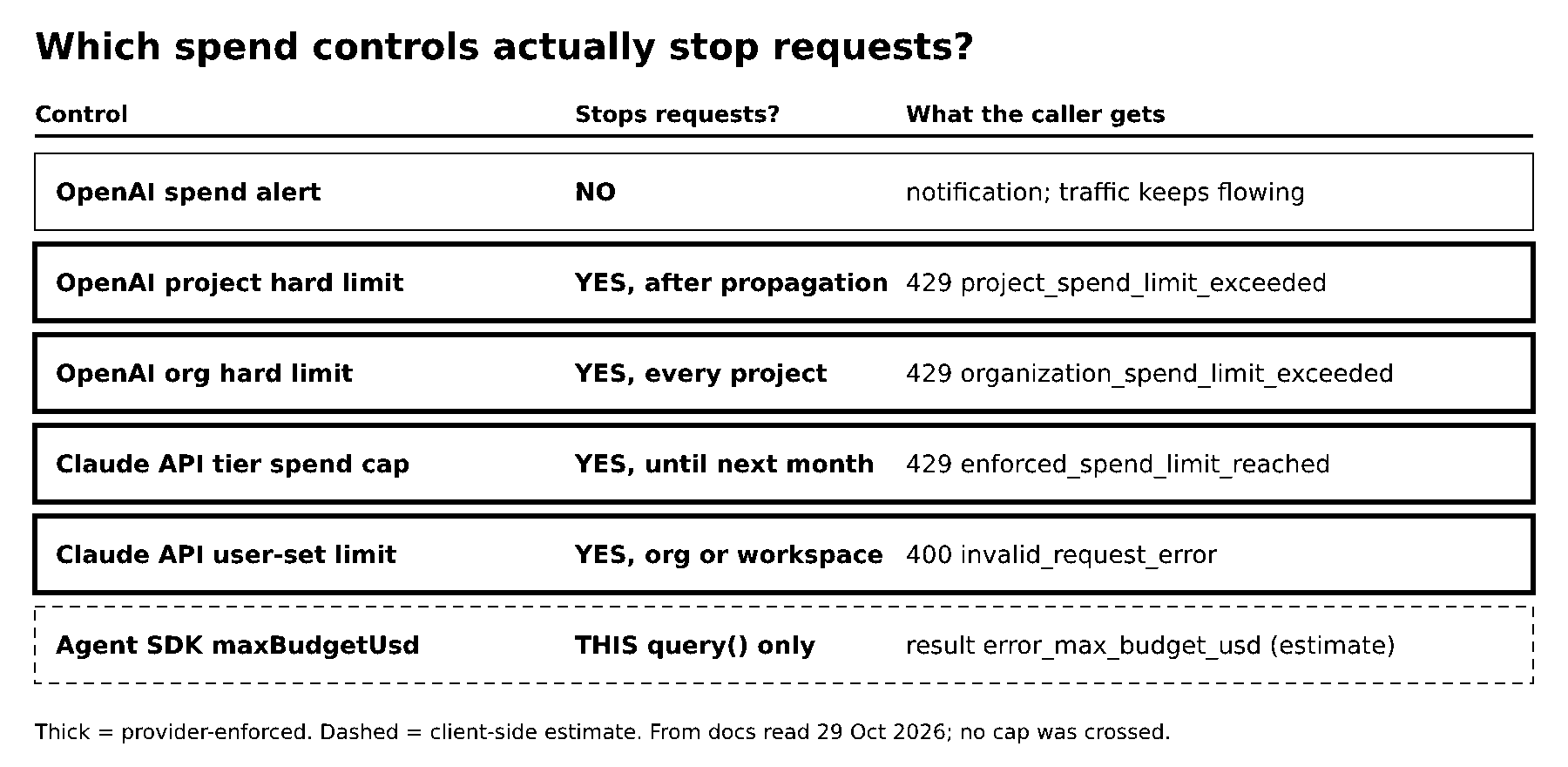
OpenAI usage limits, alerts and enforced caps
OpenAI usage limits come in two kinds: the approved monthly usage limit OpenAI assigns from your usage tier, and the spend limits you configure yourself. OpenAI's current spend-limit guide separates alerts from optional hard enforcement for the second kind. An alert leaves traffic flowing; a configured organization or project limit stops affected requests only when Enforce a hard limit is enabled.
An organization hard limit covers traffic across its projects. A project hard limit covers traffic billed to that project, and both limits can apply to a request. Separate projects therefore do not remove a shared organization constraint.
Read error.code rather than the HTTP status alone; the guide names four billing-related codes:
organization_spend_limit_exceeded: the organization's enforced cap was reached (HTTP 429).project_spend_limit_exceeded: the project's enforced cap was reached (HTTP 429).organization_usage_limit_exceeded: OpenAI's approved usage limit, a separate boundary; request a higher one.credit_balance_exhausted: the organization needs prepaid credit.
For a reached configured cap, an authorized owner can raise or remove it, and traffic resumes after the update propagates. Otherwise, the next monthly cycle resets the limit. The guide says a small amount of extra usage can be processed while the limit state propagates, and it gives no numerical delay or in-flight-request guarantee.
How do OpenAI usage limits differ from project spend limits?
OpenAI assigns an approved monthly usage limit to your organization, separately from spend limits you configure. An enforced project limit applies to traffic billed to that project, while an organization hard limit can affect every project. Inspect the returned code to distinguish configured-cap exhaustion, approved-usage exhaustion, prepaid balance exhaustion and throughput limits.
Sources: [11]
Claude API tier caps and user-set limits are different
Claude API monthly tier caps and user-set limits have different documented responses. These are API organization and workspace controls, not a description of a Claude subscription allowance.
The Anthropic spend limit that applies to a Claude API organization on the Start, Build or Scale tier is the tier's monthly cap: $500, $1,000 or $200,000, while Custom-tier organizations have no monthly cap. You can set a lower limit of your own on the Console Billing page; it cannot exceed the tier cap.
At the organization's tier spend cap, API usage pauses until 00:00 UTC on the first day of the next month, unless a higher limit is obtained sooner. The Messages API returns HTTP 429, rate_limit_error, with error.details.error_code set to enforced_spend_limit_reached. This spend-cap response has no retry-after, and retries, including the SDK's automatic retries, fail until access resumes.
At a user-set organization or workspace spend limit, the documented response is HTTP 400 with invalid_request_error. Its message starts "You have reached your specified API usage limits" or the workspace variant and states when access resumes. Raising or removing that configured limit can restore access sooner.
Workspaces and the Claude Code exception
The Claude limit reference identifies an exception: Claude Code workspace requests over that workspace's limit can receive HTTP 429 with retry-after. Spend limits cannot be set on the Default Workspace, and organization-wide limits always apply, even if workspace limits add up to more. To see which workspace a request counted against, read the anthropic-workspace-id response header, which carries the ID of the workspace your API key or access token resolved to. The reference gives no numerical propagation delay and no complete treatment of requests already running.
Not the same as Claude Enterprise member limits
Anthropic's Spend Limits API is a different control: it sets per-member spend limits for Claude Enterprise organizations and is not available to Claude Console organizations. A member's limit is a per-user override or is inherited from their group, seat tier or the organization default, and a group limit gates each member's own spend rather than a pooled budget. The only period currently supported is monthly, resetting at 00:00 UTC on the first of each month, and an admin can approve a member's request for more. The part of that page retained for this guide does not show what error a member sees at the limit, so treat that as unknown.
What is the spend limit for Anthropic?
For Claude API organizations on the Start, Build and Scale tiers, it is the tier's monthly spend cap: $500, $1,000 and $200,000, while Custom-tier organizations have no monthly cap. You can set a lower limit of your own on the Console Billing page. Claude Enterprise members have separate per-member limits, managed through the Spend Limits API, which Console organizations cannot use. These figures were current on 6 November 2026.
An SDK budget is a separate client-side boundary
The Claude Agent SDK exposes maxBudgetUsd in TypeScript and max_budget_usd in Python. Treat this as a separate client budget: the cost guide says it counts the current call's own spend, excludes totals restored from a resumed session, and starts over after /clear.
The installed TypeScript package (@anthropic-ai/claude-agent-sdk 0.3.318, checked 5 November 2026) declares it the same way: maxBudgetUsd?: number, documented as "The query will stop if this budget is exceeded, returning an error_max_budget_usd result", and error_max_budget_usd is one of the result subtypes.
The reported total_cost_usd and costUSD values are client-side estimates, not authoritative billing data; for authoritative billing, the guide as checked on 6 November 2026 points to its "Manage costs for your organization" page. For error_max_budget_usd, the response that crossed the estimate is included in total_cost_usd and modelUsage, while usage excludes it.
The budget result therefore arrives after that response has been counted, not before it: the total you read includes the response that took the estimate past the budget. The guide gives no figure for how far past the budget a call can go or how quickly it stops, so the comparison table marks the timing as unknown. Other calls and consumers remain outside this call's budget; reconcile them separately.
Starkslab's note on what the Anthropic Agent SDK ships and leaves open says the SDK does not cap token spend. The cost guide documents maxBudgetUsd / max_budget_usd. The two disagree on this point; rely on the cost guide.
Is an SDK budget the same as a provider billing cap?
No. The Claude SDK budget counts the call’s own estimated spend, excludes restored totals from a resumed session and restarts after /clear. Other calls and consumers remain outside that boundary, and estimated totals are not authoritative billing data. Keep provider-side controls and organization-wide usage reconciliation separate from this client-level budget.
Sources: [18]
Command
sed -n '2006,2009p' sdk.d.ts; grep -n "subtype: 'error_during" sdk.d.tsActual output
     * Maximum budget in USD for the query. The query will stop if this
     * budget is exceeded, returning an `error_max_budget_usd` result.
     */
maxBudgetUsd?: number;Work through one fictional development and production setup
Illustrative example. Atlas is fictional: a development agent and a production application in separate OpenAI projects inside one organization. Every amount below is a placeholder chosen to show scope, not a recommended budget, an observed bill or a real incident.
| Worksheet field | Development agent | Production application |
|---|---|---|
| Billed project | atlas-dev | atlas-prod |
| Planned monthly spend | routine work under $10 | about $85 (owner's estimate) |
| Project hard limit | chosen in the planning step below | none; the organization limit is its only stop |
| Shared organization hard limit | $100 / month, enforcement on | same $100 |
| Spend alert | below the project limit, e.g. at 75% | organization alert at $80 |
| Failure code to expect | project_spend_limit_exceeded, or organization_spend_limit_exceeded if the shared limit trips first |
organization_spend_limit_exceeded |
| Restoration owner | developer for the project limit; org owner for the shared limit | org owner |
| Timing unknowns | propagation delay, in-flight requests | same |
Before the month: choose the dev cap
The calculation below is a planning allowance, not a guarantee. It leaves room for production only while the dev cap, production's planned spend and an overrun buffer together fit under the organization limit. OpenAI documents that recorded spend can slightly exceed a limit while enforcement propagates but gives no amount, so the buffer is the owner's assumption; Atlas uses $5. On day 1, with nothing spent, the arithmetic is $100 − $85 − $5 = $10.
Decision: if the agent's routine work fits in $10, set the atlas-dev hard limit to $10 with enforcement on. If development genuinely needs $20, the alternative is an organization limit of at least $110 ($85 + $20 + $5), and only if the org owner accepts that much monthly exposure. Neither figure guarantees that production keeps running: the buffer is assumed, and production can exceed its estimate.
After the organization limit is reached: the incident branch
This branch is a separate fictional case in which Atlas skipped the planning step and kept a $20 dev cap. On day 29, production has spent $82, on track for its $85 estimate, and dev $14 when the dev agent starts looping. At dev $18, still under its own $20 limit, the organization total reaches $100; once enforcement propagates, both projects receive organization_spend_limit_exceeded, and recorded spend may land slightly above $100. The $80 organization alert would have warned the owner earlier, but an alert stops nothing.
Lowering the dev cap now cannot restore production, because the $18 already counts toward the organization total. Stop the looping agent first; otherwise any headroom you restore can go straight back into the loop.
Then the org owner decides: if production must run before the monthly reset and the extra exposure is acceptable, raise the organization limit to at least the spend already recorded plus production's remaining need plus the buffer: $100 + $3 ($85 − $82) + $5 = $108. That figure is a planning allowance too. Recorded spend may already sit slightly above $100, production may need more than its $85 estimate, and OpenAI gives no time for the raise to propagate, so read the actual recorded spend before choosing the number and record when traffic actually resumes. Otherwise production waits for the reset.
With Claude API workspaces, run the same arithmetic against the organization's spend cap and each workspace limit. The Default Workspace cannot have its own spend limit, and organization-wide limits always apply.
Can development usage still affect production under a shared organization limit?
Yes, if their requests count toward the same organization control. OpenAI documents that organization and project hard limits can both apply, and Claude states that organization-wide limits always apply to workspaces. In the fictional Atlas incident branch, dev stays under its own $20 cap, yet once the shared $100 organization cap is reached and enforcement propagates, production fails too.
Optional: check your client response to a stopped request
Before you rely on a cap, check how your client reacts to a stopped request without spending up to it. Starkslab ran the exercise below on 14 November 2026 with the 30-line Python classifier and eleven synthetic records shown in the procedure. The classifier is tested on synthetic fixtures only, not against a provider: it shows the handler action the code proposes, not a provider's enforcement. No request was sent and nothing was retried.
The records cover the documented spend-limit codes, OpenAI's usage-limit and credit codes, a Claude 429 with retry-after in three workspace states (established as not the Claude Code workspace, not established, and the Claude Code workspace), the same 429 with an unrecognized error type, and an unknown code. The classifier keys on the documented code or detail first, never on the HTTP status alone.
A Claude 429 with retry-after is not assumed to be a rate limit, because Claude's reference documents the same response for a Claude Code workspace over its spend limit. The classifier outputs RETRY only when the response carries the documented rate_limit_error type and the workspace is established as not the Claude Code workspace. It outputs CHECK when the workspace is the Claude Code workspace or not established, or when the error type is not recognized, and STOP for everything else; those are proposed handler actions, not observed retries.
Fixture fields versus real responses
The fixture keys are a flat local test format. A real response carries the same signals in different places, and one key, workspace, is a label you set yourself.
| Fixture key | Where a real client gets it |
|---|---|
name, provider |
Local labels; your client knows which provider it called |
status |
HTTP status of the response |
code (OpenAI) |
error.code in the response body |
error_type, message (Claude) |
error.type and error.message in the response body |
details.error_code (Claude) |
error.details.error_code on Messages API responses |
retry_after |
The retry-after response header; never present on the Claude spend-cap 429 |
workspace |
A label you set: claude_code or other, from your own configuration (which workspace the key belongs to) or from the anthropic-workspace-id response header compared with your Claude Code workspace's ID. Leave it out when neither establishes the workspace |
A Claude 429 with retry-after can be an ordinary rate limit or the Claude Code workspace's spend limit, so establish the workspace before choosing a handler action. If neither your configuration nor the header settles it, leave workspace out: the classifier returns CHECK, and you look at workspace usage before any retry.
Build a record from a real response
To classify a live error, build the same flat record from the response your client already holds. This sketch follows the field map above; add it to classify.py above the final loop and call classify(to_record(...)) from your error handler:
def to_record(provider, status, headers, body, claude_code_ws_id=None):
    # headers: response headers with lower-case names; body: the parsed JSON error body.
    err = (body or {}).get("error") or {}
    r = {"name": "live", "provider": provider, "status": status}
    if provider == "openai":
        r["code"] = err.get("code")
        return r
    r.update(error_type=err.get("type"), message=err.get("message") or "",
             details=err.get("details"), retry_after=headers.get("retry-after"))
    ws_id = headers.get("anthropic-workspace-id")
    if ws_id and claude_code_ws_id:  # otherwise "workspace" stays unset and classify() returns CHECK
        r["workspace"] = "claude_code" if ws_id == claude_code_ws_id else "other"
    return r
What you must adapt: how your HTTP client or SDK exposes the status, the headers and the parsed error body; header-name case (the sketch expects lower-case names); and claude_code_ws_id, the ID of your Claude Code workspace taken from your own configuration. If your configuration already establishes which workspace the key belongs to, set workspace yourself instead of reading the header. If the header is missing or you pass no ID, workspace stays unset and a 429 with retry-after comes out as CHECK. This sketch has not been run against a provider response.
The same principle applies inside a runtime: an agent loop's stop conditions show how a halt reason, not a status code, selects the next step. To extend this into attempt limits, cancellation and reconciliation probes, use the deterministic workflow harness checklist.
Before you start
A temporary directory, Python 3 and a copy of your client's classification/retry logic. No provider endpoint, account, real response dump or credential is required. The run reported below used Python 3.13.18 on 14 November 2026.
Create clearly synthetic response records
Save these records as
fixtures.json. The keys are a flat local test format, not the providers' response envelopes; the table above maps each key to where a real client reads it. Codes, details and statuses follow the documentation, and the OpenAI usage-limit and credit records carry no status because the guide does not state one.workspaceisclaude_code,other(established as not the Claude Code workspace) or absent (not established).[ {"name":"openai_project_cap","provider":"openai","status":429,"code":"project_spend_limit_exceeded"}, {"name":"openai_org_cap","provider":"openai","status":429,"code":"organization_spend_limit_exceeded"}, {"name":"openai_usage_limit","provider":"openai","code":"organization_usage_limit_exceeded"}, {"name":"openai_no_credit","provider":"openai","code":"credit_balance_exhausted"}, {"name":"claude_tier_cap","provider":"claude","status":429,"error_type":"rate_limit_error","details":{"error_code":"enforced_spend_limit_reached"},"retry_after":null}, {"name":"claude_user_limit","provider":"claude","status":400,"error_type":"invalid_request_error","message":"You have reached your specified workspace API usage limits"}, {"name":"claude_429_other_ws","provider":"claude","workspace":"other","status":429,"error_type":"rate_limit_error","retry_after":"20"}, {"name":"claude_429_unknown_ws","provider":"claude","status":429,"error_type":"rate_limit_error","retry_after":"20"}, {"name":"claude_code_ws_429","provider":"claude","workspace":"claude_code","status":429,"error_type":"rate_limit_error","retry_after":"60"}, {"name":"claude_429_other_type","provider":"claude","workspace":"other","status":429,"error_type":"something_new","retry_after":"20"}, {"name":"unknown_code","provider":"openai","status":429,"code":"something_new"} ]Expected result
A fixture file labelled synthetic, with no secrets or real account identifiers.
Run the classifier and read every branch
Save this as
classify.pyand runpython3 classify.py fixtures.json:import json, sys OPENAI = {"project_spend_limit_exceeded": "pause: project cap reached; owner raises/removes or waits for monthly reset", "organization_spend_limit_exceeded": "pause ALL projects: org cap reached; escalate to org owner", "organization_usage_limit_exceeded": "pause: OpenAI-approved usage limit; not a configured cap", "credit_balance_exhausted": "pause: add prepaid credit"} def classify(r): # Classify by documented code/detail first; HTTP status alone is never enough. if r["provider"] == "openai": if r.get("code") in OPENAI: return "STOP", OPENAI[r["code"]] return "STOP", "unknown code: do not retry blindly; log code and escalate" if r["provider"] == "claude": if (r.get("details") or {}).get("error_code") == "enforced_spend_limit_reached": return "STOP", "tier spend cap: retries will not help; higher limit or next month" msg = r.get("message", "") if r.get("status") == 400 and "specified" in msg and "API usage limits" in msg: return "STOP", "user-set org/workspace limit: owner raises/removes it" if r.get("status") == 429 and r.get("retry_after"): ws = r.get("workspace") # "claude_code", "other", or absent when not established if ws == "claude_code": return "CHECK", "Claude Code workspace: may be its spend limit; check usage before any retry" if ws != "other": return "CHECK", "workspace not established: may be a Claude Code spend limit; identify it before any retry" if r.get("error_type") == "rate_limit_error": return "RETRY", f"rate limit: wait {r['retry_after']}s, retry with a cap on attempts" return "CHECK", "429 without the documented rate-limit type: inspect it before any retry" return "STOP", "unknown error: do not retry blindly; log and escalate" return "STOP", "unknown provider: escalate" for r in json.load(open(sys.argv[1])): action, why = classify(r) print(f"{r['name']:<28} {action:<5} {why}")Expected result
Observed on 14 November 2026:
STOPfor the six spend, usage and credit records,RETRYonly forclaude_429_other_ws,CHECKforclaude_429_unknown_ws,claude_code_ws_429andclaude_429_other_type, andSTOPwith escalation forunknown_code(full output in the verification record). These are classifier outputs on synthetic fixtures; the run sent no request and retried nothing.Compare with your real client before changing it
Your production handler most likely accepts a response object, not a flat record, so build one test double per fixture first. Each double must expose what the handler reads: the HTTP status from
status; aretry-afterheader whenretry_afteris set; for Claude records ananthropic-workspace-idheader that equals your Claude Code workspace ID forclaude_code, a different ID forother, and no such header whenworkspaceis absent; and a JSON error body,{"error": {"code": code}}for OpenAI or{"type": "error", "error": {"type": error_type, "message": message, "details": details}}for Claude.Feed those doubles to the handler and diff its proposed actions against the reference output. Record fixture revision, handler version, expected action and actual action. Under the policy stated here, the handler should propose a retry for
claude_429_other_wsonly; a retry proposed for any other of these fixtures is a mismatch to resolve before deployment. The comparison says nothing about responses outside these fixtures.Expected result
A local test record showing only what the handler proposed for synthetic inputs.
Verify the result
A passing run establishes that a particular handler follows its retry/escalation policy for these fixtures. It cannot establish provider cap enforcement, billing totals, overshoot, propagation delay, in-flight behaviour or live recovery.
Troubleshooting
If every 429 comes out as RETRY, check branch order: the documented spend-limit code or detail must be tested before the generic rate-limit branch. If you cannot tell whether a Claude 429 comes from a Claude Code workspace, the result stays CHECK: read your configuration or the anthropic-workspace-id header, and check workspace usage before any retry. A synthetic fixture is not authority to raise a real limit.
Should my application retry a spend-limit error?
Not before you identify the limit. Retries cannot lift a Claude tier cap, and OpenAI's configured-cap errors need a limit or reset decision, not backoff. A Claude 429 with retry-after may be a rate limit or a Claude Code workspace's spend limit: treat it as CHECK until configuration or the anthropic-workspace-id header establishes the workspace. In the synthetic run, only the record marked as another workspace got RETRY; nothing was sent or retried.
Command
python3 classify.py fixtures.jsonActual output
openai_project_cap           STOP  pause: project cap reached; owner raises/removes or waits for monthly reset
openai_org_cap               STOP  pause ALL projects: org cap reached; escalate to org owner
openai_usage_limit           STOP  pause: OpenAI-approved usage limit; not a configured cap
openai_no_credit             STOP  pause: add prepaid credit
claude_tier_cap              STOP  tier spend cap: retries will not help; higher limit or next month
claude_user_limit            STOP  user-set org/workspace limit: owner raises/removes it
claude_429_other_ws          RETRY rate limit: wait 20s, retry with a cap on attempts
claude_429_unknown_ws        CHECK workspace not established: may be a Claude Code spend limit; identify it before any retry
claude_code_ws_429           CHECK Claude Code workspace: may be its spend limit; check usage before any retry
claude_429_other_type        CHECK 429 without the documented rate-limit type: inspect it before any retry
unknown_code STOP unknown code: do not retry blindly; log code and escalateWhat is documented, and what remains unverified
What was checked: the OpenAI spend-limit guide, Claude API limit reference and Claude Agent SDK cost guide, retained on 29 October 2026 and re-read on 6 November 2026, plus Anthropic's Claude Enterprise Spend Limits API page, retained in truncated form on 6 November 2026. On 5 November 2026 the installed @anthropic-ai/claude-agent-sdk 0.3.318 type definitions were inspected. On 14 November 2026 the revised classifier was run locally on eleven synthetic fixtures; it is tested on those fixtures only, not against a provider. What was not tested: no live account limit, cap crossing, overshoot, propagation, recovery or production isolation.
Not covered: Google Gemini and Google Cloud spend controls. Their official billing, limits and budget pages could not be retained as sources on 6 November 2026, so this guide makes no claim about them.
A control register you can copy
Keep one row per consumer and per control that can stop it, organization-level controls included, and use non-secret references only. The rows below fill it in for fictional Atlas at the incident moment above. The error column shows what to expect, because no request was sent.
| Consumer | Control and scope | Enforcement | Spend counted / limit | Owner | Error evidence | Unknown timing | Restoration action | Docs checked |
|---|---|---|---|---|---|---|---|---|
| atlas-dev agent | OpenAI project hard limit, atlas-dev | On | $18 / $20 | Developer | Not reached; would return project_spend_limit_exceeded |
Propagation delay, in-flight requests | Fix the loop before any raise | 2026-11-06 |
| atlas-dev agent | OpenAI organization hard limit | On | $100 / $100 (dev $18 + prod $82) | Org owner | Expected organization_spend_limit_exceeded; none observed |
Propagation delay, in-flight requests | Stop the loop first | 2026-11-06 |
| atlas-prod app | OpenAI organization hard limit | On | $100 / $100 (dev $18 + prod $82) | Org owner | Expected organization_spend_limit_exceeded; none observed |
Propagation delay, in-flight requests | Conditional raise to at least $108 ($100 + $3 + $5), or wait for the monthly reset | 2026-11-06 |
| atlas-prod app | Organization spend alert | Alert only | Alert at $80 | Org owner | Notification only; no rejection | Not applicable | None; an alert does not stop traffic | 2026-11-06 |
consumer,control_and_scope,enforcement,spend_counted_vs_limit,owner,error_evidence,unknown_timing,restoration_action,docs_checked
For Claude API consumers, add rows for the tier cap, any user-set organization or workspace limit and the anthropic-workspace-id value each consumer resolves to. Review the register when projects, identities, runners, limits or SDK versions change; the API key rotation checklist keeps the same one-row-per-consumer pattern for credentials and already records each key's spending limits. An alert receipt, an SDK estimate and a provider rejection prove different things, so keep them separate before deciding that a runaway development job can no longer interrupt production.