Claude Code headless authentication on a VPS needs a deliberate login method for the agent and separate authorization for its hosting tools. A browserless server can use a login approved on another device, while unattended work needs credentials that function without a new prompt.
TL;DR
- Choose human-assisted or unattended authentication for the task.
- Keep model authority separate from Railway and Vercel platform authority: a release script holds the platform tokens, and the agent gets only the model credential.
- Device logins still need outbound HTTPS from the server to the provider.
- Never let an unauthenticated
railway uprun under an agent: it starts sign-in and can create a new project. - Know where each CLI keeps credentials, and verify the intended deployment and logs.
An agent on a server still needs two kinds of authority
You connect to a Linux server over SSH, start a coding agent and ask it to help ship an application. Then a login command tries to open a browser the server does not have.
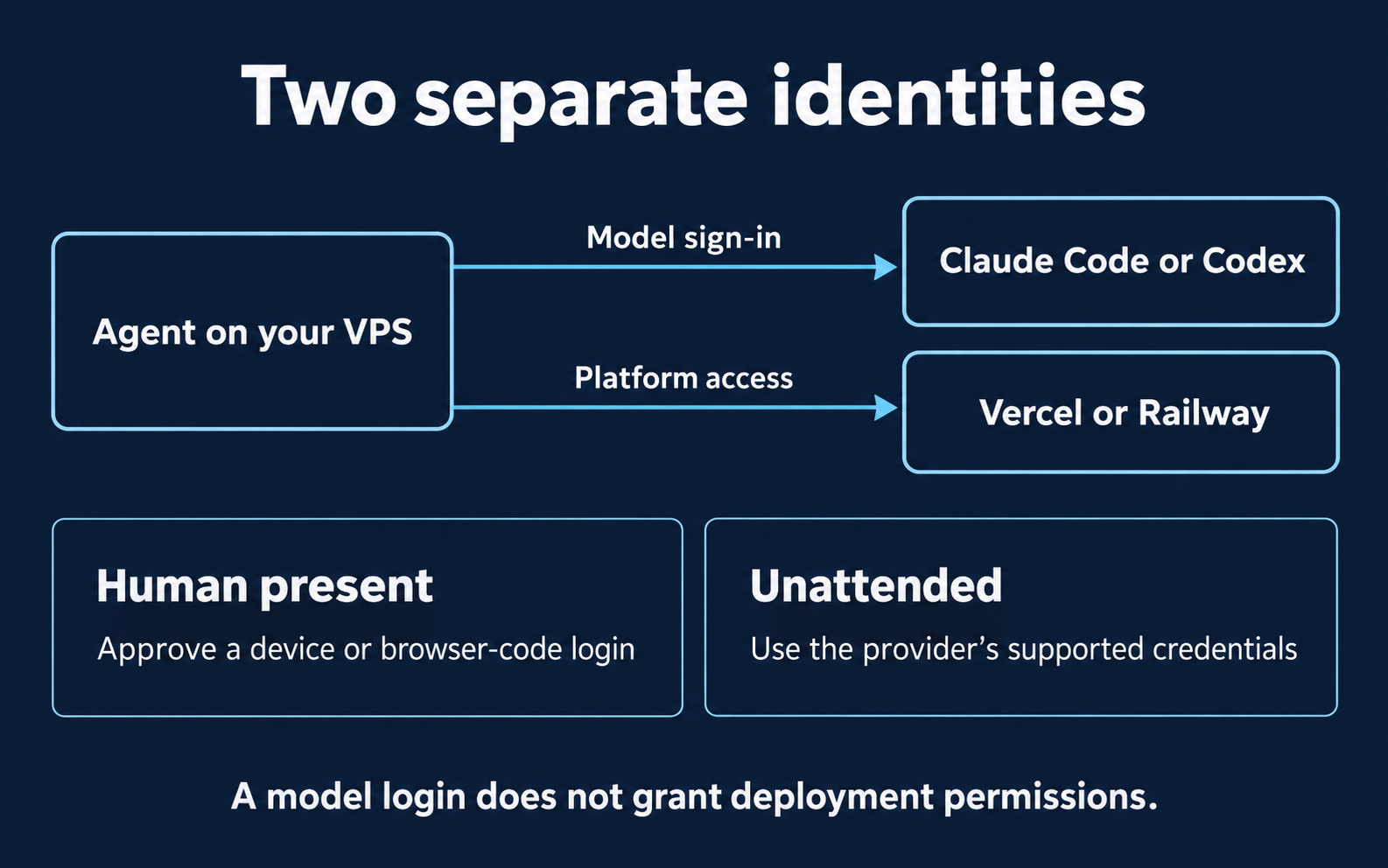
A headless VPS is a remote server you operate without a local graphical browser. Work on it needs two separate classes of authority:
- Model authority: the Claude Code or Codex sign-in that lets the agent make model requests.
- Platform authority: the Vercel and Railway credentials that let commands deploy and read logs.
Three provider logins sit inside those two classes, and none of them implies another. Signing into Claude Code does not sign the Railway CLI into a project.
The running example is a fictional staging setup: a Vercel web app and a Railway worker. An operator-controlled release script on the VPS holds the platform tokens, deploys both services and saves redacted evidence. A coding agent may then review that evidence in a separate process that receives only the model credential.
Federico Jan, who writes Starkslab, runs Codex on his own Ubuntu VPS, connected to the Codex app; the staging example is fictional. For this article, on 5 and 6 November 2026, Starkslab installed the four CLIs on fresh, browserless Linux runners and captured versions, help, login prompts, no-credential failures and credential-file lookups. No login was completed and no real deployment was made.
The agent control-surface guide helps separate the framework, gateway and infrastructure controls that govern this access. For the wider stack around a coding agent, the AI agent tools map lays out the workflows this setup supports.
When you can approve a login from another device
Start the login in the remote terminal and complete authorization in your own browser. Keep the terminal process running until it confirms completion, and approve only a request you just started.
- Claude Code: Claude Code headless login can show a URL and accept a returned code when the browser callback cannot finish.
claude auth loginandclaude auth statusare the documented commands. A remote MCP server that uses MCP OAuth has its own documented sign-in, separate from this model login. - Codex:
codex login --device-authuses the documented beta device flow; enable it in personal security settings or workspace permissions first. The installed 0.167.0 help lists--device-auth,--with-api-keyand--with-access-token. - Railway:
railway login --browserlessprints a sign-in link and short code for another device. The 5.71.0 help says the CLI already auto-detects SSH, CI and a missing display. - Vercel:
vercel loginuses OAuth device authorization.
What a fresh runner showed
On 6 November, with no TTY, claude auth login still reached the approval step: it printed an authorize URL and waited for a code (query values shortened here):
$ claude auth login
Opening browser to sign in…
If the browser didn't open, visit: https://claude.com/cai/oauth/authorize?code=true&client_id=…&response_type=code&redirect_uri=…&scope=…&code_challenge=…&code_challenge_method=S256&state=…
Paste code here if prompted >
The device flows must reach the provider before they can show a code. This runner's egress proxy refused connections to the auth hosts, so all three stopped at their first request on both days:
$ codex login --device-auth
Error logging in: error sending request for url (https://auth.openai.com/api/accounts/deviceauth/usercode)
$ railway login --browserless
error sending request for url (https://backboard.railway.com/oauth/device/auth)
$ vercel login
Error: An unexpected error occurred in login: TypeError: fetch failed
If you see this on a locked-down VPS, allow egress to the provider's auth endpoint (the URL is in the error) rather than looking for a different login method. The Claude login was not completed, so whether this runner could finish it was not tested.
Never paste the returned credential into the agent chat. Choosing claude -p print mode does not supply a missing credential either: decide the authentication method first, then the interactive or programmatic interface.
Can I run Claude Code headless on a VPS without a browser?
Yes, with a supported authentication method. On a headless test runner, claude auth login printed an authorize URL and a "Paste code here if prompted" prompt, so the approval can happen on another device. For unattended scripts, use the documented API-key, helper or setup-token method that fits the account and the features you need. The server still needs outbound HTTPS to the provider to finish any login.
Does signing into Claude Code also authenticate Railway and Vercel?
No: model authority and platform authority are separate. Railway and Vercel need their own supported logins or tokens and an explicit target. In the captured runs, an unauthenticated railway up -y under an agent announced it would sign in and create a new project, and stopped only because the auth request failed. Confirm the account and token scope before assuming a task is read-only.
Command
curl egress probe; claude auth login; claude setup-token (pseudo-terminal); codex login --device-auth; railway login --browserless; vercel loginActual output
$ claude auth login
Opening browser to sign in…
If the browser didn't open, visit: https://claude.com/cai/oauth/authorize?code=true&client_id=…&response_type=code&redirect_uri=…&scope=…&code_challenge=…&code_challenge_method=S256&state=…
Paste code here if prompted > [exit 124]
(stopped by a 15 s timeout: exit 124)
$ script -qfec "claude setup-token" /dev/null   # pseudo-terminal; rendered with its cursor positioning
Welcome to Claude Code v2.1.318
 This will guide you through long-lived (1-year) auth token setup for your
 Claude account. Claude subscription required.
 Browser didn't open? Use the url below to sign in (c to copy)
https://claude.com/cai/oauth/authorize?code=true&client_id=…&response_type=code&redirect_uri=…&scope=…&code_challenge=…&code_challenge_method=S256&state=…   (wrapped over five terminal lines; query values elided)
 Paste code here if prompted >
(stopped by a 20 s timeout before any approval)
$ codex login --device-auth
Error logging in: error sending request for url (https://auth.openai.com/api/accounts/deviceauth/usercode)
[exit 1]
$ railway login --browserless
error sending request for url (https://backboard.railway.com/oauth/device/auth)

Caused by:
    0: client error (Connect)
    1: tunnel error: unsuccessful
[exit 1]
$ vercel login
Vercel CLI 65.12.1
Error: An unexpected error occurred in login: TypeError: fetch failed
[exit 1]Claude Code headless authentication for unattended work
For Claude Code headless scripts, choose the documented method that matches the account and features. claude setup-token opens the same browser authorization as /login, then prints a one-year subscription OAuth token for CLAUDE_CODE_OAUTH_TOKEN without saving it. Under a pseudo-terminal on the runner it showed "long-lived (1-year) auth token setup… Claude subscription required" and the same URL-and-code prompt, so create the token where you can complete the browser step.
That token is supported for CI and scripts. It makes model requests but cannot establish Remote Control sessions or fetch claude.ai connectors; locally configured MCP servers still work. Bare mode does not read it: with --bare, use ANTHROPIC_API_KEY or apiKeyHelper instead. Claude's docs extend apiKeyHelper, ANTHROPIC_API_KEY and ANTHROPIC_AUTH_TOKEN to the surfaces that wrap the CLI, including the VS Code extension, the Agent SDK and GitHub Actions.
Hosting-platform tokens
Codex supports API-key login through stdin. Railway accepts project-scoped RAILWAY_TOKEN or broader account/workspace-scoped RAILWAY_API_TOKEN; only one may be set at a time. Vercel accepts VERCEL_TOKEN, which keeps the token out of command arguments, and targets a project or team with --project, --scope or --team. Inspect the real scope rather than assuming a token is read-only because today's task only reads logs.
From credential creation to a read-only check
| Credential | Create it | Deliver it | Non-destructive check |
|---|---|---|---|
CLAUDE_CODE_OAUTH_TOKEN |
claude setup-token on a machine where you can complete the browser step |
runner secret store, review job only | claude auth status, which exits 0 when logged in |
RAILWAY_TOKEN (project) |
the Railway project's token settings | runner secret store, release job only | railway deployment list --limit 1 against the explicit project, environment and service |
VERCEL_TOKEN |
Vercel account token settings | runner secret store, release job only | vercel whoami, which shows the signed-in username |
Keep values out of prompts and committed files, and do not turn one person's login into a shared credential pool. A failed check stops the release before anything deploys.
How each path fails with no credential
Run each unattended path once with nothing configured and you learn how it fails. On the credential-free runner on 6 November (output shortened):
$ claude -p "Reply with OK"
Not logged in · Please run /login
[exit 1]
$ codex exec --skip-git-repo-check "Reply with OK"
ERROR: Reconnecting... 5/5
warning: Falling back from WebSockets to HTTPS transport. stream disconnected before completion: URL error: Proxy connection failed: HTTP CONNECT failed with status 403
ERROR: Reconnecting... waiting for network
[exit 124]
$ vercel whoami
> Logged out.
[exit 1]
Claude Code and Vercel failed fast. Codex, with no login and its API host blocked, kept retrying until the outer 30-second timeout stopped it (exit 124), so put a time limit around unattended agent calls.
An unauthenticated deploy is not a harmless failure
With no Railway credential present, railway up --detach -y did not simply exit. It announced that it would sign in (or create an account) and then create a new Railway project from the current directory, detected the agent harness and skipped the confirmation:
  ! You're not signed in to Railway.

  railway up will sign you in (or create an account if you don't have one),
  then create a new Railway project from this directory and deploy it.
  ...
  → Agent harness detected — printing a device-code sign-in link (skipping confirm).
The run then stopped at the failed auth request, so no account or project was created; the output was the same on 5 and 6 November. The 5.71.0 help describes this path: --new is "implied on a cold/unauthenticated first run, and for -y when nothing is linked". Railway's up documentation says scripts and CI never create projects implicitly, but this CLI classified the session as an agent harness, not CI, so do not rely on that guard.
Vercel stopped instead: No existing credentials found. So for unattended Railway work, deliver RAILWAY_TOKEN and pass --project, --environment and --service explicitly; never let a missing credential turn into an interactive sign-in under the agent.
When the wrong credential is selected
If a script uses an unexpected account or billing method, check precedence before minting another token. A selected gateway or cloud-provider mode can take priority, and ANTHROPIC_AUTH_TOKEN ranks above ANTHROPIC_API_KEY. For direct Anthropic API access in non-interactive -p mode, an injected ANTHROPIC_API_KEY takes precedence over the setup token or subscription login.
What does claude setup-token allow in an unattended script?
It runs the browser authorization once, then prints a one-year subscription OAuth token without saving it. Supply it through CLAUDE_CODE_OAUTH_TOKEN for model requests; it cannot establish Remote Control sessions or fetch claude.ai connectors, while locally configured MCP servers still work. Bare mode ignores that variable and needs ANTHROPIC_API_KEY or an apiKeyHelper instead.
Sources: [5]
Command
claude -p; claude --bare -p; codex exec; railway up --detach -y; vercel deploy --yes; railway whoami with placeholder token variablesActual output
$ claude -p "Reply with OK"
Not logged in · Please run /login
[exit 1]
$ claude --bare -p "Reply with OK"
Not logged in · Please run /login
[exit 1]Command
claude -p; claude --bare -p; codex exec; railway up --detach -y; vercel deploy --yes; railway whoami with placeholder token variablesActual output
$ cd '~/../project' && railway up --detach -y

  ! You're not signed in to Railway.

  railway up will sign you in (or create an account if you don't have one),
  then create a new Railway project from this directory and deploy it.

  To deploy to an existing project instead, cancel and run
  `railway login && railway link --project <name>` first.

  → Agent harness detected — printing a device-code sign-in link (skipping confirm).
error sending request for url (https://backboard.railway.com/oauth/device/auth)

Caused by:
    0: client error (Connect)
    1: tunnel error: unsuccessful
[exit 1]
$ cd '~/../project' && vercel deploy --yes
Vercel CLI 65.12.1
Error: No existing credentials found. Run `vercel deploy --temporary` to create a temporary deployment you can claim later, or `vercel login` to log in.
Learn More: https://err.sh/vercel/no-credentials-found
[exit 1]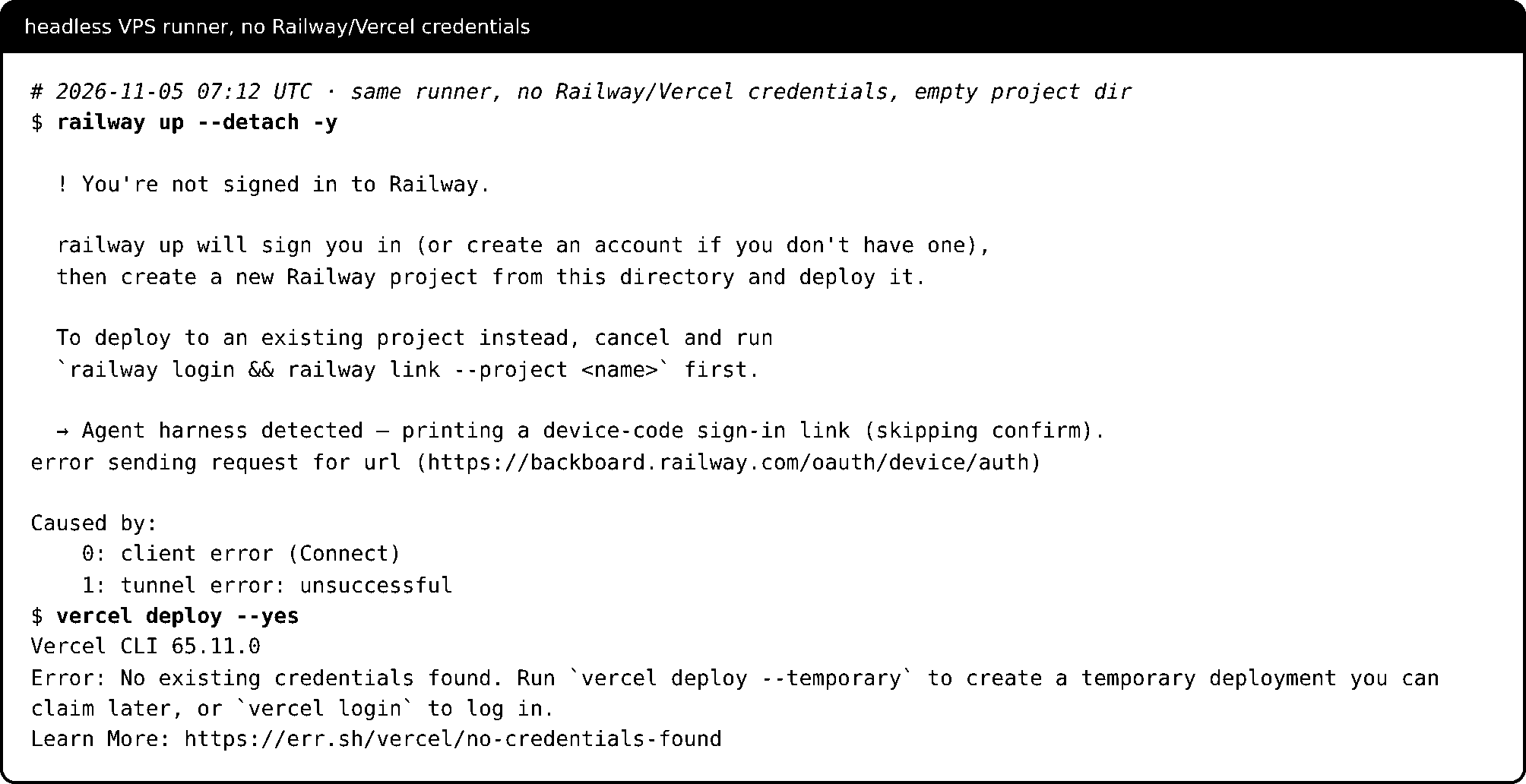
Where credentials remain after SSH closes
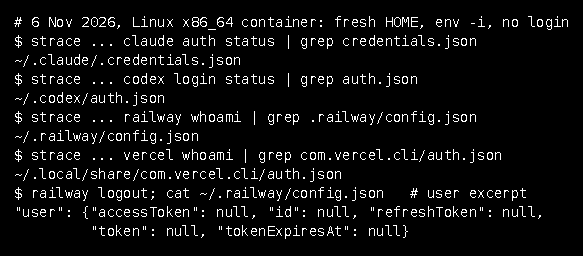
Closing SSH is not a logout. Start your credential inventory with these Linux locations, checked against each provider's documentation and the installed CLIs on 6 November 2026:
| Tool | Where the credential lives | What the runner showed |
|---|---|---|
| Codex | auth.json under CODEX_HOME, normally ~/.codex, or the configured credential store; ephemeral mode keeps it in process memory |
codex login status looked for ~/.codex/auth.json |
| Claude Code | ~/.claude/.credentials.json with mode 0600, or under CLAUDE_CONFIG_DIR when set |
claude auth status looked for ~/.claude/.credentials.json and reported configDirectory |
| Vercel | auth.json in com.vercel.cli under XDG_DATA_HOME, normally ~/.local/share |
vercel whoami looked for ~/.local/share/com.vercel.cli/auth.json |
| Railway | not stated in the documentation used here | railway whoami read ~/.railway/config.json; after railway logout it held a user object with token, accessToken and refreshToken set to null |
No login completed, so none of these files held a token; the lookups show where each CLI expects one. The Railway file was written with mode 0600, and its empty token fields indicate that this is where Railway CLI 5.71.0 keeps its sign-in state. A token inside it after a real login was not observed. A setup-token lives wherever you deliberately deliver it.
A fresh HOME is not proof of a clean runner
The CLIs also create state before any login succeeds. In the fresh HOME used for the captures, the failed attempts had created ~/.codex/ (lock, log and state files), ~/.railway/ (sessions and update status) and ~/.local/share/com.vercel.cli/ (config.json and telemetry files). On the container runner itself, claude auth status first reported loggedIn: true with authMethod: oauth_token despite a fresh HOME and a cleared environment, because the hosting layer supplied its own credential outside HOME; the no-credential captures hid it from the test process. Run claude auth status and the other status commands as the runner account before assuming nothing is signed in.
Run the agent under a dedicated runner account and decide which processes can read its home directory and environment. That is an operating recommendation, not a claim that a separate account blocks arbitrary shell access.
Where do credentials remain after I close SSH?
Closing SSH does not remove cached authentication. Codex keeps auth.json under CODEX_HOME or a configured credential store, Claude Code uses ~/.claude/.credentials.json with mode 0600, and Vercel uses auth.json under ~/.local/share/com.vercel.cli. On the test runner, Railway CLI 5.71.0 read ~/.railway/config.json, and after railway logout that file held empty token fields. Inventory these paths for the account the agent runs under.
Command
strace -f -e trace=… <cli> <status command> | grep <credential file>; railway logout; cat ~/.railway/config.json; ls -l <credential files>Actual output
$ strace -f -e trace=openat,newfstatat,statx claude auth status 2>&1 | grep -oE '[^"]*credentials\.json' | sort -u
~/.claude/.credentials.json
$ strace -f -e trace=%file codex login status 2>&1 | grep -oE '[^"]*auth\.json[^"]*' | sort -u
~/.codex/auth.json
$ strace -f -e trace=%file railway whoami 2>&1 | grep -oE '[^"]*\.railway/[^"]*' | sort -u
~/.railway/config.json
~/.railway/preferences.json
~/.railway/skills.json
~/.railway/skills.lock
~/.railway/update-status.json
~/.railway/update-status.lock
~/.railway/version.json
$ strace -f -e trace=openat,newfstatat,statx vercel whoami 2>&1 | grep -oE '[^"]*com\.vercel\.cli/auth\.json' | sort -u
~/.local/share/com.vercel.cli/auth.json
$ railway logout
Logged out successfully
[exit 0]
$ cat ~/.railway/config.json
{
  "activeSandbox": null,
  "agentBootstrapDefaults": null,
  "codeAgents": null,
  "editor": null,
  "linkedFunctions": null,
  "projects": {},
  "sandboxTemplates": null,
  "sandboxes": null,
  "user": {
    "accessToken": null,
    "id": null,
    "refreshToken": null,
    "token": null,
    "tokenExpiresAt": null
  }
}
Worked example: authenticate, deploy, check the right logs
The sequence below carries the fictional staging setup from identity record to a release decision. Every identifier is a non-secret placeholder, and the flags come from the installed CLI help captured on 6 November 2026 (Vercel 65.12.1, Railway 5.71.0, Claude Code 2.1.318). The deployment itself was not run.
The identity and target record
Keep this record non-secret:
| Field | Web app | Worker |
|---|---|---|
| Platform / CLI | Vercel 65.12.1 | Railway 5.71.0 |
| Credential | VERCEL_TOKEN, release job only |
RAILWAY_TOKEN, project-scoped, release job only |
| Explicit target | project atlas-web, environment preview |
project PROJECT_ID, environment STAGING_ID, service WORKER_ID |
| Model authority | CLAUDE_CODE_OAUTH_TOKEN, review job only |
same |
| Approved commit | APPROVED_SHA |
same APPROVED_SHA |
| Working directory | ~/atlas/apps/web |
~/atlas/apps/worker |
| Application check (fictional, replace with yours) | GET /healthz on the deployment URL returns 200 within 5 tries |
a test job enqueued with npm run enqueue-test logs job test-<sha> done within 5 minutes |
| Evidence directory | ~/release-evidence/APPROVED_SHA, outside the checkout |
same |
| Decision owner | operator on call | operator on call |
The choice: nobody is present during the release, so both platforms use unattended tokens. The Railway token is project-scoped rather than RAILWAY_API_TOKEN because the task never needs other projects.
Who holds which credential
The release job runs release.sh, which holds the two platform tokens and starts no agent. The optional review job starts Claude Code with env -i, an empty environment plus HOME, PATH and the Claude credential, so it never receives a platform token. On the runner, a child started that way listed only CLAUDE_CODE_OAUTH_TOKEN, HOME, PATH and PWD, although its parent had RAILWAY_TOKEN and VERCEL_TOKEN set.
--tools "Read" limits the built-in tools to Read but does not restrict MCP tools, so the review also passes --strict-mcp-config without an MCP config file. --allowedTools only preapproves matching tool calls; it does not confine the agent, and none of these flags changes what an upstream token can do. The installed 2.1.318 help says --restricted also confines the file tools to the working directories, so the review runs from the evidence directory with that flag.
Before you start
Existing staging targets with known IDs; a clean checkout of the approved commit; git, curl, jq and the four CLIs on the runner; a secret store that can scope secrets to one job; outbound HTTPS from the runner to the provider APIs. The /healthz endpoint and the worker test job are fictional: replace them with your application's own checks and pass conditions before starting.
Fill in the identity and target record
Copy the table above into
release-record.mdwith real, non-secret IDs, and put the same values into the placeholders at the top ofrelease.shin step 3. Replace both fictional application checks with commands that prove your own services work.Expected result
Every field holds a real value or a deliberate "not used", and the script's
RWtargets, project name and checks match the record.Give each job only its own credential
In the runner's secret store, expose
VERCEL_TOKENandRAILWAY_TOKENto the release job only, andCLAUDE_CODE_OAUTH_TOKENto the review job only. In each job, list which credential variables are present without printing their values:printenv | cut -d= -f1 | grep -E '^(RAILWAY_(API_)?TOKEN|VERCEL_TOKEN|ANTHROPIC_|CLAUDE_CODE_OAUTH_TOKEN)'In the review job, also run
claude auth status --text; it exits 0 when a credential is active. IfANTHROPIC_API_KEYappears there, remove it unless it is the intended billing path, because in-pmode it wins over the setup token.Expected result
The release job lists exactly
RAILWAY_TOKENandVERCEL_TOKEN; the review job lists onlyCLAUDE_CODE_OAUTH_TOKEN, andclaude auth status --textexits 0. Any extra name, includingRAILWAY_API_TOKEN, is removed at its source before step 3.Run release.sh as the operator
Run it in the release job with
APPROVED_SHAset. It stops before writing anything if the checkout or credentials are wrong, waits on each deployment with a bound, runs both application checks and saves redacted, bounded logs from the two deployments it created:#!/usr/bin/env bash # release.sh: operator-run staging release for the fictional "atlas" example. # It deploys and collects evidence. It never starts an agent. # Replace atlas-web, PROJECT_ID, STAGING_ID, WORKER_ID and both application checks. # Flags follow the help of Vercel CLI 65.12.1 and Railway CLI 5.71.0. set -euo pipefail : "${APPROVED_SHA:?set APPROVED_SHA to the approved commit}" REPO="$HOME/atlas" OUT="$HOME/release-evidence/$APPROVED_SHA" # outside the checkout RW=(--project PROJECT_ID --environment STAGING_ID --service WORKER_ID) # FILL: confirm both jq filters once against your Railway CLI's JSON output. UP_ID='.deploymentId' LIST_STATUS='.[] | select(.id == $id) | .status' die() { echo "STOP: $*" >&2; exit 1; } note() { echo "$*" | tee -a "$OUT/summary.txt"; } stop() { note "STOP: $*"; exit 1; } redact() { sed -E 's/((token|secret|password|api[_-]?key|authorization)[^:=]{0,3}[:=][[:space:]"]*)(bearer[[:space:]]+)?[^[:space:]",]+/\1\3[redacted]/Ig'; } # 1. Preflight: nothing is written until the source and credentials check out. cd "$REPO" [ "$(git rev-parse HEAD)" = "$APPROVED_SHA" ] || die "checkout is not APPROVED_SHA" [ -z "$(git status --porcelain)" ] || die "checkout has local changes" [ -n "${VERCEL_TOKEN:-}" ] || die "VERCEL_TOKEN is not set" [ -n "${RAILWAY_TOKEN:-}" ] || die "RAILWAY_TOKEN is not set" [ -z "${RAILWAY_API_TOKEN:-}" ] || die "RAILWAY_API_TOKEN is also set" mkdir -p "$OUT"; : > "$OUT/summary.txt" note "commit $APPROVED_SHA" vercel whoami > "$OUT/vercel-whoami.txt" 2>&1 || stop "vercel whoami failed" railway deployment list "${RW[@]}" --limit 1 --json > "$OUT/railway-preflight.json" 2>&1 \ || stop "railway read-only check failed" # 2. Web app: queue one preview deployment, then wait at most 10 minutes. cd "$REPO/apps/web" vercel deploy --project atlas-web --environment preview --yes --no-wait \ > "$OUT/vercel-url.txt" || stop "vercel deploy failed" WEB_URL="$(tail -n 1 "$OUT/vercel-url.txt")" [[ "$WEB_URL" == https://* ]] || stop "no deployment URL in vercel-url.txt" note "web deployment $WEB_URL" rc=0; vercel inspect "$WEB_URL" --wait --timeout 10m > "$OUT/vercel-inspect.txt" 2>&1 || rc=$? if [ "$rc" -ne 0 ]; then vercel inspect "$WEB_URL" --logs 2>&1 | redact > "$OUT/vercel-build.log" || true stop "web deployment not ready (inspect exit $rc)" fi # 3. Web check (fictional): /healthz must return 200 within 5 tries. code=000 for _ in 1 2 3 4 5; do code="$(curl -s -o /dev/null -w '%{http_code}' --max-time 10 "$WEB_URL/healthz" || true)" [ "$code" = 200 ] && break sleep 10 done note "web check /healthz $code" # 4. Worker: detached deploy tagged with the commit, then poll at most 10 minutes. cd "$REPO/apps/worker" railway up --detach --json --message "release $APPROVED_SHA" "${RW[@]}" \ > "$OUT/railway-up.json" || stop "railway up failed" DEP_ID="$(jq -rs "last | $UP_ID // empty" "$OUT/railway-up.json" 2>/dev/null || true)" [ -n "$DEP_ID" ] || stop "no deployment ID in railway-up.json" note "worker deployment $DEP_ID" status=TIMEOUT for _ in $(seq 40); do railway deployment list "${RW[@]}" --limit 10 --json > "$OUT/railway-list.json" 2>&1 || true s="$(jq -r --arg id "$DEP_ID" "$LIST_STATUS" "$OUT/railway-list.json" 2>/dev/null || true)" if [[ "$s" =~ ^(SUCCESS|FAILED|CRASHED)$ ]]; then status="$s"; break; fi sleep 15 done note "worker status $status" if [ "$status" != SUCCESS ]; then railway logs "$DEP_ID" --build "${RW[@]}" --lines 100 2>&1 | redact > "$OUT/railway-build.log" || true stop "worker deployment ended $status" fi # 5. Worker check (fictional): enqueue a test job, expect its log line within 5 minutes. npm run --silent enqueue-test -- --id "test-$APPROVED_SHA" > "$OUT/worker-enqueue.txt" 2>&1 \ || note "enqueue command failed" worker=FAIL for _ in $(seq 20); do if railway logs "$DEP_ID" "${RW[@]}" --lines 200 2>/dev/null | grep -q "job test-$APPROVED_SHA done"; then worker=PASS; break fi sleep 15 done note "worker check $worker" # 6. Bounded, redacted logs from exactly these two deployments. railway logs "$DEP_ID" "${RW[@]}" --lines 100 --json | redact > "$OUT/railway-logs.jsonl" \ || note "railway logs unavailable" vercel logs --project atlas-web --deployment "$WEB_URL" --since 30m --limit 100 --json \ | redact > "$OUT/vercel-logs.jsonl" || note "vercel logs unavailable" note "evidence complete: $OUT"The two
jqfilters are the only lines that depend on the Railway CLI's JSON shape, which could not be observed without credentials. Runrailway up --detach --jsonandrailway deployment list --jsononce against a test service and correct them; the script stops rather than guessing when they return nothing.On a Vercel timeout,
vercel inspect --waitexits non-zero: the 65.12.1 help says 1, while Vercel's global-options page documents 124. The script treats any non-zero code as not ready. It was checked here withbash -n, its four preflight stops and stub commands only, never against either platform.Expected result
summary.txtin the evidence directory reads, in order:commit,web deployment <url>,web check /healthz 200,worker deployment <id>,worker status SUCCESS,worker check PASSandevidence complete. AnySTOP:line ends the run with exit 1; a deployment that is not ready or fails also leavesvercel-build.logorrailway-build.log.Optionally let a credential-free agent read the evidence
After the script finishes, run the review job from the evidence directory:
cd "$HOME/release-evidence/$APPROVED_SHA"
env -i HOME="$HOME" PATH="$PATH" CLAUDE_CODE_OAUTH_TOKEN="$CLAUDE_CODE_OAUTH_TOKEN" \
  claude -p "Read summary.txt and the log files in this directory. Answer PROMOTE, RETRY_ONCE or STOP: promote only if summary.txt shows web check /healthz 200, worker status SUCCESS, worker check PASS and evidence complete; retry once only for a transient platform error; otherwise stop. Quote the lines you relied on." \
  --restricted --tools "Read" --allowedTools "Read" --strict-mcp-config --output-format json \
  < /dev/null > agent-review.json
Keep
< /dev/null: without it,claude -pon the runner waited 3 seconds for stdin before starting.Expected result
agent-review.jsonholds one JSON result withis_errorfalse, one of the three answers and the quoted lines. With no Claude credential the same command returnedis_errortrue, resultNot logged in · Please run /loginand exit 1; treat that, or any non-zero exit, as no review.Decide: promote, retry once or stop
The decision owner decides; the agent's answer is advisory.
evidence complete, web check 200, worker check PASS: record both deployment IDs and hand off for promotion.STOP:before anything deployed: fix the record or secret store and restart from step 1.- Later
STOP:(deploy failed, web not ready, worker FAILED, CRASHED or TIMEOUT): read the saved files and build log. Send code or dependency errors to the developer and missing variables or platform errors to the target owner; retry once only for a transient platform failure. - Healthy status, failing application check: do not promote; read that deployment's runtime logs.
logs unavailable: do not promote on terminal status alone.- Authentication error: use the repair section; do not widen the token.
Expected result
One recorded outcome, tied to deployment IDs: promote, stop, or a single justified retry.
Verify the result
The release is verified only when the evidence directory holds the approved commit, both deployment IDs from this run with terminal states, both application-check results and a bounded, redacted log sample from each deployment. Authentication and a terminal status alone do not show application health.
Troubleshooting
On the test runner, error sending request for url before any code meant the egress proxy had refused the provider host; allow egress to it. railway up printed "You're not signed in" and vercel whoami printed Logged out. when no credential reached the process, so cancel and check the job's token. For later failures, record the failing stage and check for conflicting credentials before widening scope.
Why can a successful login still fail to prove my deployment works?
A login establishes authentication; the release still depends on target selection, permissions, build outcome and application behaviour. Railway's detached mode acknowledges a queued build, not a successful release. Record the deployment identifier and terminal state, then read a bounded log sample from that same deployment.
Command
RAILWAY_TOKEN=placeholder VERCEL_TOKEN=placeholder CLAUDE_CODE_OAUTH_TOKEN=placeholder sh -c 'env -i HOME="$HOME" PATH="$PATH" CLAUDE_CODE_OAUTH_TOKEN="$CLAUDE_CODE_OAUTH_TOKEN" sh -c "printenv | cut -d= -f1 | sort"'Actual output
$ RAILWAY_TOKEN=placeholder VERCEL_TOKEN=placeholder CLAUDE_CODE_OAUTH_TOKEN=placeholder sh -c 'env -i HOME="$HOME" PATH="$PATH" CLAUDE_CODE_OAUTH_TOKEN="$CLAUDE_CODE_OAUTH_TOKEN" sh -c "printenv | cut -d= -f1 | sort"'
CLAUDE_CODE_OAUTH_TOKEN
HOME
PATH
PWD
[exit 0]Command
bash -n release.sh; sample redaction; release.sh preflight with placeholder values; release.sh against stub vercel/railway/curl/npmActual output
$ bash -n release.sh && echo "syntax OK"
syntax OK
$ printf ... | redact   # the script's redact() expression on four sample lines
{"message":"connect token=[redacted] ok"}
Authorization: Bearer [redacted]
api_key: [redacted], user=alice
nothing secret here
$ APPROVED_SHA=6fc2ddeff87ce5df57d9b8392ad721de3c16d28d bash release.sh
STOP: VERCEL_TOKEN is not set
[exit 1]
$ APPROVED_SHA=6fc2ddeff87ce5df57d9b8392ad721de3c16d28d VERCEL_TOKEN=placeholder RAILWAY_TOKEN=placeholder RAILWAY_API_TOKEN=placeholder bash release.sh
STOP: RAILWAY_API_TOKEN is also set
[exit 1]
$ APPROVED_SHA=0000000000000000000000000000000000000000 VERCEL_TOKEN=placeholder RAILWAY_TOKEN=placeholder bash release.sh
STOP: checkout is not APPROVED_SHA
[exit 1]
$ APPROVED_SHA=6fc2ddeff87ce5df57d9b8392ad721de3c16d28d VERCEL_TOKEN=placeholder RAILWAY_TOKEN=placeholder bash release.sh   # after editing a tracked file
STOP: checkout has local changes
[exit 1]
$ ls ~/release-evidence
ls: cannot access '~/release-evidence': No such file or directory
[exit 2]Replace a credential without losing the workflow
Keep a non-secret register: owner, machine, provider, credential type, scope, delivery location, expected expiry, replacement procedure, restart requirement and last successful check. Store a reference to the secret, never its value.
When authentication fails, separate five causes: missing credential, expired login, conflicting environment variables, wrong account and insufficient scope. Broadening a token should not be the automatic repair.
A hypothetical example: the worker release reports a Railway authentication error even though RAILWAY_TOKEN is set. The runner also injects an old RAILWAY_API_TOKEN from a shared secret group, and Railway documents that setting both is an error. The fix is to remove the extra variable at its source, keep the narrower project token, restart the runner and repeat the same railway up, not to swap in the broader token.
Do not count on the CLI to catch that conflict early. On the runner, with both variables set to placeholders, railway whoami went straight to its API request (blocked there) without a local error, which is why release.sh refuses to start when both are present.
If a custom runner still picks the wrong credential after replacement, follow the source-to-runbook method to trace initialization, credential resolution and failure handling.
Verification limits and next checks
What was run: on 5 and 6 November 2026, on Ubuntu 24.04.5 x86_64 runners with a fresh HOME, a cleared environment and no TTY, the four CLIs were installed and their versions and help recorded. Logins were started for Claude Code, Codex, Railway and Vercel and stopped at the approval prompt or at the first blocked request. No-credential failures, credential-file lookups, an env -i isolation check and release.sh syntax, preflight and stub runs were also captured.
What was not run: no login was completed, no token was created, and no deployment, credential refresh or log retrieval happened, because the runner's egress proxy refused the provider hosts and no real credential was used. The Railway token after a real login, the Railway JSON fields that release.sh reads and every CLI's behaviour with valid credentials remain untested here.
What was not compared: for the US English search "claude code headless", three of the top five results were read in full and two could not be read. The first result, listed as a Claude Code documentation page, sits behind a Google link with no resolvable destination, and the Reddit thread at rank 2 refuses automated reads through robots.txt, so this guide claims no coverage of, or novelty over, those two pages; comparing against them remains an open review task.
A successful login proves neither a healthy application nor minimal permissions. Keep the target identifiers, the deployment's terminal state and a sanitized log sample as separate evidence. The next check is to repeat these steps on a VPS whose egress allows the provider hosts, with real tokens, and record the outcome.