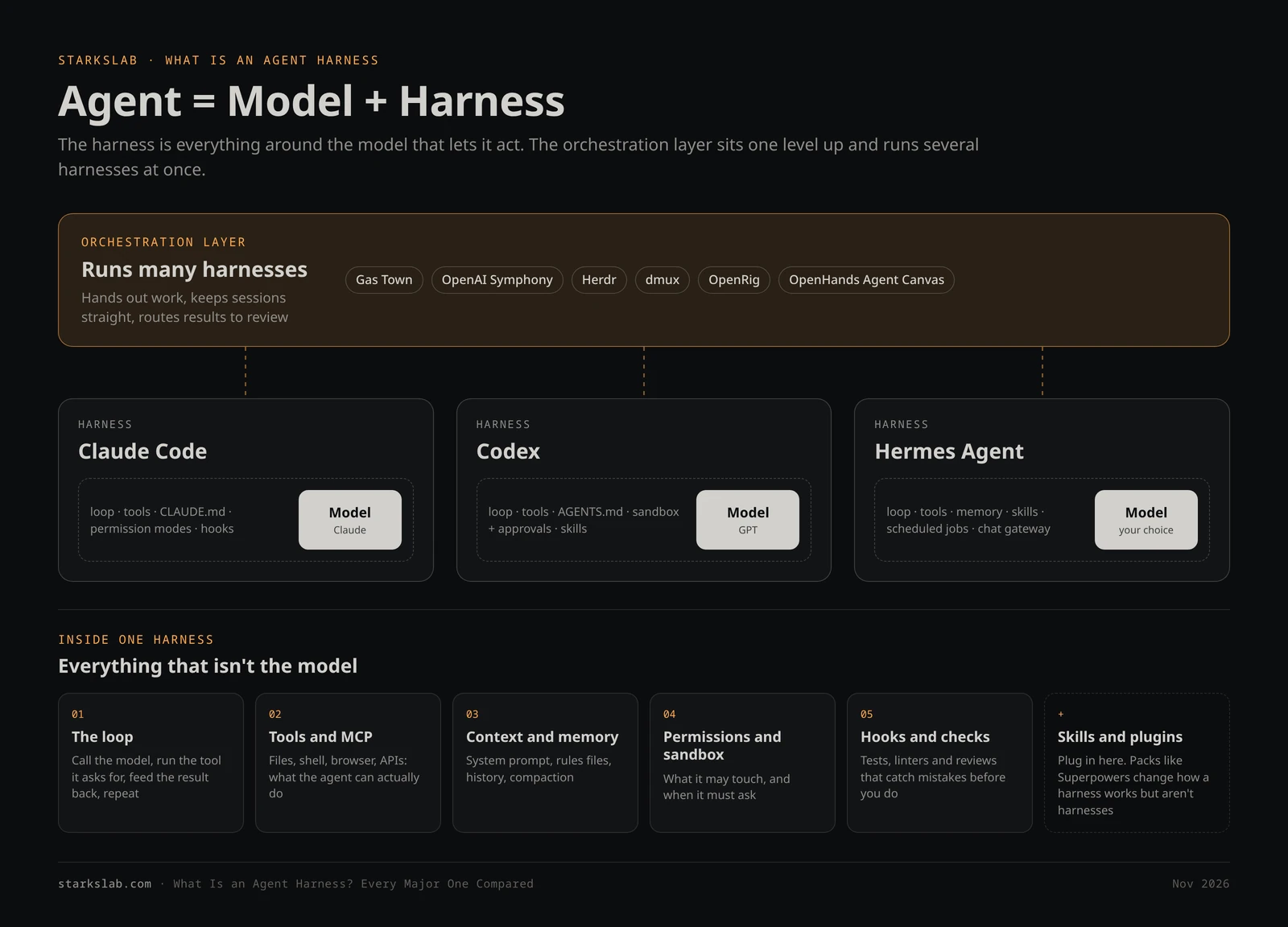
An agent harness is everything around a language model that turns it into an agent: the loop that keeps it working, the tools it can call, the context and memory it reads, the permissions that hold it back and the checks that catch its mistakes. Claude Code, the Codex app, Hermes Agent and OpenAI’s Dots are all harnesses. Tools like Gas Town and OpenAI Symphony sit one level up and run several harnesses at once; that’s the orchestration layer.
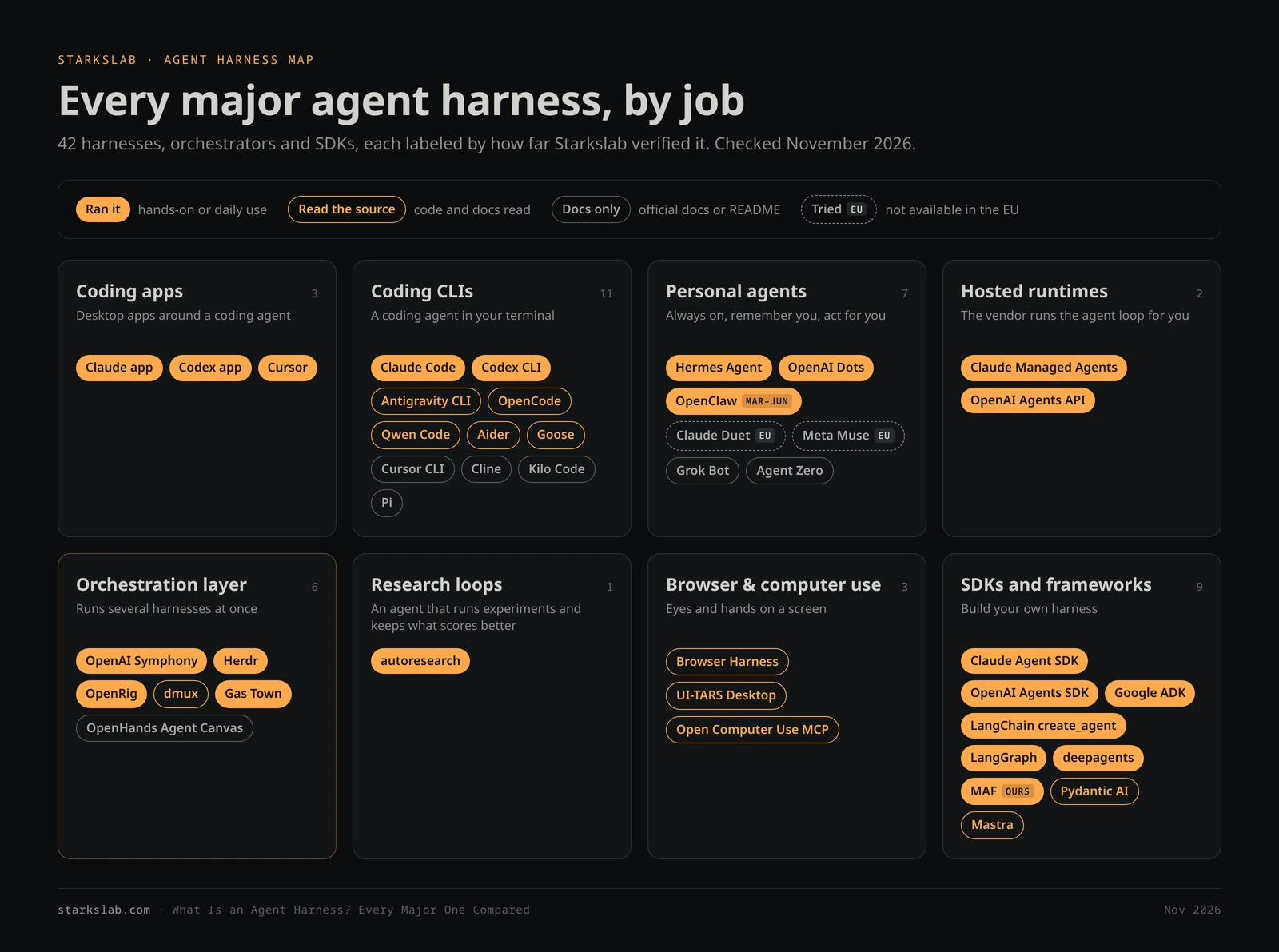
I’ve spent this year running, reading and taking apart these tools for Starkslab. This page maps 42 of them by job (coding apps and CLIs, personal agents, hosted runtimes, orchestrators, research loops, browser agents and SDKs) and labels each one by how far I actually got: ran it, read the source, or docs only. Nothing is ranked, and most entries link to a longer deep dive.
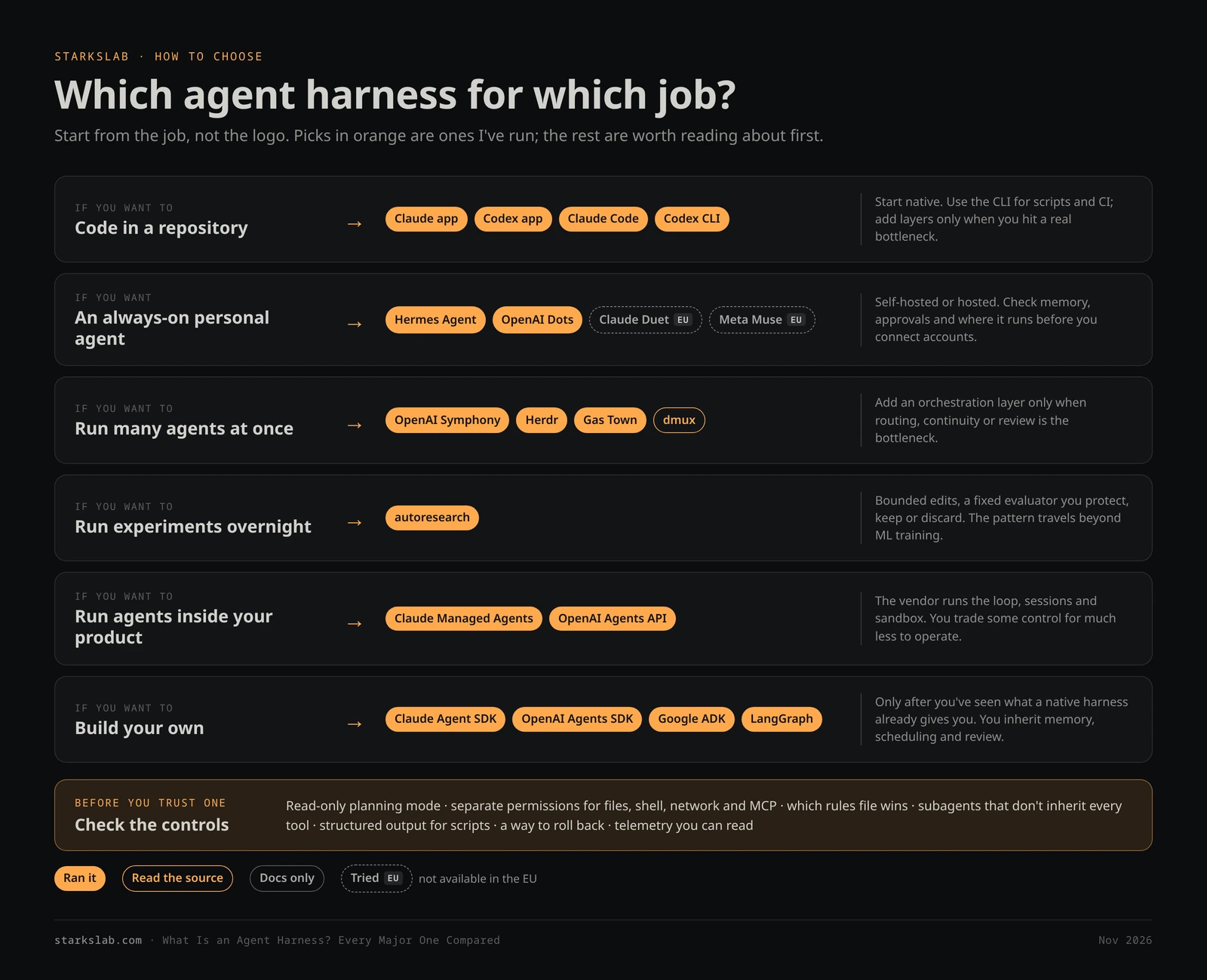
The short answer to “which one?” depends on the job: a coding app or CLI for work in a repository, Hermes Agent or Dots for an always-on personal agent, an orchestration layer once you’re juggling many agents, and an SDK only if you’re building your own.
Agent = Model + Harness
That formula comes from LangChain’s Vivek Trivedy, whose one-line version is easier to remember: “If you’re not the model, you’re the harness.” A raw model only turns text into more text; it becomes an agent when a harness gives it state, tool execution, feedback loops and constraints it can’t talk its way around.
At the center of every harness is a loop. LangChain calls today’s main pattern a ReAct loop: the model reasons, asks for a tool call, the harness runs it and hands back the result, and the cycle repeats until the work is done or something stops it.
Whether people say agent harness, AI agent harness or LLM harness, they mean this layer. The model decides what to do next; the harness is what actually reads the file, runs the command, stores the memory and says no.
What goes into a harness
In practice, a harness is a stack of ordinary engineering. LangChain’s list covers system prompts; tools, skills and MCP servers; bundled infrastructure such as a filesystem, a sandbox and a browser; orchestration logic such as subagents, handoffs and model routing; and hooks that run deterministic steps such as compaction, continuation and lint checks. None of it is the model, and all of it changes what the model gets done.
Designing that stack on purpose now has a name, harness engineering, and its effect can be measured. LangChain reports moving its own coding agent from the top 30 to the top 5 on Terminal Bench 2.0 by changing only the harness. Same model, different scaffolding, very different result.
Birgitta Böckeler, writing on martinfowler.com, adds a useful split for coding agents. Part of the harness comes built in: the system prompt, the code retrieval, the orchestration. Around it, users build an outer harness of guides, which steer the agent before it acts (an AGENTS.md file, a skill), and sensors, which catch problems after it acts (tests, type checkers, linters, AI review).
One detail stands out: linter messages written so the agent can fix the problem itself, which Böckeler calls “a positive kind of prompt injection.” And if a harness inside a harness sounds odd, Böckeler has heard that objection before, put this way: “Have you ever tried to put a harness on the inside of a dog?”
What isn’t a harness
Some popular tools live inside a harness rather than being one. Skill and plugin packs such as Superpowers or Compound Engineering change how Claude Code or Codex behaves, but they still need a harness to run in, so they aren’t on the map.
You’ll also see the word stretched to cover the app you run agents in. Devon Burriss defines an agent harness as software that helps orchestrate AI agents to accomplish tasks, usually an IDE, a terminal UI or a desktop app. That’s why the Claude and Codex apps sit on this map next to their CLIs.
The layer above: orchestration
Once you run many agents at once, you need something above the harness that hands out work, keeps the sessions straight and routes results to review. I call that the orchestration layer. Gas Town is the clearest example: Steve Yegge’s workspace manager coordinates Claude Code, Codex, Gemini and other coding agents, and its README says it scales to 20 to 30 of them.
The map below keeps the two levels apart: harnesses first, then the orchestration layer that sits above them.
What does harness mean for LLM?
For an LLM, the harness is the program around the model that lets it act. The model only returns text; the harness turns a requested tool call into a real file read or shell command, feeds the result back, keeps state between steps and stops the loop when a limit or check says so. “LLM harness” and “agent harness” mean the same thing.
What do you mean by harness engineering?
Harness engineering is the deliberate design of everything around the model so an agent does useful, reliable work: prompts and rules files, tools, sandboxes, hooks, context management and the checks that let it correct itself. LangChain uses it to improve its own harness library, deepagents. Böckeler frames the user’s side as guides that steer the agent before it acts and sensors that catch problems afterward.
The map: 42 tools at a glance (November 2026)
Here’s everything on one screen, grouped by job and labeled by how far I verified each tool. Under it, a shorter table lists only the ones I’ve actually run, how, and the deep dive to read next.
The tools I’ve actually run
Comparison method
Dated tests with captures, tools I run as of November 2026, and a few I ran earlier (Cursor, OpenClaw, Gas Town). The map above covers the rest.
| Option | Job | How I've used it | Deep dive |
|---|---|---|---|
| Claude app | Coding and Cowork | Daily, Nov 2026 Sources: [9] | |
| Codex app | Coding agents in parallel | Daily, Nov 2026 Sources: [9] | |
| Cursor | Coding in an editor | Long-time use | — |
| Claude Code | Coding in the terminal | Headless check, 5 Nov 2026 Sources: [11] | |
| Codex CLI | Coding in the terminal | Install check, 5 Nov 2026 Sources: [11] | |
| Hermes Agent | Personal agent | Live test, 7 Nov 2026 Sources: [10] | |
| OpenAI Dots | Personal agent | In use, Nov 2026 | — |
| OpenClaw | Personal agent | Daily, Mar to Jun 2026 Sources: [12] | |
| Claude Managed Agents | Hosted runtime | In use, Nov 2026 | |
| OpenAI Agents API | Hosted runtime | In use, Nov 2026 | — |
| Gas Town | Orchestration | Ran it; it crashed my VPS | — |
| OpenAI Symphony | Orchestration | In use, Nov 2026 | |
| Herdr | Orchestration | TUI check, Nov 2026 Sources: [13] | |
| OpenRig | Orchestration | Tested, Nov 2026 Sources: [41] | |
| autoresearch | Research loop | In use, Nov 2026 | |
| Claude Agent SDK | Build your own | In use, Nov 2026 | |
| OpenAI Agents SDK | Build your own | In use, Nov 2026 | |
| Google ADK | Graph workflows | In use, Nov 2026 | — |
| LangChain create_agent | ReAct-style agent | In use, Nov 2026 | — |
| LangGraph | Custom agent graphs | In use, Nov 2026 | — |
| deepagents | Harness library | In use, Nov 2026 | — |
| MAF | Our own agent loop | Built it Sources: [61] | — |
Comparison limitations
Months show when I last ran or checked each one. These tools change monthly, so treat older rows with care.
Coding agent apps: Claude, Codex and Cursor
The desktop apps are where most of my coding happens now, and they’ve drifted a long way from the CLIs they started next to. As of November 2026 my real work runs in the Claude app with Claude Code and in the Codex app, in sessions I can pick up from my phone or another machine.
Claude app
The Claude desktop app now gives Claude Code its own Code tab, next to chat and Cowork, which handles Dispatch and longer agentic work. Since Anthropic’s April 2026 redesign, each session there has its own history and project folder, several run in parallel, and a session can run on my machine, in the cloud or over SSH.
I start work in Claude Code and keep going from my phone, and the app runs a twice-weekly growth memo for me as a scheduled task. Ran it: daily use, November 2026.
Codex app
OpenAI launched the Codex app for macOS in February 2026 as a command center for agents: several Codex agents work in parallel, each in its own thread and git worktree, with skills and automations built in. It’s my other daily driver; on my phone it shows two connected machines, my Mac mini and my Ubuntu VPS, each with its own projects. Ran it: daily use, November 2026.
Cursor
I used the Cursor app for a long time. Its agent now also runs outside the editor, as the Cursor CLI covered with the terminal harnesses below. Ran it: long-time use of the app.
Coding agent harnesses in the terminal
The terminal versions are still the sharpest tools when you want to script an agent, run it in CI, or see exactly what it did. What separates them is the control surface: what each one may read, change and run, where project rules live, and what a script gets back. The agent CLI control-surface comparison goes through those layers tool by tool; these are the short versions.
Claude Code
The Claude Code harness in the terminal wraps Anthropic’s models in an agent that also runs in IDEs, CI and an SDK, and it reads project rules from CLAUDE.md. Its permission modes (plan, default, acceptEdits, auto, dontAsk and bypassPermissions) set how much it may do without asking: plan only reads and proposes, and bypassPermissions deserves its alarming name. Ran it: daily, plus a headless claude -p --output-format json check on version 2.1.318 on 5 November 2026, which returned one result object with the turn count, any permission denials and the cost (2 turns, about $0.027).
Codex CLI
OpenAI’s Codex CLI keeps two dials apart, sandbox mode (what the agent can touch) and approval policy (when it must ask), reads AGENTS.md, and codex exec --json streams JSONL events that a supervisor can react to mid-run. The same agent also ships as an app-server, an SDK, an MCP server and a GitHub Action. Ran it: in the 5 November check, codex-cli 0.166.0 installed and began streaming events, but the test container’s network blocked the OpenAI API, so no model turn ran.
Antigravity CLI (and Gemini CLI)
Since Google’s transition notice of 19 May 2026, Antigravity CLI is Google’s current terminal agent and Gemini CLI is lineage. That lineage still explains a lot (plan mode, GEMINI.md context files, extensions, checkpointing), but treat older Gemini CLI tutorials as dated. Read the source: verified 5 November 2026; more in what changed after Gemini CLI.
OpenCode
OpenCode puts a terminal UI on top of a local server, so the same agent can be driven from the TUI, opencode run, a server or an SDK. It ships separate Plan and Build agents, a plain allow/ask/deny permission grammar and AGENTS.md rules. Read the source: re-checked for the 5 November comparison; see OpenCode shows the real boundary of terminal coding agents.
Qwen Code
Qwen Code splits its CLI from a core package, adds SDK and IDE surfaces, and names its approval modes bluntly: plan, default, auto-edit and yolo. That bluntness helps when you’re deciding what to allow. Read the source: May 2026, and again for the 5 November comparison; see what the source shows about its control surface.
Aider and Goose
Aider is the mature terminal pair-programmer: you choose which files it may edit, it keeps a map of the repo, and git gives you the undo button. Goose goes the other way and widens into a desktop app, a CLI and an API server with MCP extensions, ACP (the Agent Client Protocol), recipes and subagents. Read the source: both in the 5 November comparison, where Aider served as the baseline without first-class MCP, subagent or sandbox surfaces.
Docs only, and not covered yet
A few more terminal harnesses I’ve only checked in their official docs (19 November 2026): Cursor CLI runs Cursor’s agent as the agent command with Agent, Plan and Ask modes and a print mode for scripts; Cline is an open source (Apache 2.0) agent with a CLI, a desktop app and IDE extensions; Kilo Code is MIT-licensed and its CLI is a fork of OpenCode. Pi calls itself “a minimal, extensible agent harness that you can make your own,” which makes it the most literal open source agent harness here. Roo Code, Amp, Factory Droid, Crush and GitHub Copilot CLI aren’t covered yet, because I haven’t read or run them.
Is Claude Code a harness?
Yes. Claude Code is Anthropic’s harness for coding: the Claude model decides what to do, and Claude Code supplies the loop, the file and shell tools, the permission modes, CLAUDE.md rules, hooks and subagents, in the terminal or in the Claude app. LangChain notes that Claude Code is even post-trained with its harness in the loop.
What's the best harness for Claude?
It depends on the job: for coding, Claude Code, in the Claude app or the terminal, which is one of the two I use every day. For an always-on assistant, Hermes Agent ran cleanly on Claude Haiku 5.5 in my test, for about $0.0046. Inside a product, Claude Managed Agents runs the loop for you; to build your own, start with the Claude Agent SDK.
Command
claude --version; claude -p --output-format json "print the current directory" > claude_p_json.txt; jq '{type, subtype, is_error, num_turns, result, permission_denials, terminal_reason, total_cost_usd}' claude_p_json.txtActual output
$ claude --version
2.1.318 (Claude Code)
$ jq '{type, subtype, is_error, num_turns, result, permission_denials, terminal_reason, total_cost_usd}' claude_p_json.txt
{
 "type": "result",
 "subtype": "success",
 "is_error": false,
 "num_turns": 2,
 "result": "The current directory is `/tmp/ev/demo`.",
 "permission_denials": [],
 "terminal_reason": "completed",
 "total_cost_usd": 0.0265035
}Always-on personal agents
A personal agent has a different job from a coding agent. It stays on, remembers you, runs jobs on a schedule and acts in your accounts, which makes memory, approvals and where it runs the parts to inspect. Since August 2026 Meta, OpenAI, Anthropic and the Grok team have each shipped one, though not all of them reach Europe (Google’s Gemini Spark isn’t covered here yet).
Hermes Agent
For a self-hosted personal agent, Hermes Agent is where I’d start today. It’s an MIT-licensed runtime from Nous Research: the same agent sits behind a CLI and terminal UI, a desktop app, a web dashboard and a messaging gateway for apps such as Telegram, Discord, Slack, WhatsApp and Signal, with memory and skills kept on disk and scheduled jobs built in.
Ran it: on 7 November 2026 I tested v0.23.0 from the official Docker image on Claude Haiku 5.5. Seven model calls cost about $0.0046 in total, it used its terminal and file tools correctly, and a fact I gave it in one session came back in a fresh one. The catch is weight: every turn carried about 17,000 input tokens of system prompt and tool definitions before my message, so prompt caching and cheap models matter.
It installs with a script on Linux, macOS (Apple Silicon) and WSL2, a native Windows installer, a desktop app or Docker, and v0.23.2 shipped on 16 November. Hermes and Claude Code don’t compete: Claude Code works inside a repository, while Hermes is the agent you message from your phone, with memory across sessions and jobs on a schedule. The Hermes Agent review has the full test, the costs and a code-level teardown.
OpenAI Dots
OpenAI launched Dots at DevDay on 29 September 2026: always-on agents inside ChatGPT, powered by GPT-6 Astra, each working from a cloud computer of its own that you can open to watch what it’s doing. Hand one a goal and it carries the job forward without step-by-step direction. Dots rolled out to ChatGPT Pro and Business Premium subscribers, though Pro plans in the EEA, Switzerland and the UK were left out at launch; of the four new big-lab personal agents, it’s the one I run (ran it: in use, November 2026).
Claude Duet
Anthropic opened Claude Duet as a research preview on 21 October 2026: an app where Claude works as a proactive agent, bringing you what needs your attention and working in a virtual machine with its own browser while you’re away. Before it sends a message, makes a payment, signs a document or deletes anything, it shows you exactly what it’s about to do and waits for your approval. It’s a US waitlist for Pro, Max and Ultra users; tried, and blocked for me in the EU, even with a VPN.
Meta Muse
Meta introduced Muse on 8 September 2026: a personal agent on a cloud computer of its own that you message in the Muse app or from WhatsApp, rolling out in the US. Tried, and blocked for me in the EU, VPN or not.
Grok Bot
Grok Bot, announced on 11 August 2026, runs always-on agents on a cloud computer of their own and launched in beta for SuperGrok and Cursor subscribers. Docs only: I haven’t tested it yet.
OpenClaw
OpenClaw is gateway-first: one long-running gateway process owns every chat channel and client connection, and coding agents plug in as swappable harnesses. Starkslab’s source map was re-verified on 5 November 2026 against main and the 2026.10.10 release, and the gateway note was checked on a live 2026.10.10 gateway, including how it routes each message, from any of its 33 channels, to exactly one session.
Ran it: I used OpenClaw very actively from March to June 2026. It was a great playground and an unreliable production partner; the Claude and Codex apps replaced it for my real work. If you’re moving off OpenClaw, Hermes is the closest like-for-like I’ve tested; for OpenClaw itself, start with the source map and the gateway note.
Agent Zero
Agent Zero is an open source agent with its own sandboxed Linux workspace (a terminal, a browser and desktop apps it can drive), set up through a Docker-based launcher. Docs only: README, 19 November 2026.
Command
hermes -z "<prompt>" --usage-file <file>Actual measurement
Test | What Hermes did | Time | Input / output tokens | Model calls | Hermes cost estimate
Simple answer ("Reply with exactly five words about Rome.") | "Eternal city of ancient ruins." | 22.7 s | 17,239 / 15 | 1 | $0.0022
Tool use (create hello.txt, read it back, name the tools) | Used terminal, write_file and read_file; the file was on disk with the right content | 23.7 s | 53,022 / 866 | 3 | $0.0013
Memory, part 1 (save a preference for future sessions) | Saved; the fact was written to USER.md | 20.1 s | 34,756 / 190 | 2 | $0.0007
Memory, part 2 (new session: recall the preference) | "Herdr." | 19.3 s | 17,314 / 7 | 1 | $0.0004
Total: seven model calls for about $0.0046, by Hermes's own usage reports. Input counts include cached tokens; most of each call is a cached system prompt and tool definitions.Hosted agent runtimes
Between a desktop app and building your own sits a third option: let the vendor run the agent loop, the sessions and the sandbox, and call it from your product. I run both of the big ones.
Claude Managed Agents
Claude Managed Agents is Anthropic’s hosted agent runtime, with sessions, environments and tools, so you don’t operate the loop yourself. The trade is control, and Starkslab’s Managed Agents review maps what you give up. Ran it: in use, November 2026.
OpenAI Agents API
OpenAI’s Agents API went into public beta in September 2026 and gives developers a managed version of the harness that powers Codex: you specify the task, model, tools and environment, and OpenAI operates the harness. Agents can run in OpenAI-hosted sandboxes, your own environment or a partner’s, and can split work among subagents; the API itself carries no fee beyond the tokens and tools you use. Ran it: in use, November 2026.
The orchestration layer: running many harnesses at once
My rule of thumb: start with a native app or CLI, and add an orchestration layer only when routing, continuity, supervision or review has become the real bottleneck. Starkslab’s field guide to orchestrating coding agents walks through when an extra layer earns its complexity.
The line is moving, too. Since version 2.1.224 (August 2026), Claude Code sessions can message each other, which pulls some orchestration into the harness itself.
Gas Town
Gas Town coordinates many coding agents at once (Claude Code, Codex, Gemini and others) and its README says it scales comfortably to 20 to 30 of them. A Mayor agent coordinates, Polecat workers take the tasks, and work state survives restarts in git-backed hooks and a Beads ledger.
It was the first big orchestration engine that let me run lots of Claude Code or Codex CLIs under it, and it crashed my VPS immediately. If you try it, size the machine first: by default it dispatches workers directly, and setting scheduler.max_polecats switches it to deferred dispatch under a concurrency cap. Ran it: README re-read on 20 November 2026.
OpenAI Symphony
Symphony is issue-driven: each issue gets its own workspace, a reconciliation loop keeps the agents and the issue tracker in step, and the workflow contract lives in the repository, in a file the team reviews like code. Ran it: in use, November 2026; the Symphony review is Starkslab’s source teardown from April.
Herdr
Herdr is a terminal multiplexer that knows its panes hold agents, and it’s now two products: the herdr terminal app (0.9.5) and a desktop app built on herdr-core. Ran it: a hands-on check of the TUI (release binary, headless server, raw socket API calls), with the note re-checked on 17 November 2026. The Herdr note covers install, ACP, detaching and how it compares with tmux.
OpenRig
OpenRig is open-source software (Apache 2.0) that defines a team of Claude Code and Codex agents in YAML and boots it with one command. Ran it: I had Claude install OpenRig 0.7.9 inside one of my Claude Code cloud sessions, next to Claude Code’s own cross-session messaging, and compare how each one delivers a message (verified 7 November 2026); see the multi-agent note.
dmux
dmux turns parallel coding work into a worktree cockpit: each prompt gets its own branch, git worktree and tmux pane, with the agent’s state and the merge or PR step in one view. It doesn’t replace Claude Code or Codex, and I’d treat it as a pattern worth copying rather than a tested recommendation. Read the source, plus an install check on dmux 5 (5 November 2026) with no agent run; see the dmux note.
OpenHands Agent Canvas
Agent Canvas is OpenHands’ self-hosted control center for running OpenHands, Claude Code, Codex, Gemini, Pi, OpenCode or any agent that speaks ACP on local, remote or cloud backends. The first install option in its README runs without a sandbox, which gives the agent full access to your filesystem. Docs only: README, 19 November 2026.
Research loops: Karpathy's autoresearch
Karpathy’s autoresearch is a harness for one narrow loop. A coding agent edits train.py in a small single-GPU language-model training repo, trains for a fixed five minutes, and keeps the change only if validation bits per byte (val_bpb) goes down; otherwise the change is thrown away and the agent tries again.
The catch is the evaluator. The rules “edit only train.py” and “don’t touch the evaluator” are written instructions in program.md, not an enforced sandbox, so the agent is trusted to leave its own scorecard alone.
Ran it: I run it. It needs one NVIDIA GPU, and the README points Mac, Windows and AMD users to community forks; Starkslab’s review re-checked the repo on 7 November 2026 at commit 228791f.
What transfers to other work is the pattern: bounded mutation, a fixed evaluator outside the edit surface, explicit keep-or-discard logic and a written workflow contract. The autoresearch review shows what breaks when you generalize it.
Browser and computer-use harnesses
Browser and computer-use harnesses give a model eyes and hands on a screen, so the first question is where its permissions stop. All three below are source reads: maps of that boundary, not proof that it holds.
Browser Harness
Browser Harness is an editable sidecar that drives the browser over the Chrome DevTools Protocol (CDP), with small helpers and per-site domain skills you can read and change. That makes the browser agent’s control boundary visible, but the source read doesn’t show that it’s safe to point at a logged-in account. Read the source: May 2026; see Browser Harness is an editable CDP sidecar.
UI-TARS Desktop
UI-TARS Desktop exposes the four operator surfaces behind computer-use agents: a local computer, a local browser, a remote computer and a remote browser. Read the source: May 2026, nothing launched; see the four operator surfaces behind computer-use agents.
Open Computer Use MCP
Open Computer Use MCP is useful for a similar reason: it makes the computer-use runtime boundary visible. Read the source: June 2026.
SDKs and frameworks for building your own harness
Build your own harness when the existing ones get in the way: you need a loop shaped like your own process, approvals in a specific place, or a product other people will run. Otherwise everything the ready-made harnesses handle, from memory to review, becomes your maintenance work. I build with most of the SDKs below.
Claude Agent SDK
Anthropic’s Claude Agent SDK gives you tool use, streaming and a single-agent loop; what it leaves to you is orchestration across workspaces, cost controls, review gates and memory. Ran it: in use, November 2026; Starkslab’s note maps what the Anthropic Agent SDK ships and leaves to you.
OpenAI Agents SDK
The OpenAI Agents SDK is more than an agent loop: its source shows where control lives for handoffs between agents, guardrails, human approval, sessions, tracing and sandboxed agents. Ran it: in use, November 2026; see a workflow-control stack, not just an agent loop.
Google ADK
Google’s Agent Development Kit 2.0 swapped its hierarchical agent executor for a graph-based Workflow Runtime: agents, tools and plain functions become nodes, with routing, loops and human-in-the-loop pauses between them. Python reached general availability on 19 May 2026, Go on 30 June and TypeScript on 21 August. Ran it: I build graph workflows with it.
LangChain, LangGraph and deepagents
In LangChain v1, create_agent is the ReAct-style agent: it replaces LangGraph’s old create_react_agent prebuilt and runs on LangGraph, so persistence, streaming, human-in-the-loop pauses and time travel come built in, with middleware as the main way to customize it. LangGraph itself is where I run several custom setups, and deepagents is LangChain’s own harness library, the one its harness-engineering work goes into. Ran it: all three are in use, November 2026.
Pydantic AI and Mastra
Pydantic AI makes typed agent contracts visible in Python: typed tools and outputs, validation, MCP, durable execution and evals. Read the source: June 2026; see typed control surface, not magic. Mastra is the TypeScript option, and its public repo and docs expose clear control surfaces (read the source: June 2026).
Before you build: the loop and a checklist
If you’d rather understand the loop before picking a framework, my Minimal Agent Framework (MAF) is a one-loop Python runtime with typed tool schemas and JSONL traces, and Starkslab’s walkthrough follows one execution of it step by step. Before you trust any workflow harness, the deterministic workflow checklist asks who owns routing, persisted results, retry policy, approvals and external writes.
How to choose the best agent harness for your job
Choose by job, not by logo. Here’s where I’d start for each one, naming harnesses I’ve run first and the pattern to borrow where I haven’t.
- Coding in a repository: the Claude app or the Codex app, with Claude Code or the Codex CLI when you want to script it or run it in CI. Start native, and add layers only when you hit a real bottleneck.
- An always-on personal agent: Hermes Agent if you want to host it yourself, Dots if you’d rather OpenAI host it. Claude Duet and Meta’s Muse are the ones to watch, if you’re in the US.
- Many agents at once: an orchestration layer. Symphony fits issue-driven work, Gas Town is built for 20 to 30 agents, and Herdr keeps them in one terminal.
- Overnight experiments: borrow autoresearch’s loop of bounded edits, a fixed evaluator you protect and keep-or-discard.
- Agents inside your product: Claude Managed Agents or the OpenAI Agents API, so the vendor runs the loop and the sandbox for you.
- Building your own: an SDK such as the Claude Agent SDK, the OpenAI Agents SDK, Google’s ADK or LangGraph, but only after you’ve seen what a native harness already gives you.
Check the control surface before you trust it
Whatever you pick, compare the controls before the claims. Look for a read-only planning mode, separate permission classes for files, shell, network and MCP tools, a clear order for which rules file wins, subagents that don’t inherit every tool, structured output for scripts, a way to roll back a bad edit, and telemetry you can actually read.
Then try it with something small: one repository you can reset, one task with a test that proves it worked, and permissions one notch tighter than feels necessary. You’ll learn more about a harness in that first hour than from any comparison table, this one included.
What are the best LLM harnesses?
There isn’t one best LLM harness, only a best fit for each job. From the ones I run: the Claude or Codex app for coding, Hermes Agent or Dots for an always-on personal agent, Symphony or Herdr for many agents, and Claude Managed Agents or the OpenAI Agents API inside a product. Everything else here carries a weaker label, so treat those entries as leads.
What is the best free AI harness?
Many harnesses here are open source and free to run; the model is what you pay for. The free one I’ve tested is Hermes Agent (MIT): seven calls on Claude Haiku 5.5 cost about $0.0046 in total, though each turn carried about 17,000 input tokens of instructions. For coding, OpenCode, Cline (Apache 2.0), Kilo Code (MIT) and Pi (MIT) are open source, but I’ve only read their source or docs.
How this list was built
Every entry comes from my own use, from work already published on Starkslab, or from the maker’s own documentation. Starkslab notes state their evidence level (a hands-on run, a source read or a documentation check), often with the date it was last verified, and this page carries those labels over.
Ran it covers two kinds of first-hand evidence. Some are dated tests published with captures: Hermes Agent v0.23.0 on 7 November 2026, the Claude Code and Codex headless calls on 5 November, the OpenClaw source map re-verified against 2026.10.10 the same day, and Herdr, re-checked on 17 November. The rest are tools I run as of November 2026, reported first-hand without captures on this page: the Claude and Codex apps, Dots, Claude Managed Agents, the OpenAI Agents API, Symphony, autoresearch and the SDKs.
Docs only rows were checked against official READMEs and docs on 19 and 20 November 2026 and were not installed or run. Claude Duet and Meta’s Muse are marked as tried: both turned me away from the EU, VPN or not. Nothing is ranked: the order follows the job, and “start here” advice appears only for tools I’ve run, for a named job.
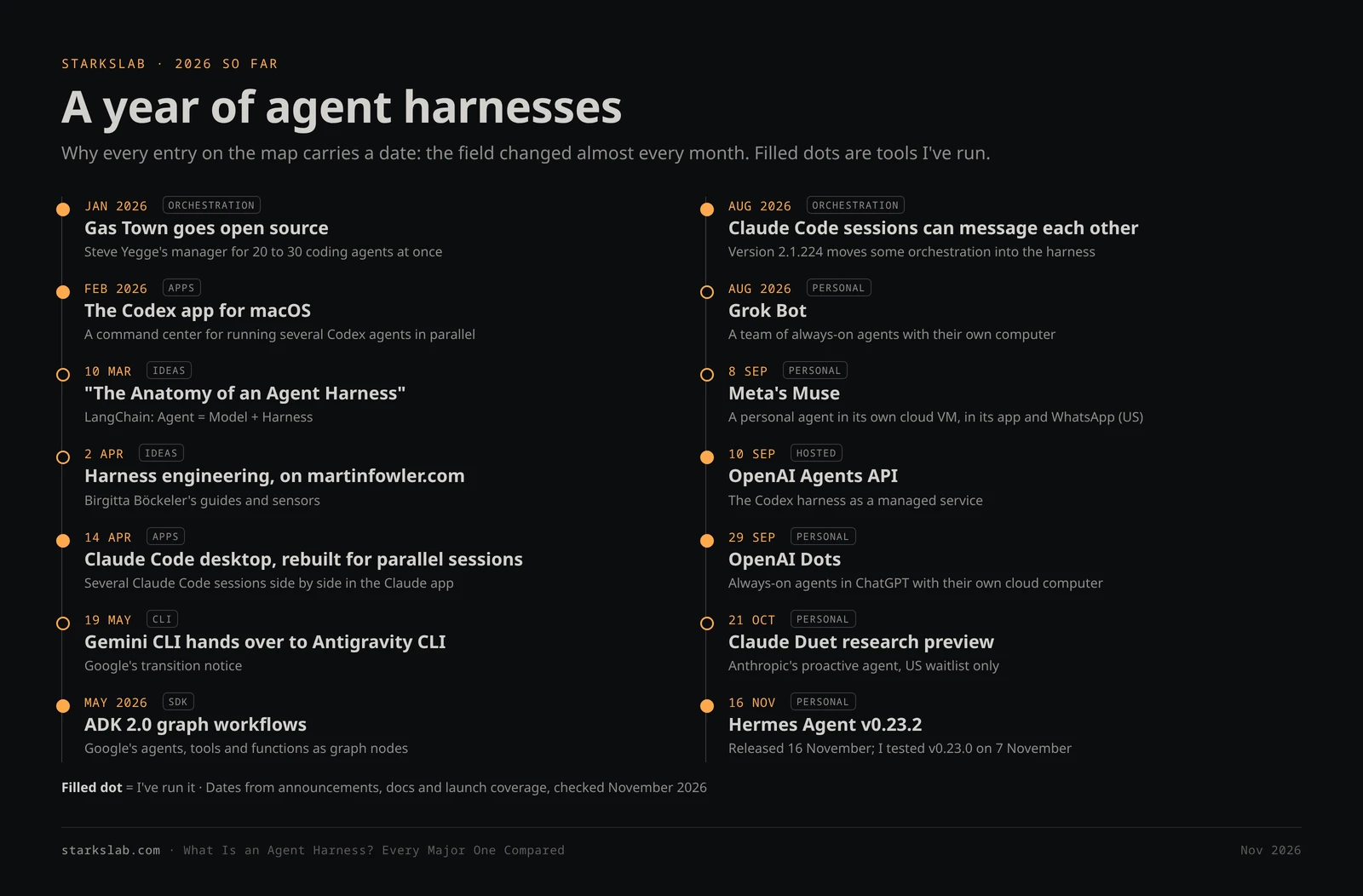
The timeline below is why every label carries a date: most of these tools changed this year, several of them more than once. I’ll update this page as harnesses ship and as I test more of them, and each entry keeps its own date.