Inside one of my Claude Code cloud sessions, Claude started a second, headless Claude session, sent it a note, and got this back: ack from rig-worker: received Cross-session test from claude-b1. Nothing extra was installed to make that happen. Here's what that means for Claude Code multi agent work, and how it compares with OpenRig, an open-source rig for teams of Claude Code and Codex agents.
The short answer
Yes. Since Claude Code v2.1.224, released in the week of August 3–7, 2026 (v2.1.234 on native Windows), your sessions can find each other with ListAgents and send each other plain text with SendMessage. In my test, a second Claude session inside one cloud session's VM appeared in the first session's peer list 24 seconds after it started, then replied over a local Unix socket. So a Claude Code multi agent setup can now be as small as two sessions you already run.
I missed the feature when it shipped. I noticed it in November, around the time someone sent me the OpenRig repository and I starred it, so the comparison picked itself: Claude Code's built-in way for sessions to talk, next to an open-source rig built for teams of Claude Code and Codex agents. They answer different questions:
- Native messaging is for sessions you already run. One session hands another a finding, a status or a decision, as labelled text that can't approve anything on the other side.
- OpenRig is for named teams that mix Claude Code and Codex. You define the team in YAML, and it delivers each message by pasting it into an agent's terminal, so the agent reads it as typed input.
What Claude Code cross-session messaging is
The feature is deliberately small. Claude discovers your other sessions with a tool called ListAgents and sends with SendMessage, and you never call either tool yourself. Claude can send on its own when it sees another session needs something, or you can ask it to and name the target with an @-mention (v2.1.232 or later).
What travels is a piece of text one Claude writes to another, never the sender's conversation history or files. The receiving Claude reads it between tool calls, so a running tool is never interrupted, and an idle session starts a new turn with the message. Once delivered, a message counts toward usage like a prompt you type.
To see who's reachable, run /list-agents, also available as /peers. It shows subagents, agent-team teammates, other sessions on the machine and, while the session is connected to Remote Control, your cloud and Remote Control sessions.
Why it matters when you run several sessions
Take a made-up example. One session is changing a database schema while another builds the API on top of it. Without messaging, you notice the break and re-explain it in the second terminal; with it, the first session can send the change across while the second is still working.
The note itself can be short: The users table now has a deleted_at column; list endpoints should filter on it. In the API session, it would arrive as a message from the schema session. To be sure it landed, have the schema session ask for a one-line reply, as my tests did.
The Claude Code docs list five ways to work on several tasks at once: subagents, agent view, agent teams, dynamic workflows and projects. Cross-session messaging isn't a sixth. The docs treat it as a supporting tool for sessions you already run yourself, and that's the right way to think about it: it doesn't organize the work, it lets separate pieces of work hand each other what they've learned.
Can Claude Code sessions talk to each other?
Yes. Since Claude Code v2.1.224 (v2.1.234 on native Windows), a session can find your other sessions with ListAgents and send them plain text with SendMessage. Claude sends on its own or when you ask, and you can name the target with an @-mention (v2.1.232 or later). A message is a note, never the sender's conversation history or files, and the receiver reads it between tool calls.
Test 1: two Claude sessions inside one cloud session's VM
Anthropic-hosted Claude Code cloud sessions run in an isolated VM that Anthropic manages; self-hosted environments run on your own infrastructure instead. They keep running after you close your laptop, and they count toward your plan's usage limits with no separate charge for the VM. From inside, that VM is an ordinary Linux machine, so the question was simple: can two Claude sessions in it find each other?
Here's the setup. The test ran on 7 November 2026 inside one of my cloud sessions: Ubuntu 24.04.5 LTS, Linux 6.18.44, 2 vCPU, 7.8 GiB of RAM and Claude Code 2.1.318. The cloud session itself was session A, named claude-b1, and Claude started session B as a headless worker with this command, its prompt piped in on stdin:
claude -p --name rig-worker --settings '{"crossSessionInbound":"accept"}'
The prompt asked the worker to stay alive for a couple of minutes, which it did by running sleep 150 in the background. Call this the first run: Claude ran it at my request, and both captures below come from it.
The second run is a separate check. The last step of the procedure below prints a slightly different command, with the worker named worker and the prompt passed as an argument instead of on stdin. Later the same day, also at my request, Claude ran that command exactly as printed in the same VM. That worker showed up in ListAgents a second after it started and replied over uds:/tmp/cc-socks/290.sock, quoting the message it had been sent.
The first run: the worker appears
The settings flag is the important part. A claude -p session binds an inbox socket like an interactive one but can't show the approval dialog an incoming message may need, so a headless worker that should take messages unattended needs crossSessionInbound set to accept. A session in bare mode binds no socket at all.
In the first run, ListAgents in session A listed the worker about 24 seconds after it started:
This session is claude-b1 [8c807f] — the name other sessions use to message it ...
Peer sessions (1):
  rig-worker [18935f]  ·  interactive  ·  busy  ·  started 24s ago
The reply
Session A sent one message asking for a confirmation, and SendMessage reported delivered to rig-worker's inbox (another Claude session on this machine). The answer came back into session A between tool calls:
<cross-session-message from="uds:/tmp/cc-socks/253.sock" from-name="rig-worker" from-mode="prompting">
ack from rig-worker: received Cross-session test from claude-b1
</cross-session-message>
The useful part is the envelope. The note arrives labelled with the sender's name and the socket to answer on, so the receiving Claude knows it came from another session rather than from me. On the worker's side, the incoming message showed up the same way, attributed to claude-b1 (uds:/tmp/cc-socks/105.sock).
Two Claude sessions, one VM, no extra infrastructure. That's enough for a small coordinator-and-worker pattern inside a single cloud session, as long as each headless worker starts with the right inbound setting.
Command
ListAgents, then SendMessage to rig-worker (tool calls in session A, claude-b1)Actual output
This session is claude-b1 [8c807f] — the name other sessions use to message it ...
Peer sessions (1):
rig-worker [18935f] · interactive · busy · started 24s agoCommand
ListAgents, then SendMessage to rig-worker (tool calls in session A, claude-b1)Actual output
result: delivered to rig-worker's inbox (another Claude session on this machine)

## Reply from B, delivered to A between tool calls
<cross-session-message from="uds:/tmp/cc-socks/253.sock" from-name="rig-worker" from-mode="prompting">
ack from rig-worker: received Cross-session test from claude-b1
</cross-session-message>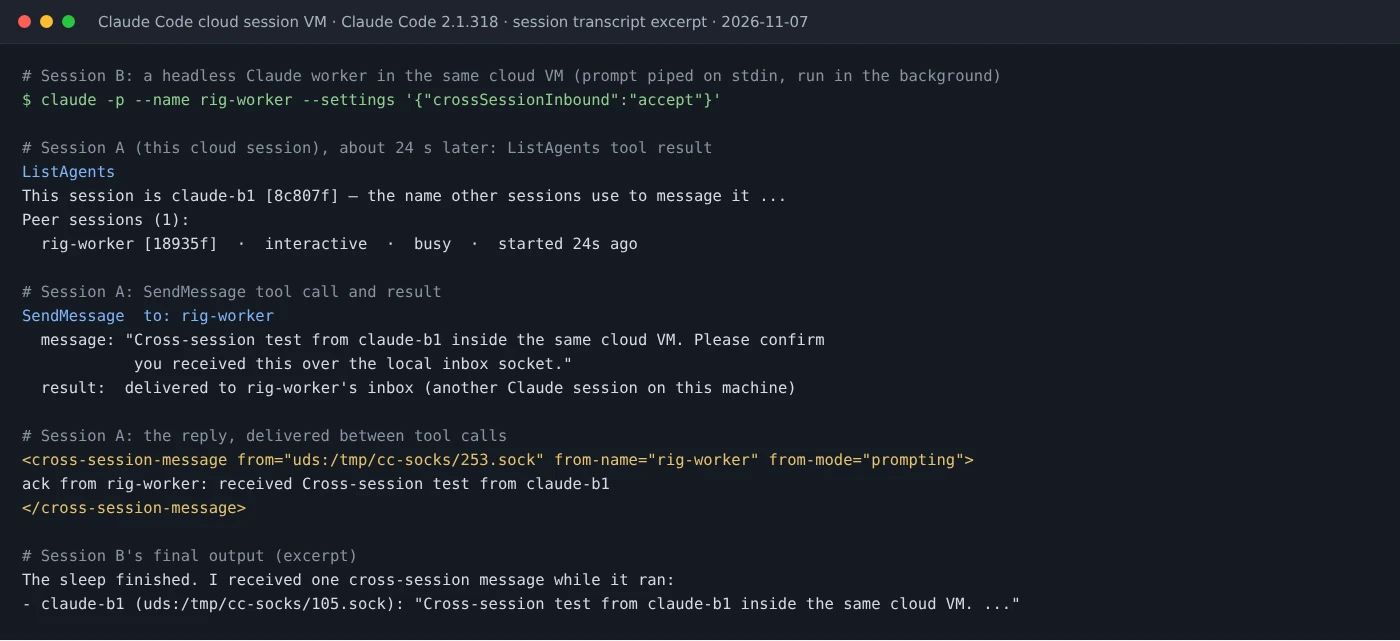
How a message travels, and what it cannot do
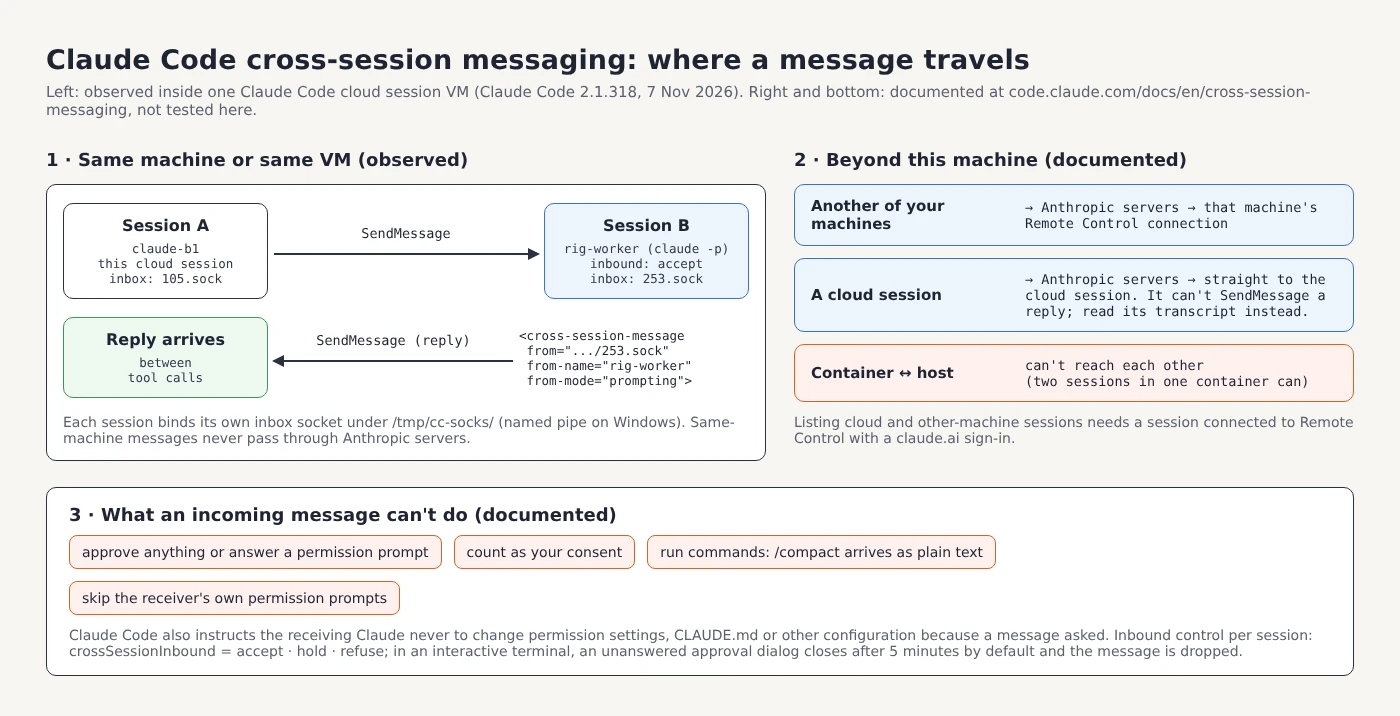
Let's follow one message. Between two sessions on the same machine, it travels over a per-session socket (a named pipe on native Windows) and never passes through Anthropic servers. That's the route my test used: each session had its own inbox under /tmp/cc-socks/.
Beyond one machine, the docs describe two more routes. A message to another of your machines goes through Anthropic servers to that machine's Remote Control connection, and starting that conversation needs v2.1.225 or later. A message to a cloud session goes through Anthropic servers straight to it. I didn't test either route, because the test session wasn't connected to Remote Control.
Two boundaries are easy to trip over. A session inside a container and a session on the host can't reach each other, though two sessions inside the same container can, and a WSL 2 session can't reach a native Windows session on the same computer. A cloud session also can't use SendMessage to answer a message from another machine; you read its response in its transcript at claude.ai/code.
Finding those remote sessions needs your session connected to Remote Control with a claude.ai sign-in, and a session on another machine shows up only when it runs with Remote Control as well. With an API key, or on Amazon Bedrock and the other third-party providers, they won't show up.
What a message can't do
The authority rules are the part to read twice. A message from another session can't approve anything or answer a permission prompt, because it never counts as your consent.
Claude Code also instructs the receiving Claude never to change permission settings, CLAUDE.md or other configuration because a message asked, and a command inside a message, such as /compact, arrives as plain text. Whatever the message asks for, the receiving session's own permission prompts still fire.
Each session also decides what it accepts. crossSessionInbound can be accept, hold or refuse; without a value, Claude Code decides per message from the permission-mode classes of the two sessions. In an interactive terminal, an approval dialog left unanswered past the dialogExpiry deadline, five minutes by default, closes and drops the message.
There are guardrails against runaway chatter as well. A same-machine message over about a million characters is refused, rapid bursts are refused at the sender, and repeated messages are throttled, with at most 50 accepted messages queued for Claude. Two agents stuck in a loop stop on their own.
The contract is sensible: sessions share what they know, but every session keeps its own permissions. Handing work to another Claude never hands over the right to approve it.
Does cross-session messaging work with Claude Code cloud sessions?
Yes, with limits. In my test, two Claude sessions inside one cloud session's VM messaged each other over a local socket. The docs say a message to a cloud session travels through Anthropic servers, but finding cloud sessions needs a session connected to Remote Control with a claude.ai sign-in, and a cloud session can't use SendMessage to answer a message from another machine.
Can a message from another session approve a permission prompt?
No. A message from another session can't approve anything or answer a permission prompt, because it never counts as your consent. Claude Code also instructs the receiving Claude not to change permission settings or CLAUDE.md because a message asked, and a command such as /compact arrives as plain text. The receiving session's own permission prompts and rules still apply.
Sources: [18]
Do cross-session messages use tokens?
Yes. Once delivered, a message counts toward usage like a prompt you type, because the receiving Claude has to read it. Claude Code also limits runaway traffic: rapid bursts are refused at the sender, repeated messages are throttled, and at most 50 accepted messages queue for Claude. I didn't measure token cost in my own test.
Test 2: OpenRig in the same VM
OpenRig takes a different approach. It's open-source software under the Apache 2.0 license that defines an agent team in YAML and boots it with one command, with Claude Code and Codex in the same rig. Underneath is a local daemon, a CLI, a terminal UI and an MCP server, all built on tmux, so if you've ever wired up a Claude Code tmux layout by hand, the shape will feel familiar.
It needs Node.js 22 or 24 (22 on Apple silicon), tmux, and macOS or Linux (WSL2 on Windows), with Claude Code or Codex signed in; one provider is enough to start. Agents in a rig talk with rig send, rig broadcast and rig chatroom, and the built-in teams include starter, workshop and factory. It's a third-party project, not an Anthropic one.
Read the setup before you run it
OpenRig changes more than the project folder. rig setup adds a block to ~/.tmux.conf and installs Herdr for its terminal view unless you pass --no-herdr. When OpenRig starts agents, it writes Claude Code workspace trust to ~/.claude.json, activity hooks to the project's .claude/settings.local.json and discovery skills under ~/.claude/skills and ~/.agents/skills.
Its own kernel seats get broader permissions than project teams. On Codex that means full access with no approval prompts, while the kernel's Claude Code seats run with acceptEdits and a per-launch allow list; YOLO mode is off by default.
Herdr is a terminal control surface for supervising many coding-agent panes, and as my Herdr note explains, it doesn't sandbox the agents. So review what OpenRig writes, back up those files first, and keep the kernel's permission defaults away from anything you care about.
What the kernel rig did
In the cloud VM, Claude installed OpenRig 0.7.9 (build ddb9d25b) and brought up its kernel rig. rig ps showed four seats, advisor-lead, operator-agent, operator-human and queue-worker, all running and idle, with advisor-lead last observed on claude-opus-5-5. Claude then sent the advisor one small task from outside the rig: call ListAgents and reply with the session names it lists.
rig send was candid about what it could and couldn't confirm:
Sent to advisor-lead@kernel
Advisory: Delivered without sender identity: this request carried no X-OpenRig-Session header ...
Verified: no
Delivery: rendered-unconfirmed (landed; pane re-render not confirmed - confirm with: rig capture advisor-lead@kernel)
rig capture showed what the agent received: the text wrapped in a From/To envelope, with From: <unknown sender>. The advisor did the task: its native ListAgents listed two peers, queue-worker@kernel and operator-agent@kernel, so Claude Code's own ListAgents works inside a rig too. Then it explained why it answered in its own pane instead of through the rig:
I'm answering here rather than with rig send: the message gives its reply
address as <unknown sender>, and that isn't a session I can send to.
Sender identity isn't decoration. Without it, the agent had nowhere to send the answer.
How rig send delivers text
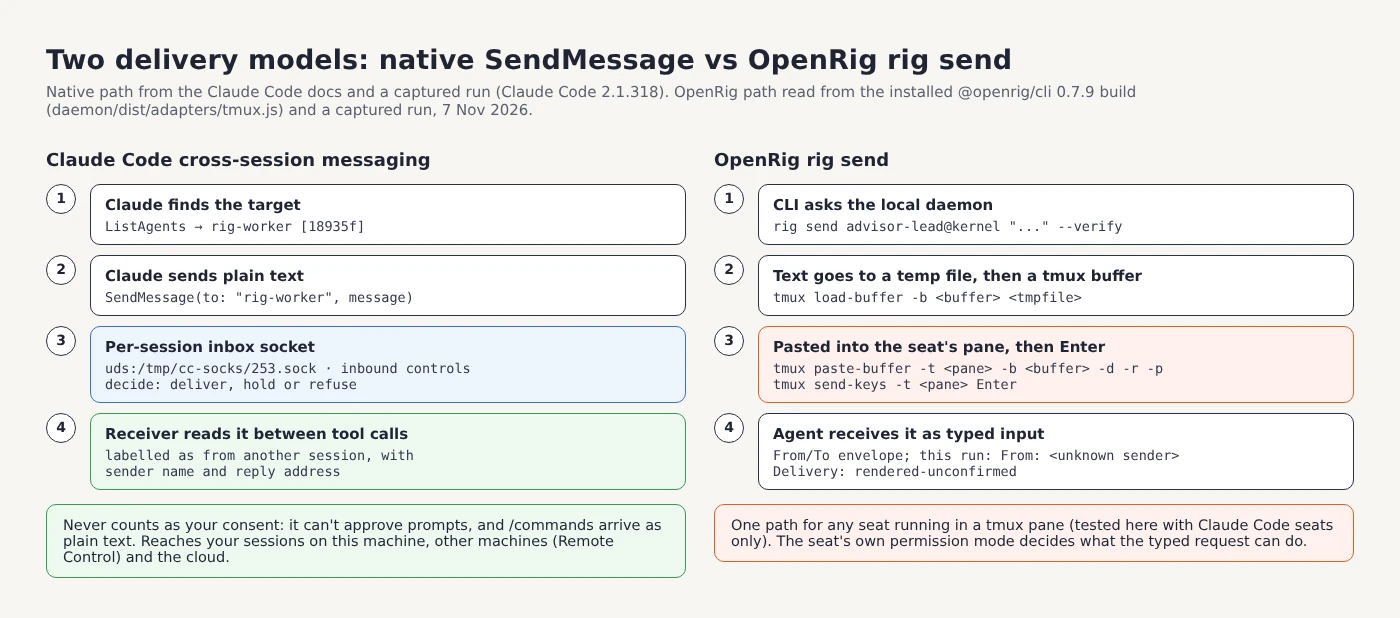
The delivery status made more sense once Claude read the installed 0.7.9 code, the same way I'd read an AI-agent system's source before operating it. The daemon's session transport hands the text to its tmux adapter, which writes it to a temporary file, loads it into a tmux buffer and pastes it into the seat's pane with paste-buffer -d -r, adding -p for bracketed paste by default. A separate step then submits it with Enter, so the agent receives the message as typed input.
Each flag is there for a reason, and the code comments say which. -p brackets the paste so agent interfaces don't consume the text as individual keystrokes, -r keeps newlines raw because a carriage return means submit in the Claude and Codex interfaces, and -d drops the buffer afterwards. Enter goes separately, as its own key.
It's a sensible design for a tool that has to drive any agent sitting in a tmux pane, and it's how one rig can mix Claude Code and Codex. The trade-off is that the message is just input: it carries whatever identity the envelope gives it, and the seat's own permission mode decides what it can do.
Is OpenRig made by Anthropic?
No. OpenRig is a third-party open-source project under the Apache 2.0 license that runs Claude Code and Codex agents as a YAML-defined team on tmux, through a local daemon, a CLI, a terminal UI and an MCP server. Its README positions it against Claude Managed Agents as open source and self-hosted. At my request, Claude ran version 0.7.9 inside the VM of one of my Claude Code cloud sessions.
Command
rig send advisor-lead@kernel "Test from outside the rig, one short task only: call your ListAgents tool and reply here with the session names it lists. Do nothing else." --verifyActual output
Sent to advisor-lead@kernel
Advisory: Delivered without sender identity: this request carried no X-OpenRig-Session header ...
Verified: no
Delivery: rendered-unconfirmed (landed; pane re-render not confirmed - confirm with: rig capture advisor-lead@kernel)Command
rig capture advisor-lead@kernel --lines 40Actual output
❯ From: <unknown sender>
  To: advisor-lead@kernel
  Sent: 11-07 09:10Z
  ---
  Test from outside the rig, one short task only: call your ListAgents tool and
  reply here with the session names it lists. Do nothing else.
  ---
  ↩ Reply: rig send <unknown sender> "..."

● ListAgents lists two peer sessions:

  - queue-worker@kernel (idle)
  - operator-agent@kernel (idle)

  I'm answering here rather than with rig send: the message gives its reply
  address as <unknown sender>, and that isn't a session I can send to. If you
want the reply delivered, give me the real session name.Command
awk 'FNR==3098||FNR==3111||FNR==3166||FNR==3172 {s=$0; sub(/^ +/,"",s); print FILENAME":"FNR": "s}' domain/session-transport.js; awk 'FNR==828||FNR==829||(FNR>=831&&FNR<=835)||FNR==838||FNR==868||FNR==869||FNR==874||FNR==876||FNR==884 {s=$0; sub(/^ +/,"",s); print FILENAME":"FNR": "s}' adapters/tmux.jsActual output
domain/session-transport.js:3098: const textResult = await this.runStage("session_transport.send_text", () => {
domain/session-transport.js:3111: return beforePaste ? this.tmuxAdapter.sendText(sessionName, text, beforePaste) : this.tmuxAdapter.sendText(sessionName, text);
domain/session-transport.js:3166: // 5. Submit (Enter)
domain/session-transport.js:3172: return opts?.beforeWrite ? this.tmuxAdapter.sendKeys(sessionName, ["Enter"], opts.beforeWrite) : this.tmuxAdapter.sendKeys(sessionName, ["Enter"]);
adapters/tmux.js:828: * Bracketed paste by default, at every size. Unbracketed input can be consumed as individual
adapters/tmux.js:829: * keystrokes by agent TUIs, losing text even below the old 8 KiB cutoff.
adapters/tmux.js:831: *   `-p`  bracket the paste when the receiving application enables that mode.
adapters/tmux.js:832: *   `-r`  preserve raw LF. tmux's default paste-buffer replaces every LF with
adapters/tmux.js:833: *         CR, and CR is SUBMIT in the Claude/Codex TUIs - a
adapters/tmux.js:834: *         default paste of a multi-line pack would submit on every newline.
adapters/tmux.js:835: *   `-d`  drop the buffer after a successful paste.
adapters/tmux.js:838: * Any trailing submit stays the caller's separate `sendKeys(["Enter"])`.
adapters/tmux.js:868: async sendTextUnchecked(target, text, beforeWrite, bracketed = true, policy) {
adapters/tmux.js:869: const path = this.fileOps.tmpName();
adapters/tmux.js:874: await this.fileOps.writeFile(path, text, { mode: 0o600, flag: "wx" });
adapters/tmux.js:876: await this.run(["tmux", "load-buffer", "-b", buffer, path], `tmux load-buffer -b ${shellQuote(buffer)} ${shellQuote(path)}`);
adapters/tmux.js:884: await this.run(["tmux", "paste-buffer", "-t", target, "-b", buffer, "-d", "-r", ...(bracketed ? ["-p"] : [])], `tmux paste-buffer -t ${shellQuote(target)} -b ${shellQuote(buffer)} -d -r${bracketed ? " -p" : ""}`);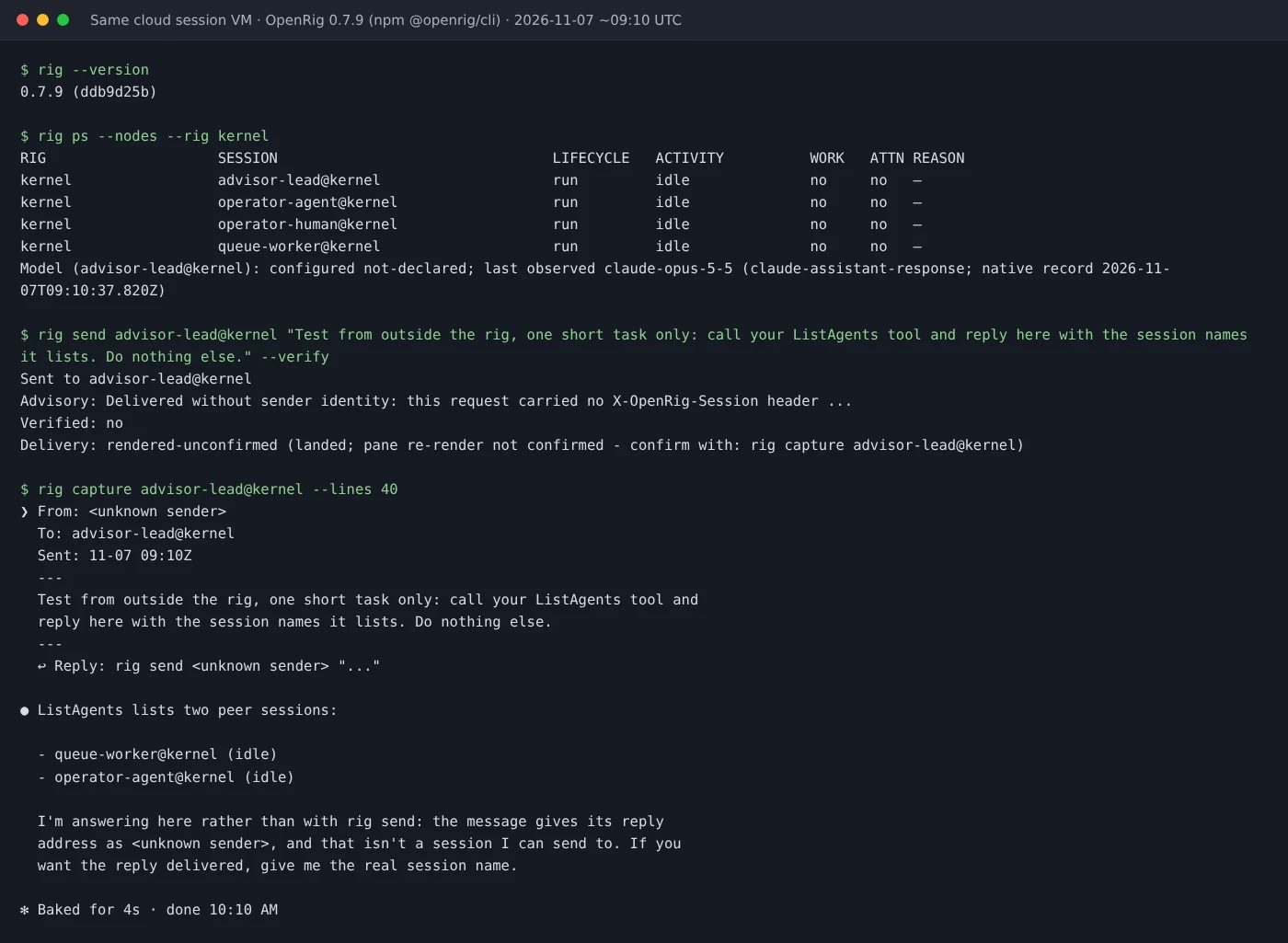
Native messaging vs OpenRig: two delivery models
Side by side, the two tools answer different questions.
| Claude Code cross-session messaging | OpenRig rig send |
|
|---|---|---|
| How it travels | Per-session socket on one machine; Anthropic servers to your other machines (via Remote Control) and to cloud sessions | Temporary file, tmux buffer, paste into the seat's pane (bracketed by default), then a separate Enter |
| What arrives | A labelled message from another session | Typed input inside a From/To envelope |
| Sender identity | Attached in my local test (from-name and socket) |
My send from outside the rig carried no X-OpenRig-Session header and arrived as <unknown sender>; a send with a named sender wasn't tested |
| Replies | SendMessage back to the sender; a cloud session can't answer a message from another machine this way | rig send to the sender the envelope names; with <unknown sender>, the seat answered in its own pane |
| Authority | Never counts as your consent; slash commands arrive as plain text; the receiver is told not to change permissions or config because of it | The seat's own permission mode decides |
| Reach | Your sessions on this machine; other machines and cloud sessions through Remote Control (v2.1.225 or later to start a cross-machine conversation) | Seats in a rig run by the local daemon |
| Agents | Claude Code sessions | Claude Code and Codex seats |
| Setup | Claude Code v2.1.224 or later (v2.1.234 on native Windows; v2.1.248 for same-machine messaging on third-party providers) | Node.js and tmux, plus setup changes to tmux and Claude Code config |
When the difference matters
OpenRig's README positions it against Claude Managed Agents: open source, self-hosted, with Claude Code and Codex in the same team. That's the honest reason to reach for it. If every agent you run is a Claude Code session and they can reach each other (on one machine, or through Remote Control for other machines and cloud sessions), native messaging covers the talking: in my local run each message arrived with the sender's name and socket, and the docs keep each session's own permission rules in charge.
If you want named roles with Claude Code and Codex together in one team, a rig gives you a team definition that native messaging doesn't try to provide. The two can also coexist: in my test, the advisor seat inside the rig listed two other seats with Claude Code's own ListAgents.
Which Claude Code multi-agent setup fits which job
Claude Code multi-agent work isn't one feature, and "Claude Code orchestration" can mean anything from a single subagent to a full rig. The options differ mostly in who holds the plan: Claude inside one conversation, a team lead, a script, or you.
My own setup came from leaving an always-on agent behind. I moved from OpenClaw to Claude Code, the Claude app and the Codex app, using Remote Control for work that needs my machine and cloud sessions for work that should keep running while I'm offline. Messaging fills a gap in exactly that setup: my sessions were already separate, and now they can tell each other things.
Cloud sessions also have two command-line handles, and neither one is cross-session messaging. claude --cloud "task" creates a new cloud session, while claude -p "message" --cloud <session-id> queues a message from you into an existing one, from a CLI signed in to the same claude.ai account. That's you prompting a session from a terminal, not one Claude writing to another. Inside a cloud session, subagents work as they do locally, while agent teams are off by default and can be enabled with CLAUDE_CODE_EXPERIMENTAL_AGENT_TEAMS=1 in the cloud environment's variables.
Agent teams, rigs and worktrees
Agent teams are the closest built-in relative of a rig: several coordinated sessions with a shared task list and messaging, managed by a lead. They're experimental and disabled by default, and they don't isolate teammates in worktrees, so the docs say to partition the work so each teammate owns a different set of files.
Worktrees are for sessions you run yourself: each one gets a separate git checkout. A worktree cockpit like dmux gives Claude Code, Codex and other agents an operating surface for that, without replacing any of them.
A quick way to choose
Start from the job, not the tool:
- One session with side work to hand off: subagents. Claude delegates inside the conversation and gets a summary back.
- Independent tasks you want to start now and check on later: agent view, a research preview you open with
claude agents. - One large job that a lead should split, assign and supervise: agent teams, once you've enabled them.
- A repeatable fan-out where a script should hold the plan: dynamic workflows, which run many subagents and cross-check their results.
- Ongoing work in the Claude desktop app or at claude.ai/code that should spin up parallel threads: projects, in public beta on Pro, Max and Ultra.
- Sessions you already run that need to share findings or status: cross-session messaging.
- Named roles across Claude Code and Codex, defined in one file: OpenRig, if you're comfortable with what its setup changes.
One exception cuts across all seven: if two workers will edit the same files, isolate them first. Sessions you run yourself can each get a separate worktree; agent teams don't use worktrees, so split the work so each teammate owns a different set of files.
Back to the schema and API example
Both sessions already exist, so it's number 6, cross-session messaging, with nothing extra to set up. If the two sessions work in separate worktrees, the message tells the API session what landed. Pulling the change into its own checkout is still a git step; the docs' own sample message ends by saying that rebasing on main is safe now.
If both sessions would edit the same migration files, decide which one owns them, and have the other ask for changes by message. A message tells a session what changed, but it doesn't stop two sessions from writing the same file.
The options side by side
Read the first column first: once you know who should hold the plan, the other two tell you how the work comes back and how settled the option is.
Comparison method
Rows follow the five ways in the Claude Code docs, plus cross-session messaging and OpenRig, as read on 7 November 2026.
| Option | Who holds the plan | How work comes back | Status |
|---|---|---|---|
| Subagents | Claude, inside one conversation Sources: [36] | A summary back to the conversation that spawned them Sources: [37] | Built in; same in cloud sessions Sources: [41] |
| Agent view | You, checking back on independent background tasks Sources: [36] | Only to you; Claude can still message these sessions Sources: [37] | Research preview; open with Sources: [36] |
| Agent teams | A lead that plans, assigns and supervises Sources: [36] | Teammates message each other and can share a task list Sources: [38] | Experimental, off by default; no worktree isolation Sources: [38] |
| Dynamic workflows | A script, instead of Claude's turn-by-turn judgment Sources: [36] | The script cross-checks many subagents' results Sources: [36] | No availability label on the overview page Sources: [36] |
| Projects | Claude, across parallel threads Sources: [36] | Claude shows you which threads need you Sources: [37] | Public beta on Pro, Max and Ultra Sources: [36] |
| Cross-session messaging | You, across sessions you already run Sources: [36] | Plain text read between tool calls, labelled with the sender in my local test Sources: [46] | On from v2.1.224 (v2.1.234 on native Windows); tested here in one cloud VM Sources: [47] |
| OpenRig | A coordinating lead seat in a YAML-defined team Sources: [45] | Text pasted into each seat's tmux pane Sources: [48] | Third-party, Apache 2.0; 0.7.9 tested with Claude Code seats Sources: [45] |
Comparison limitations
Only cross-session messaging and OpenRig were run for this article.
What is the difference between agent teams and cross-session messaging?
Agent teams are a coordinated structure: several sessions with a shared task list and messaging, managed by a lead, and they're experimental and disabled by default. Cross-session messaging is a supporting tool for sessions you run yourself, with no lead or shared plan. Use a team when one lead should split and track the work, and messaging when separate sessions need to share what they learn.
Try it in ten minutes
Try it with something small: two sessions on one machine and one fact the second session needs. The steps take a few minutes, and the optional last step adds a headless worker like the one in my test.
Before you start
- Claude Code v2.1.224 or later on macOS or Linux (including WSL 2), or v2.1.234 or later on native Windows. Same-machine messaging on Amazon Bedrock and other third-party providers, or with feature-flag fetching off, needs v2.1.248 or later.
- Two sessions that can reach each other: two terminals on the same machine, or two sessions inside the same container or VM.
- For cloud sessions or other machines: your session connected to Remote Control with a claude.ai sign-in; a session on another machine must run with Remote Control too.
Check your version
Run
claude --versionin each terminal you'll use.Expected result
2.1.224 or later (2.1.234 or later on native Windows). There's nothing to enable.
Sources: [49]
Open two sessions
Start Claude Code in two terminals on the same machine, or run two sessions inside the same container.
Expected result
Two live sessions that share a machine.
Sources: [55]
List what's reachable
In the first session, run
/list-agents(or/peers).Expected result
The second session appears in the list.
Sources: [50]
Pass a known fact and ask for an acknowledgement
In the first session, ask Claude to send a harmless, known fact and request a reply, for example:
Tell my other session that the test word is lighthouse, and ask it to reply with the word.To pick the target yourself, @-mention the session (v2.1.232 or later).Expected result
Claude reports the message as delivered to the other session's inbox, which only means it arrived, not that the other Claude has read it. The second session shows it as a message from the first session, between tool calls or as a new turn if it was idle. Its reply with the word lighthouse, arriving back in the first session as a cross-session message, is what shows the message was read and answered.
Optional: add a headless worker that replies
Start a worker that takes messages without an approval dialog and has an explicit reply task, then send it a short message from the first session. This is the exact command Claude ran at my request in the cloud VM:
claude -p --name worker --settings '{"crossSessionInbound":"accept"}' "Run sleep 150 in the background. If another session messages you before it finishes, reply to that session with SendMessage, quoting what you received."If
/list-agentsno longer shows the worker, it has already exited; start it again with a longer sleep before you send.Expected result
While the worker is still running, it appears in
/list-agents, and its reply quoting your message arrives in the first session as a cross-session message. In that run, the worker was listed a second after it started, and its reply quoted the message back, test word included.Sources: [53]
Verify the result
The first session shows a cross-session message from the other session that contains your test word or quotes your text. In Claude's run of the last step, the reply block named the sender (from-name="worker") and the socket it came from.
Troubleshooting
/list-agentsisn't recognized. The session doesn't have cross-session messaging; update Claude Code.- The other session isn't listed, or nothing arrives. Check deny rules for SendMessage and ListAgents, and the receiver's
crossSessionInboundsetting:refusedrops messages andholdwaits for approval. - A headless worker never appears. Bare mode binds no socket, and a
-prun that finishes its task exits before anything arrives. - A container session can't see the host. Sessions inside a container and on the host can't reach each other; run both in the same container.
- Cloud or other-machine sessions are missing. Connect your session to Remote Control with a claude.ai sign-in, and make sure a session on another machine runs with Remote Control too; API-key and third-party-provider sessions can't find them.
Command
claude -p --name worker --settings '{"crossSessionInbound":"accept"}' "Run sleep 150 in the background. If another session messages you before it finishes, reply to that session with SendMessage, quoting what you received."Actual output
## Reply from the worker, delivered to A between tool calls
<cross-session-message from="uds:/tmp/cc-socks/290.sock" from-name="worker" from-mode="prompting">
Reply to claude-d5: I received your message, "Procedure check from claude-d5: the test word is lighthouse."
</cross-session-message>What I did not test
A few short runs in one VM leave plenty open. Beyond the cross-machine routes noted above, I didn't run agent teams, OpenRig's Codex seats (the VM had no Codex sign-in) or its starter, workshop and factory teams, and the runs say nothing about long-running reliability or token cost.
Versions move quickly here. Everything was last verified on 7 November 2026 with Claude Code 2.1.318 and OpenRig 0.7.9 (build ddb9d25b); OpenRig's README, read at commit 9b1d94d6, pins v0.7.5 in its install snippets, so check which version you get.
If you try one thing, make it the small version: two sessions, /list-agents, one fact passed across. Add a rig when you need named roles across Claude Code and Codex, not before.