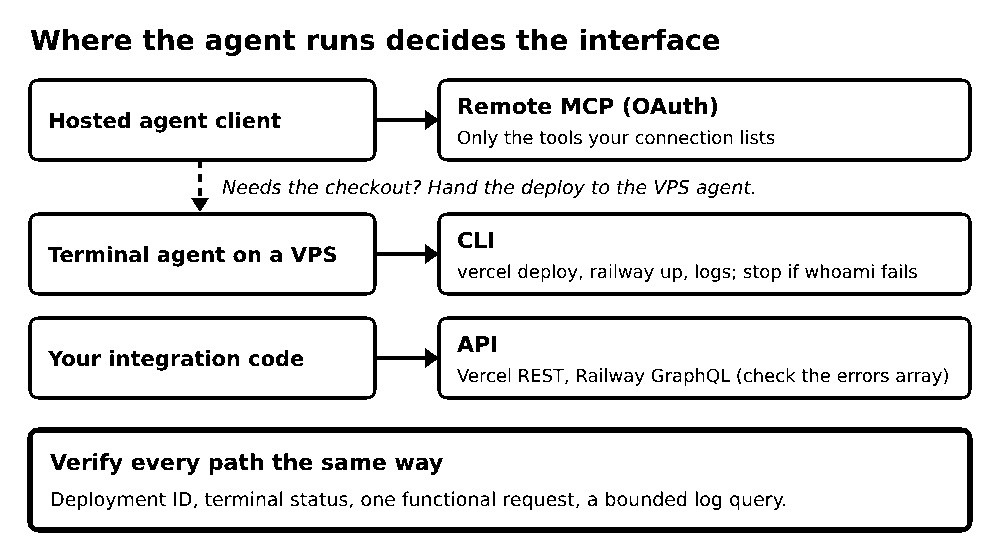
Short answer on MCP vs API vs CLI: pick the interface by where the agent runs and what it must do. Use remote MCP when a hosted client needs to inspect deployments and logs through tools it actually exposes. Use the CLI when the job needs a source checkout on the machine where commands run, and the API when you are writing a defined integration.
Whichever you pick, record the real grant and verify the exact deployment ID, its terminal status and one functional request. Here MCP means Model Context Protocol, API application programming interface and CLI command-line interface. The examples use Vercel and Railway. The Atlas release is fictional; the CLI checks were run without credentials in a Linux container on 6 November 2026.
Start with where the agent runs
An agent in a hosted client such as Claude.ai or ChatGPT reaches your Vercel and Railway accounts only through the connectors you add. It does not share your VPS filesystem, installed commands or authenticated terminal session. A terminal agent on the VPS is the reverse: it has the checkout and the CLIs, but provider access only if a person logged in there or a token was set.
That split decides most choices in this guide. A hosted agent can inspect a deployment through MCP but cannot upload source it cannot read. A VPS agent can deploy, but an unauthenticated Railway CLI may start a sign-in and then create a new project instead; step 1 of the release below covers this.
Check the particular client too. Vercel's MCP documentation lists ChatGPT, Claude web/desktop, Claude Code and Codex CLI separately, so a documented connection for one client is not proof that a similarly named product exposes the same tools.
My own setup has both sides. I work mainly in the Codex and Claude apps, and the Codex app also connects to a small Ubuntu VPS. I deploy applications on Vercel and Railway and check their logs, and the access an agent has differs between those two places it runs. The Atlas release below is fictional, and I did not run it from that VPS or anywhere else.
The CLI observations come from unauthenticated checks run for this guide in a Linux x86_64 container on 6 November 2026, with Vercel CLI 65.12.1 and Railway CLI 5.71.0: versions, help output and the errors an agent gets without credentials.
If you are still choosing the wider tool stack, the AI agent tools map shows where this workflow fits.
Choose MCP, CLI or API for the operation
MCP exposes tools that an agent can call. Vercel MCP is a remote OAuth connection at https://mcp.vercel.com. Railway MCP runs at mcp.railway.com with two ways in: clients that handle OAuth connect to https://mcp.railway.com directly, while the CLI command railway mcp connects over stdio and attaches your railway login credentials to each request.
That CLI default requires Railway CLI 5.44.0 or later; on earlier versions the same command starts Railway's in-process local server, which exposes a different tool set. On 5.71.0 in the container, railway mcp --help describes proxy as what a bare railway mcp now does and local as the in-process server. The label "MCP" therefore does not tell you where credentials are held or which operations are available.
A CLI is useful when the job needs files already present in the execution environment. Railway up uploads local source; Vercel documents a CLI deployment workflow from a linked directory.
An API is useful when you are building a defined programmatic integration. Vercel exposes REST; Railway exposes GraphQL, so inspect the response's errors array as well as the HTTP status.
These are task-fit recommendations. No performance benchmark was run. OAuth access may be broader than the task needs, a terminal may hold broad credentials, and an API wrapper can expose either a narrow action or extensive control.
Comparison method
Compare documented task fit, execution dependencies and verification needs for one deployment/log workflow, using provider documentation and unauthenticated CLI help checked on 6 November 2026. No performance benchmark or security ranking was run.
| Option | Useful when | Check before using |
|---|---|---|
| MCP | The exposed provider tools cover the platform operation. | Exact client support, remote/proxy/local path (Railway's default |
| CLI | The deployment uses source already present in a known directory. | Identity ( |
| API | A program needs defined requests, responses and error handling. | Credential scope, exact resource IDs and operation-level errors. |
Comparison limitations
Documentation synthesis plus unauthenticated CLI checks only. Availability depends on the exact client, grant and provider state. MCP, CLI and API may be combined; no universal winner or comparative reliability result is established.
Is MCP a replacement for a provider API?
MCP exposes tools an agent can call; the provider API remains a separate programmatic interface. In this workflow, choose according to the operation, execution environment and actual grant rather than assuming one replaces the other. This guide compares documented access paths and their verification needs, without claiming a benchmark winner.
When should a deployment agent use the CLI rather than remote MCP?
A CLI is a practical choice when the agreed source revision already lives in the agent's execution environment and deployment requires that directory. Remote MCP is useful when its exposed tools cover the platform operation, such as inspecting a known deployment. Confirm the exact client, target and grants before combining those paths.
Write an access map without secret values
Set up a hosted client and record what it can do
- Connect through the documented route. For Vercel in Claude.ai or Claude Desktop, add a custom connector with the URL
https://mcp.vercel.com; in ChatGPT, add it as a custom MCP server with OAuth. Railway documentshttps://mcp.railway.comfor MCP clients that manage OAuth themselves. - Read the tool list, not the label. Vercel says the connection's tool list shows which tools and parameters are available, and that server configuration, the client's OAuth grant and team permissions affect access. Write down the tools you actually see for each provider.
- Record the grant. Vercel's documentation says connecting grants the AI system the same access as your Vercel user account. The hosted Vercel row therefore carries the authorizing Vercel user's access, shaped by that connection's OAuth grant and the user's team permissions. Write down who authorized the connection and the access that user actually holds; don't assume it is narrow, and don't assume it covers the whole account.
- Decide what stays on the VPS. If no logs tool appears, or the job needs the source checkout, hand that step to the VPS agent and its CLI. Give the hosted client only the resulting deployment ID if it should inspect status or logs afterwards.
The map
Record the connections before using them. This fictional map separates intended work from the grant you still need to verify.
| Runtime → provider | Path | Intended work | Credential reference | Verify before use |
|---|---|---|---|---|
| Hosted client → Vercel | Remote MCP (OAuth) | Inspect a known deployment and its logs | Saved Vercel connector (the authorizing Vercel user's access) | The tool list includes the tools you need, and the row names who authorized it and the access that user holds |
| Hosted client → Railway | Remote MCP (direct OAuth) | Inspect service and deployment | Saved Railway connector | The tool list and the projects it can see |
| VPS → Vercel | CLI | Deploy checked source, read logs | VPS Vercel login, or VERCEL_TOKEN |
.vercel/project.json names the intended project and team |
| VPS → Railway | CLI (railway up, railway logs) |
Deploy checked source, read logs | VPS railway login, or a staging RAILWAY_TOKEN |
Explicit project, environment and service on every command |
| VPS → Railway | MCP proxy (railway mcp, CLI 5.44.0+) |
Agent tool calls from the VPS | The VPS railway login session only |
The same targets as the CLI row |
The rows describe a proposed setup, not confirmed least-privilege grants. Add the actual permissions, owner, revocation location, last-checked date and one successful bounded verification to each row. A credential reference is a label or storage location, never the value, and its presence does not prove the model cannot read the underlying secret.
Keep Railway's two VPS routes apart
The CLI rows can use a token. Railway distinguishes a project-scoped RAILWAY_TOKEN, limited to one environment in one project, from the broader account or workspace RAILWAY_API_TOKEN, and when either is set the CLI skips interactive login. The MCP proxy is documented differently: railway mcp attaches your railway login credentials, so record that row under the logged-in user's access rather than the project token's.
To map which layer supplies permissions, tracing and review beyond the tool connection, use the agent control-surface guide.
Work through a hypothetical Atlas release
Assume Atlas has an existing frontend on Vercel that already has a production deployment, and an API in an existing Railway staging environment. The agreed revision is checked out on the VPS, where a person has completed the Vercel and Railway logins. Two Atlas assumptions define the checks: the API answers GET /health with HTTP 200 and {"status":"ok"}, and the frontend route /api/status is server-side code that calls that endpoint and returns HTTP 200 with {"api":"ok"} only when the call succeeds.
The existing production deployment matters because Vercel's current guide says the first deployment of a new project becomes production even without --prod, while later vercel deploy runs create previews. Without that production deployment, the frontend deploy below would publish to production. The task is to deploy the agreed revision to the preview and staging targets, capture both deployment IDs and tie each to this run, check both routes, and report evidence and unresolved failures.
The Vercel and Railway commands come from provider documentation and the help text of Vercel CLI 65.12.1 and Railway CLI 5.71.0. They were not run against real accounts for this guide, so I have not seen authenticated output and can't give you its JSON field names. Step 2 finds them in your own output before anything is deployed.
Replace placeholders such as <revision> with your own values. <frontend-source-dir> and <api-source-dir> are the two directories the deploys run from. <run-dir> is a notes directory outside both, so the run's files are never uploaded and never dirty a working tree.
1. Confirm source, identity and destination
cd <frontend-source-dir>
git rev-parse HEAD
git status --porcelain
cat .vercel/project.json
vercel whoami

cd <api-source-dir>
git rev-parse HEAD
git status --porcelain
railway whoami
Each deploy ships the directory it runs from: Railway's up page says it compresses and uploads the current directory, and Vercel's guide deploys from the linked directory. So check each directory here, and cd into it again before its deploy.
Expected: in both directories git rev-parse HEAD prints the agreed revision and git status --porcelain prints nothing. Both whoami commands name the expected account.
Stop if git status --porcelain prints anything in either directory. A matching HEAD names the checked-out commit; it does not show that the working tree equals it. Because railway up uploads the directory, a modified file, or an untracked one that is not ignored, would ship under the agreed revision's name.
Stop if either whoami does not name the expected account, and fix the login before any deploy command. Logged out in the container, both CLIs failed with exit code 1:
> Logged out.
Unauthorized. Please login with `railway login`
The stop matters most for Railway. Its docs say railway up signs an unauthenticated user in, or creates an account, and can create a new project when none is linked. In the container check, 5.71.0 went further: with --project, --environment and --service all set, it announced it would sign in and "then create a new Railway project from this directory and deploy it", skipping the confirmation because it detected an agent harness.
vercel link writes .vercel/project.json. The README that Vercel CLI 65.12.1 writes beside it says the file holds the linked project's ID (projectId) and the owning user or team's ID (orgId); both must match the plan. On Railway, pass --project <project-id> --environment staging --service api explicitly instead of relying on linked defaults.
2. Read the output shapes before deploying
cd <frontend-source-dir>
vercel inspect <existing-deployment-url> --json > <run-dir>/inspect-shape.json

cd <api-source-dir>
railway deployment list --json --project <project-id> --environment staging --service api > <run-dir>/railway-shape.json
Both commands only read. The first inspects a deployment Atlas already has, such as the current production one, using the inspect --json form the 65.12.1 help lists. The second lists the API's existing deployments.
Find in inspect-shape.json where the projectId value from .vercel/project.json appears, and whether the output carries deployment metadata. Find in railway-shape.json the fields that hold each deployment's ID, status, creation time and message. Railway's up page names .status; I can't name the others for you.
Decide now what the later steps can verify, and write it down. Without a project ID or metadata in the inspect JSON, step 3 cannot confirm the project or the revision from the deployment record. Without a creation time or message in the Railway list, step 4 cannot tie a new entry to this run.
3. Deploy the frontend preview and capture its ID
cd <frontend-source-dir>
vercel deploy --meta atlasRevision=<revision> > <run-dir>/preview-url.txt
vercel inspect "$(cat <run-dir>/preview-url.txt)" --wait --timeout 5m
vercel inspect "$(cat <run-dir>/preview-url.txt)" --json > <run-dir>/preview-inspect.json
vercel deploy writes the deployment URL to standard output (the help's own example is vercel > deployment-url.txt), and --meta attaches the revision to the deployment as metadata. inspect prints a General block with id, name, target, status, url and created lines.
Expected: name is the name you expect for the Atlas frontend project, target reads preview and status reads Ready. Record the id line as the Vercel deployment ID. In preview-inspect.json, the project ID and the atlasRevision value appear where step 2 showed they would.
Stop if the URL file is empty, or name, target or status reads anything else. Stop as well if the JSON does not show the project ID or the revision, and report that part as unverified. The URL shows only that this command created a deployment, not which project or revision it holds.
When both values are present, the metadata is still a label this run wrote. Together with the clean tree confirmed in step 1, in the directory the deploy ran from, it is the evidence that the deployment holds the agreed revision.
Don't branch on the exit code alone. Vercel's inspect page says a --wait timeout exits with code 124, but Vercel CLI 65.12.1 behaves differently: its help says --wait "exits 1 if --timeout is reached first", and its source returns exit code 1 both on a timeout and when the deployment ends in ERROR or CANCELED. Read the status line, and treat anything other than Ready as unresolved.
4. Deploy the API and find its deployment
cd <api-source-dir>
railway deployment list --json --project <project-id> --environment staging --service api > <run-dir>/railway-before.json
jq -r '.[].<id-field>' <run-dir>/railway-before.json | sort > <run-dir>/ids-before.txt
date -u +%Y-%m-%dT%H:%M:%SZ > <run-dir>/railway-submit-start.txt
railway up --detach --project <project-id> --environment staging --service api --message "atlas <revision>" > <run-dir>/railway-up.txt
for attempt in $(seq 1 6); do
  railway deployment list --json --project <project-id> --environment staging --service api > <run-dir>/railway-after.json
  jq -r '.[].<id-field>' <run-dir>/railway-after.json | sort > <run-dir>/ids-after.txt
  comm -13 <run-dir>/ids-before.txt <run-dir>/ids-after.txt > <run-dir>/ids-new.txt
  [ -s <run-dir>/ids-new.txt ] && break
  sleep 10
done
cat <run-dir>/ids-new.txt
<id-field> is the ID field you found in step 2, and the jq filters assume the list is a JSON array; adjust them if yours is not. --detach returns once the build is queued, so exit code 0 means only that. The loop looks for an ID that was not in the baseline, at most six times, ten seconds apart.
Expected: ids-new.txt holds one ID. In railway-after.json, that entry's message reads atlas <revision> and its creation time is not earlier than the time in railway-submit-start.txt. If railway-up.txt names a deployment ID, it is the same one.
Stop if ids-new.txt is empty after the sixth attempt, or holds more than one ID, or the message or creation time contradicts this run. Stop as well if step 2 found no creation time or message field: the list alone then cannot establish identity, so report the ID as unverified. One new entry is not proof on its own.
Even a full match is an inference. A newest-first list cannot tell this run from another deploy submitted to the same service at the same moment, and --message is a label anyone can set. Say in the report which checks the match rests on.
If you stopped here and deploy again, use an attached run: without --detach, Railway says the exit code comes from that deployment's terminal status. That gives this run's result without list matching, but still no ID for the log check in step 6.
5. Poll the API deployment to a terminal status
status=""
for attempt in $(seq 1 30); do
  status=$(railway deployment list --json --project <project-id> --environment staging --service api | jq -r '.[] | select(.<id-field> == "<railway-deployment-id>") | .status')
  case "$status" in SUCCESS|FAILED) break ;; esac
  sleep 10
done
echo "attempt $attempt: status ${status:-not found}"
Thirty attempts ten seconds apart cap the wait at about five minutes. SUCCESS and FAILED are the terminal values Railway's up page names for this poll, and .status is the field it says to watch.
Expected: the last line reads status SUCCESS.
Stop if it reads status FAILED: skip step 6, read the build logs with the command in the next section and report the failure. Stop as well if the loop ends on any other value, and report the deployment as unresolved instead of waiting longer.
6. Exercise the application and tie each request to a deployment
curl -sS -i https://<api-domain>/health
vercel curl /api/status --deployment "$(cat <run-dir>/preview-url.txt)"
railway logs <railway-deployment-id> --http --path /health --lines 20 --json --project <project-id> --environment staging --service api
Expected: /health returns 200 with {"status":"ok"}, and /api/status returns 200 with {"api":"ok"}. vercel curl reaches the route through deployment protection, and Railway's HTTP log rows carry a deploymentId, so the health request should appear under the ID you recorded. A SUCCESS status cannot show that the frontend has the intended API address; only the /api/status request can.
Stop if either response differs or the health request is logged under another deployment ID. The failure path in the next section starts from there.
If a match is uncertain
Every stop above ends the same way: an unclean working tree, an empty URL file, another project or target, a missing project ID or revision, a Railway entry that cannot be tied to this run, a poll without SUCCESS, or a request logged under another deployment ID. Don't test or promote "latest". Report the release as unresolved, with the IDs, statuses and responses you did observe.
Before you start
Hypothetical Atlas only: an existing Vercel project with a production deployment; an existing Railway staging API; the agreed revision checked out on the VPS, with the frontend and API source directories named and a notes directory outside both; Vercel and Railway CLIs logged in on the VPS by a person; explicit project, environment and service identifiers; jq for the status poll; and the assumed /health and /api/status routes with their expected responses.
Confirm source, identity and destination
In
<frontend-source-dir>rungit rev-parse HEAD,git status --porcelain,cat .vercel/project.jsonandvercel whoami. In<api-source-dir>rungit rev-parse HEAD,git status --porcelainandrailway whoami. Then, before deploying, savevercel inspect <existing-deployment-url> --jsonandrailway deployment list --jsonto<run-dir>and note which fields hold the project ID, deployment metadata, deployment ID, status, creation time and message. Pass--project <project-id> --environment staging --service apiexplicitly to every Railway command.Expected result
Both directories print the agreed revision and
git status --porcelainprints nothing; both accounts and theprojectIdandorgIdmatch the plan. Any uncommitted change stops the run, because a matching HEAD does not show a clean working tree and the deploy uploads the directory. If eitherwhoamireports logged out or unauthorized, stop before any deploy command, because an unauthenticatedrailway upmay sign in and create a new project. Any field the read-only outputs do not show is written down as a check this run cannot make.Deploy the frontend preview and capture its ID
From
<frontend-source-dir>, runvercel deploy --meta atlasRevision=<revision> > <run-dir>/preview-url.txt, thenvercel inspect "$(cat <run-dir>/preview-url.txt)" --wait --timeout 5m, then savevercel inspect "$(cat <run-dir>/preview-url.txt)" --jsonto<run-dir>/preview-inspect.json.Expected result
The
inspectGeneral block shows the expected projectname,targetpreview andstatusReady, and itsidline is recorded as the Vercel deployment ID. Where the earlier read-only check showed those fields exist, the saved JSON shows the project ID and theatlasRevisionvalue. An empty URL file, any other status, or a project ID or revision that cannot be found stops the run and is reported as unverified; in CLI 65.12.1 the exit code alone does not separate a timeout from a failed build.Deploy the API and capture its ID
From
<api-source-dir>, saverailway deployment list --jsonwith the explicit targets to<run-dir>/railway-before.json, record a UTC timestamp, and runrailway up --detachwith the same targets and--message "atlas <revision>". List again at most 6 times, 10 seconds apart, until an ID that is not in the before file appears. Then poll that ID's status with the same list command at most 30 times, 10 seconds apart.Expected result
One new ID appears, its message reads
atlas <revision>and its creation time is not earlier than the recorded timestamp; this is an inference from the list, not proof. No new ID, several new IDs, a contradicting field, or a list without a creation time or message stops the run, with the ID reported as unverified. The poll ends onSUCCESS.FAILEDstops the run before the functional checks, and any other status after the last attempt is reported as unresolved.Exercise the application and tie requests to deployments
Request
https://<api-domain>/healthand runvercel curl /api/status --deployment "$(cat <run-dir>/preview-url.txt)", then checkrailway logs <railway-deployment-id> --http --path /health --lines 20 --jsonwith the explicit targets.Expected result
/healthreturns 200 with{"status":"ok"},/api/statusreturns 200 with{"api":"ok"}, and the health request is logged under the recorded Railway deployment ID. Any other response or deployment ID goes to the failure path in the logs section.
Verify the result
Report each deployment ID with its terminal status and the request evidence tied to it. A timeout, an empty log query, a successful build or a SUCCESS status alone is insufficient application verification.
Troubleshooting
If an ID cannot be tied to this run, stop and report the release as unresolved rather than testing "latest". Separate build, runtime and request questions and target the exact deployment. Treat a missing-configuration message as a lead: correct the variable in the intended environment, reload the process and repeat the same request. If the variable is already present or no request reached the API, check the frontend's request records and API address instead, and do not dump environment values.
Command
vercel whoami; echo "[exit $?]"; railway whoami 2>&1 | head -1; echo "[exit ${PIPESTATUS[0]}]"Actual output
Vercel CLI 65.12.1
> Logged out.
> Run `vercel deploy --temporary` to create a temporary deployment you can claim later, or `vercel login` to log in.
[exit 1]
Unauthorized. Please login with `railway login`
[exit 1]Command
vercel deploy --non-interactive </dev/null 2>&1; echo "[exit code: $?]"Actual output
Vercel CLI 65.12.1
Error: No existing credentials found. Run `vercel deploy --temporary` to create a temporary deployment you can claim later, or `vercel login` to log in.
Learn More: https://err.sh/vercel/no-credentials-found
[exit code: 1]Command
railway up --detach --project 00000000-0000-0000-0000-000000000000 --environment staging --service api --message "atlas test" </dev/null 2>&1; echo "[exit code: $?]"Actual output
  ! You're not signed in to Railway.

  railway up will sign you in (or create an account if you don't have one),
  then create a new Railway project from this directory and deploy it.

  To deploy to an existing project instead, cancel and run
  `railway login && railway link --project <name>` first.

  → Agent harness detected — printing a device-code sign-in link (skipping confirm).
error sending request for url (https://backboard.railway.com/oauth/device/auth)

Caused by:
    0: client error (Connect)
1: tunnel error: unsuccessfulCommand
grep -oE 'VERCEL_DIR="[^"]+"|VERCEL_DIR_PROJECT="[^"]+"' cli-support/dist/chunks/chunk-3OZ2TMZE.js; grep -oE 'writeFile\(join7\(path2,VERCEL_DIR,VERCEL_DIR_PROJECT\)' cli-support/dist/chunks/chunk-3OZ2TMZE.js; grep -A3 'What does the "project.json" file contain' cli-support/dist/chunks/chunk-3OZ2TMZE.js; grep -c 'VERCEL_DIR_PROJECT="project.json"' vc-native-linux-x64/bin/vercelActual output
VERCEL_DIR=".vercel"
VERCEL_DIR_PROJECT="project.json"
writeFile(join7(path2,VERCEL_DIR,VERCEL_DIR_PROJECT)
> What does the "project.json" file contain?
The "project.json" file contains:
- The ID of the Vercel project that you linked ("projectId")
- The ID of the user or team your Vercel project is owned by ("orgId")
1Command
vercel inspect --help </dev/null 2>&1; echo "[exit code: $?]"Actual output
  --timeout <TIME>  Time to wait for deployment completion (default: 3m)
  --wait            Blocks until deployment completes (exits 1 if --timeout is
reached first)Command
grep -oE 'timedOut\?1:exitCode\(deployment\.readyState\)|function exitCode\(state\)\{return state==="ERROR"\|\|state==="CANCELED"\?1:0' cli-support/dist/commands-deployments.js; grep -c 'timedOut?1:exitCode(deployment.readyState)' vc-native-linux-x64/bin/vercelActual output
timedOut?1:exitCode(deployment.readyState)
function exitCode(state){return state==="ERROR"||state==="CANCELED"?1:0
1Read the logs that answer the question
First identify the question. Build logs explain why a release could not be prepared, runtime logs show what the running process wrote, and request records show which HTTP requests arrived and how they were answered.
| Question | Vercel (CLI v64.0.0+) | Railway |
|---|---|---|
| Why did the build fail? | vercel inspect <deployment-url> --logs |
railway logs <deployment-id> --build --lines 100 |
| What did the process write? | vercel logs --deployment <deployment-id> --since 30m --limit 100 --json |
railway logs <deployment-id> --lines 100 --json |
| Which requests failed? | vercel logs requests --deployment <deployment-id> --query 'httpStatus >= 500' |
railway logs <deployment-id> --http --status ">=400" --lines 50 |
Add --project <project-id> --environment staging --service api to the Railway commands. Without a deployment ID, Railway shows the most recent successful deployment, which may not be the release you are investigating. Confirm installed versions and help output before running any of these.
Two traps in agent sessions
Vercel's deployment guide still checks preview errors with vercel logs --deployment <id> --level error, but the vercel logs reference lists --level as removed and replaced by --query 'level:error'. The 65.12.1 help uses --query as well, so use that form.
Choose non-interactive flags per command; no single switch covers all of them. On vercel logs, add --json when an agent runs it. Unauthenticated in the container, vercel logs --deployment dpl_example123 --since 30m --limit 100 --json failed at once with a structured login_required error, while vercel logs --deployment dpl_example123 --level error printed the lines below before the container's network proxy stopped the request:
> No existing credentials found. Starting login flow...
Error: fetch failed
--json also changes what vercel logs prints: the reference says one JSON object per line, ending with a summary line, and that --non-interactive implies --json for this command. On vercel deploy, --non-interactive in the same container exited 1 with a credentials error instead of starting a login.
Railway's flags do different jobs. On railway logs, --json is only an output format; --lines, --since or --until is what turns the default stream into a bounded fetch, and logged out, railway logs --lines 100 --json exited 1 with Unauthorized.
On railway up, --json changes behavior: Railway documents that it implies CI mode, which streams build logs only and exits when the build completes, with the logs as NDJSON and the result as one JSON object. The 5.71.0 help does list railway up --detach --json as an automation form and says it does not wait for the deployment to become healthy. The Atlas steps use --detach without --json and read state from railway deployment list --json.
A fictional Atlas failure, carried to a decision
Suppose the frontend preview loads but its API call fails.
- Find the request.
railway logs <deployment-id> --http --status ">=400" --lines 50shows the failing path returning 500, with a request ID. - Read the process output for that window.
railway logs <deployment-id> --since 15m --filter "@level:error"shows a missing configuration name,ATLAS_QUEUE_URL. - Decide. Do not promote anything. Check that the variable is defined in the intended staging environment through its normal delivery path, correct it there, and redeploy or restart the API so the process loads it.
- Repeat the same check. Send the same frontend request and run the same bounded queries. Record both deployment IDs, timestamps, and expected and observed responses.
If the lead is wrong
If the variable is already present in the intended environment, or the Railway HTTP log shows no request at all, stop changing Railway. Check the Vercel request records and the frontend's API address instead, and hand the finding to whoever owns that configuration. Never dump the full environment into chat to investigate one setting.
"No errors in the retrieved logs" describes only that bounded query. If you operate your own agent wrapper, use the source-to-runbook guide to trace where configuration and credentials are resolved before changing the deployment.
Does a successful deploy mean the application works?
It establishes the observed deployment result, not complete application correctness. In the hypothetical Atlas workflow, separately exercise the health endpoint and a frontend route that calls the API, then record the expected and observed responses against each deployment ID. A detached Railway command returning after queueing, or a Vercel inspect exit code on its own, does not establish a successful deployment, so read the terminal status too.
Command
vercel logs --deployment dpl_example123 --since 30m --limit 100 --json </dev/null 2>&1; echo "[exit code: $?]"Actual output
{"status":"error","reason":"login_required","message":"You're not logged in.","hint":"Run `vercel login`. It prints a URL and a code. A person opens the URL to approve the login. Or set VERCEL_TOKEN or pass --token, then retry. Create a token at https://vercel.com/account/tokens.","retryable":false,"userActionRequired":true,"next":[{"command":"vercel login","when":"To sign in; a person approves it in a browser"}],"cliVersion":"65.12.1","invocationId":"94994b44-d6c2-40f6-97b4-82d9074dac55"}
[exit code: 1]Keep the setup usable next month
A connection can become stale when credentials, team membership, targets or tooling change. Keep a short runbook with reauthentication, revocation, target identifiers, the installed CLI versions and the functional checks that show the workflow still works.
Headless authentication is a separate decision from interface selection. Railway documents a browserless device-code login (railway login --browserless) for machines without a local browser; a person still completes it on another device. Fully unattended automation instead needs a supported non-interactive credential, such as a project-scoped token, with its scope confirmed.
Re-check help output after every CLI upgrade. The container checks for this guide found two behaviors that go beyond or contradict the docs: Vercel CLI 65.12.1 exits 1, not the documented 124, when inspect --wait times out, and Railway CLI 5.71.0 skipped its sign-in confirmation for an unauthenticated agent and announced it would create a new project.
When a credential needs replacing, Starkslab's API key rotation checklist gives a per-consumer record to work from.
This guide combines the author's reported Vercel and Railway use, official documentation retained on 29 October 2026, and unauthenticated CLI checks run in a Linux x86_64 container on 6 November 2026.
Start with one existing non-production workflow, and decide in advance what evidence would justify saying it worked.
Does a headless VPS need a browser tunnel to log in?
Not necessarily: Railway documents a device-code flow completed from another browser-capable device. That flow still requires a person to complete authorization; it does not establish an unattended login method. For fully unattended work, choose the provider's supported non-interactive credentials and confirm their scope and suitability for the intended operation.
Sources: [29]
Command
vercel --version 2>&1; railway --versionActual output
Vercel CLI 65.12.1 (native)
65.12.1
railway 5.71.0