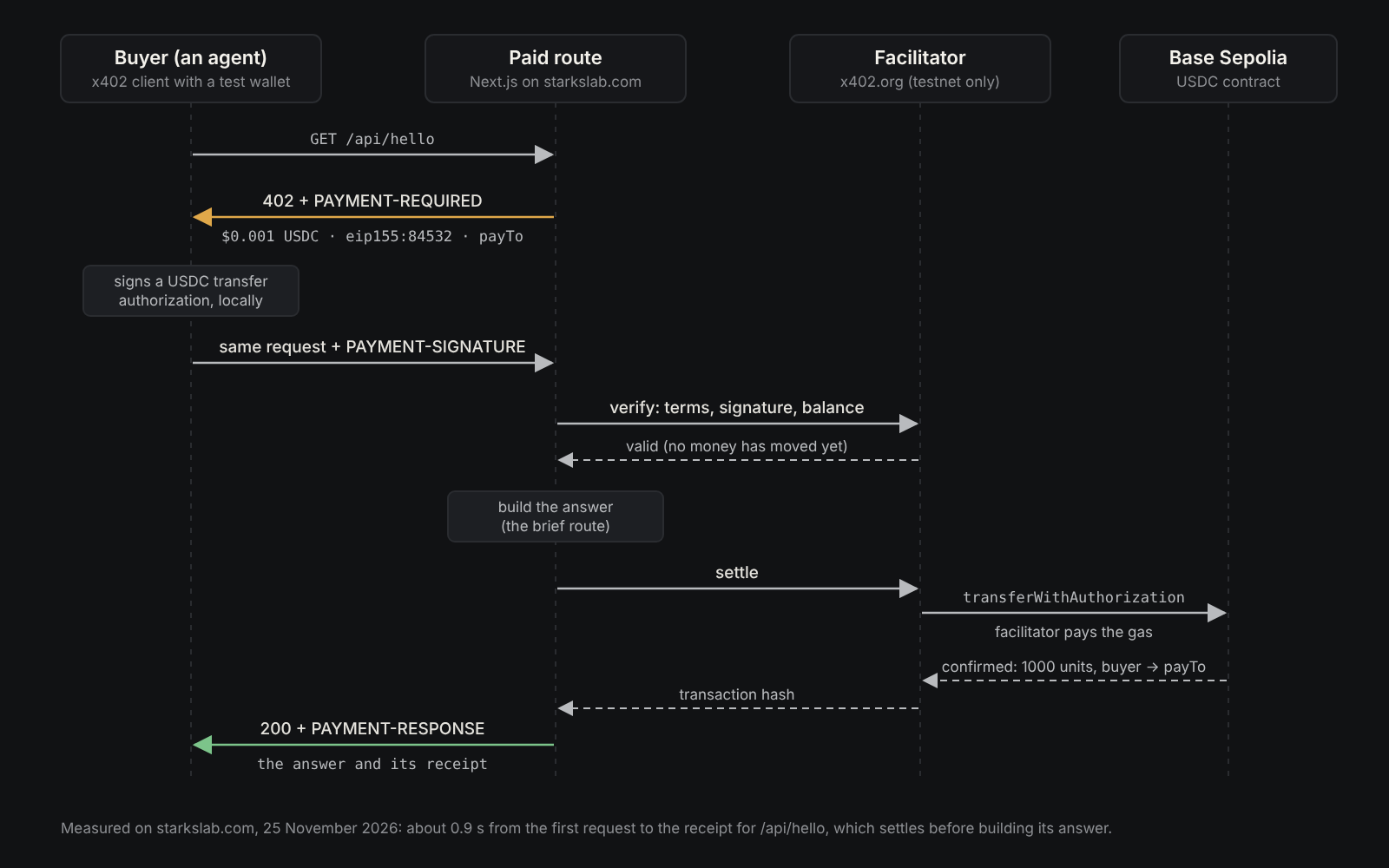
Short answer: x402 lets an API charge an AI agent per request, with no account, checkout or API key. The route answers 402 Payment Required with its price, network and receiving address in a PAYMENT-REQUIRED header. The agent's client signs a USDC payment and asks again with PAYMENT-SIGNATURE; a facilitator verifies and settles it, and the route returns the resource with a PAYMENT-RESPONSE receipt.
On 25 November 2026 I made two routes on starkslab.com, a Next.js site, payable on the Base Sepolia test network. Buying the smallest, a $0.001 postcard paid in test USDC, took about 0.9 seconds. This x402 example follows that route from its 402 answer to a receipt you can check on-chain.
How 402 Payment Required works in a paid request
HTTP 402 is a standard but rarely used status code: Payment Required. The x402 protocol puts it to work. A paid route answers 402 with the amount, currency and destination, so a program can pay without creating an account.
Three headers carry the exchange, each holding Base64-encoded JSON:
PAYMENT-REQUIREDcomes with the 402, from server to client. It holds the terms.PAYMENT-SIGNATUREcomes with the client's retry. It holds the signed payment.PAYMENT-RESPONSEcomes back after settlement, successful or not. It is the receipt.
You can decode Starkslab's terms yourself (the resource description is left out here):
curl -s -D - -o /dev/null https://starkslab.com/api/hello \
  | tr -d '\r' \
  | awk -F': ' 'tolower($1)=="payment-required"{print $2}' \
  | base64 -d | jq '{x402Version, accepts}'
{
  "x402Version": 2,
  "accepts": [
    {
      "scheme": "exact",
      "network": "eip155:84532",
      "amount": "1000",
      "asset": "0x036CbD53842c5426634e7929541eC2318f3dCF7e",
      "payTo": "0x1081354b598A4bF259004fC09C967e885E6232ab",
      "maxTimeoutSeconds": 300,
      "extra": {
        "name": "USDC",
        "version": "2"
      }
    }
  ]
}
exact is the scheme, a fixed price. eip155:84532 is a CAIP-2 network id, a chain-neutral name for Base Sepolia. USDC has six decimals, so an amount of 1000 atomic units is $0.001; asset is the USDC contract and payTo is the address that gets paid.
Nothing here asks who the buyer is. The terms travel in the 402 and each request is paid, so the buyer needs no account or API key from the seller. That also removes a chore: there are no keys to issue, or to rotate across every consumer when one leaks.
The standard is open. On 14 July 2026 the Linux Foundation announced the operational launch of the x402 Foundation to steward the protocol, which Coinbase contributed. Forty organizations had joined, with premier members including Adyen, AWS, American Express, Circle, Cloudflare, Coinbase, Google, Mastercard, Shopify, Stripe and Visa.
What I built: a $0.001 postcard and paid tool briefs
I wanted to understand x402 payments from the seller's side, so I made two routes payable. Both cost $0.001 in test USDC on Base Sepolia, a test network whose tokens have no value, and both are documented on Starkslab's developers page with a buyer script.
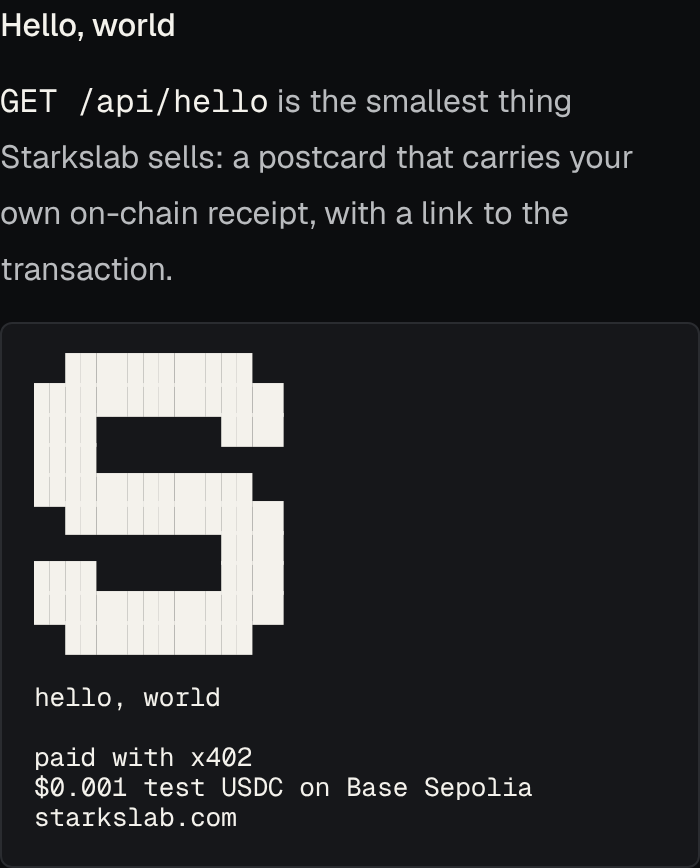
GET /api/hellois the hello world: a postcard with the Starkslab S in block characters and the buyer's own on-chain receipt.GET /api/briefs/{tool}returns everything Starkslab has on one tool: every note with its evidence label, versions and dates, plus the full text of each tested note.
The same notes stay free through Starkslab's API, MCP server and pages; the paid routes only test how agents pay. A test network was the right place to start, because every request, failure and receipt is real but nobody loses money. Choosing whether agents reach you through MCP, an API or a CLI comes first; charging per request comes after.
The stack is Next.js 16.1.4 on Vercel, deployed through Gomnee Sites with functions in iad1, with the protocol's packages at 2.32.0 and viem 2.58.6 (exact versions are listed at the end). I did the work in a Claude Code cloud session on 25 November 2026.
Before you start
You need four things:
- A Next.js app with the App Router, on a patched release. On 27 November 2026,
npm auditlisted security advisories for Next.js 16.1.4, the version these tests started on, and for 16.4.1, with fixes from 16.4.5. It listed none for 16.4.6. - A receiving address you control on an EVM network. The terms publish it, so it is not a secret; the code reads it from
X402_PAY_TO. - A test-only buyer wallet with test USDC. Make a fresh key for this alone, and get Base Sepolia USDC, which has no value, from Circle's faucet.
- Node.js 22 or later and the packages:
npm install @x402/core @x402/evmfor the server, andnpm install @x402/fetch @x402/evm viemfor the buyer.
The official adapter, @x402/next, is optional and needs a newer Next.js: version 2.32.0 declares a peer dependency on 16.4.1 or later.
npm view @x402/next@2.32.0 peerDependencies --json
{
  "next": ">=16.4.1",
  "@x402/paywall": "^2.32.0"
}
Without it, you drive x402HTTPResourceServer from the core package yourself, as Starkslab does on 16.1.4. The next section shows both ways.
Add a paid route to Next.js, step by step
There are two ways to add the route. On Next.js 16.4.5 or later, the official adapter does it in one file. On older versions, or to see each part of the flow, use the core package as in the steps below.
The shorter path: withX402 on Next.js 16.4.5 or later
Install @x402/next as well, and the whole route fits in one file:
// app/api/hello/route.ts: the whole paid route, with @x402/next
import { NextResponse, type NextRequest } from "next/server";
import { withX402, x402ResourceServer } from "@x402/next";
import { HTTPFacilitatorClient } from "@x402/core/server";
import { ExactEvmScheme } from "@x402/evm/exact/server";

const server = new x402ResourceServer(
  new HTTPFacilitatorClient({ url: "https://x402.org/facilitator", timeoutMs: 30_000 }),
).register("eip155:84532", new ExactEvmScheme());

async function handler(_request: NextRequest) {
  return NextResponse.json({ hello: "world" }); // settled only if this returns a status below 400
}

export const GET = withX402(
  handler,
  {
    // A bare route config: it applies to whatever path this file serves.
    accepts: { scheme: "exact", price: "$0.001", network: "eip155:84532", payTo: process.env.X402_PAY_TO! },
    description: "Hello, world over x402",
    mimeType: "application/json",
  },
  server,
);
withX402 settles only after your handler returns a status below 400, and the docs recommend it for API routes. Pass a bare route config, as here, rather than a map keyed by path: if a key does not match the served path, the handler runs without payment and only a warning is logged. On 16.4.1 and 16.4.6 this route answered 402 unpaid and 200 with a receipt after a test purchase; that is the first output at the end of this section. Run it and buy from it as in steps 3 and 4.
The core-package path
The two files below are complete. I copied them into a fresh Next.js app on 27 November 2026, ran it on Next.js 16.1.4 and 16.4.6, and bought from it with a test wallet; that is the second output at the end of this section. They are trimmed from Starkslab's code: no rate limiting, no postcard. The order follows the protocol's docs: answer 402, verify the payment, do the work, settle, return the receipt.
Write the paid route, and fail closed
The route asks the core package to check the request, answers 402 without a valid payment, builds the answer, settles and returns the receipt. Only a
payment-verifiedresult gets the answer: a route whose terms do not match its path getsno-payment-required, and serving that would give the answer away (troubleshooting shows the test).// app/api/hello/route.ts: one paid route import { NextResponse, type NextRequest } from "next/server"; import { withPrivateCacheControl } from "@x402/core/server"; import { failure, json, paidRoute, PAYMENT_CORS, requestContext, respond } from "@/lib/x402"; export { OPTIONS } from "@/lib/x402"; export const dynamic = "force-dynamic"; const { httpServer, init } = paidRoute("Hello, world over x402"); async function buildAnswer() { return { hello: "world" }; // your paid work goes here } export async function GET(request: NextRequest) { const context = requestContext(request); let result; try { await init(); result = await httpServer.processHTTPRequest(context); } catch (error) { return failure(error); } // No valid payment: a 402 with the terms in PAYMENT-REQUIRED. if (result.type === "payment-error") return respond(result.response); // Fail closed: answer only after a verified payment. if (result.type !== "payment-verified") return json(500, { error: "misconfigured" }); // Build the answer before settling, so a failure is never charged. let answer; try { answer = await buildAnswer(); } catch (error) { await result.cancellationDispatcher.cancel({ reason: "handler_threw", error }); return json(500, { error: "unavailable" }); // nothing settled } let settlement; try { settlement = await httpServer.processSettlement( result.paymentPayload, result.paymentRequirements, result.declaredExtensions, { request: context }, undefined, // no settlement overrides result.beforeHandlerSettlement, ); } catch (error) { return failure(error); } if (!settlement.success) return respond(settlement.response); return NextResponse.json(answer, { headers: { ...PAYMENT_CORS, ...settlement.headers, // PAYMENT-RESPONSE: the receipt "cache-control": withPrivateCacheControl("no-store"), }, }); }A verified payment has not moved any money yet, so the route builds the answer first and settles after; if building throws, it cancels and nothing is charged. Starkslab's postcard is the exception: it settles first, because the postcard prints its own transaction hash.
Run it and check the unpaid answer
Build and start the app with your receiving address set, then request the route without paying:
npm run build
X402_PAY_TO=0xYourReceivingAddress npm start

# in a second terminal
curl -s -o /dev/null -w "%{http_code}\n" http://localhost:3000/api/hello
Expected result
A 402, with the terms in
PAYMENT-REQUIRED; decode them as in the first section to see yourpayToand 1000 units of USDC oneip155:84532.402Sources: [2]
Buy from your own route
Save the buyer script from "Buy one and check the receipt on-chain" below as
buy.mjs, then run it against your route with a test-only key that holds test USDC:TEST_WALLET_KEY=0x... node buy.mjs http://localhost:3000/api/helloExpected result
A 200 with a decoded receipt and your answer; mine is at the end of this section. A 402 with
invalid_exact_evm_transaction_failedmeans the facilitator failed to settle: see troubleshooting.Sources: [17]
Check the browser preflight
Browsers hide response headers from scripts unless the server exposes them, and a request with a
PAYMENT-SIGNATUREheader triggers a preflight first.lib/x402.tsaddsPAYMENT_CORSto its own responses and exports theOPTIONShandler the route re-exports; check that it answers:curl -s -o /dev/null -D - -X OPTIONS http://localhost:3000/api/hello \ | tr -d '\r' | grep -i "^HTTP/\|^access-control"Expected result
A 204 with the payment headers allowed and exposed:
HTTP/1.1 204 No Content
access-control-allow-headers: PAYMENT-SIGNATURE, Content-Type
access-control-allow-methods: GET, OPTIONS
access-control-allow-origin: *
access-control-expose-headers: PAYMENT-REQUIRED, PAYMENT-RESPONSE
Command
X402_TEST_PAYER_KEY=<test-only key> npm run x402:buy -- http://localhost:3300/api/helloActual output
paid: 200 OK in 0.6s
  receipt: {"success":true,"payer":"0xB5e7c066867EB3eE5e9ee657C916bd19fb788551","transaction":"0x7f268a8bc43fc75c4139bc0a9bc7648f4036eef1e0e9ba744aa3eef13e963996","network":"eip155:84532"}
body: {"hello":"world"}Command
TEST_WALLET_KEY=<test-only key> node buy.mjs http://localhost:3000/api/helloActual output
200 {
  success: true,
  payer: '0xB5e7c066867EB3eE5e9ee657C916bd19fb788551',
  transaction: '0x5fde3301159e69e0f4da71ea5d9aa63e61df3b99dca6f05b3af2dc4a0ec805bc',
  network: 'eip155:84532'
}
{"hello":"world"}What the x402 facilitator does, and which one to use
A facilitator checks and executes payments for the seller. It verifies that a signed payment matches the route's terms, then submits it to the blockchain and waits for confirmation, so your server needs no blockchain connection. It does not hold funds or act as a custodian.
The live receipt shows the division of labour. The transaction was a transferWithAuthorization call sent by the facilitator's address, 0xd407e409E34E0b9afb99EcCeb609bDbcD5e7f1bf, to the USDC contract, moving 1000 units from the buyer to the receiving address. The buyer signed; the facilitator's address paid the gas.
Which one to use depends on whether real money moves, and on which network. The public https://x402.org/facilitator is for development and testnets, and it is what Starkslab uses on Base Sepolia. For mainnet, the docs say to use a production facilitator for your network, run your own or self-facilitate, and not to reuse this one. Base is only one choice: the docs' examples also register Solana and Algorand test networks, and production facilitators cover networks including Solana, Polygon and Avalanche.
Mind the timeout. HTTPFacilitatorClient waits 90 seconds per request by default and takes a timeoutMs override; I set 30 seconds, so a stuck facilitator fails well inside the 60-second limit Starkslab's routes run under. A timeout during settle is indeterminate, though, because the facilitator may have settled anyway; the real-payments section shows how to check.
Buy one and check the receipt on-chain
The quickest test is to buy the postcard. This buyer script, adapted from Starkslab's developers page to take any URL, prints the status, the decoded receipt and the answer; run it with Node 22 or later, using a test-only key:
// buy.mjs: npm install @x402/fetch @x402/evm viem
// then run: TEST_WALLET_KEY=0x... node buy.mjs https://starkslab.com/api/hello
import { wrapFetchWithPaymentFromConfig } from "@x402/fetch";
import { ExactEvmScheme } from "@x402/evm/exact/client";
import { privateKeyToAccount } from "viem/accounts";

// A test-only key. Never use a wallet that holds real funds.
const account = privateKeyToAccount(process.env.TEST_WALLET_KEY);
const pay = wrapFetchWithPaymentFromConfig(fetch, {
  schemes: [{ network: "eip155:84532", client: new ExactEvmScheme(account) }],
});

const response = await pay(process.argv[2] ?? "https://starkslab.com/api/hello");
const receipt = response.headers.get("payment-response");
console.log(response.status, receipt ? JSON.parse(Buffer.from(receipt, "base64").toString()) : "no receipt");
console.log(await response.text());
pay is a fetch that pays: on a 402 it reads the terms, signs with the registered scheme and repeats the request with PAYMENT-SIGNATURE. Point it at your own route, as in step 4 above.
I ran the same purchase with the repository's buy script, which prints each step. Against starkslab.com it returned 200 OK in 0.9 seconds with a receipt for transaction 0x5561c289…dfbc2; the output is below.
Don't stop at the receipt; check the chain. Basescan and Blockscout show the transaction, and Blockscout's API returns it as JSON (the second output below): status ok, method transferWithAuthorization, sent by the facilitator to the USDC contract, with 1000 USDC units moving from the buyer to the receiving address.
How long a paid request takes
Client wall-clock time for the paying fetch, from its first request to the receipt (the 402, signing, the paid retry, verification and settlement), measured from a cloud container to Vercel's iad1 region on 25 November 2026:
| Route | Runs | Paid request |
|---|---|---|
/api/hello |
local, preview, live | 0.8 to 0.9 s |
/api/briefs/{tool} |
five runs: local, preview, live | 2.5 to 3.9 s |
The brief is slower because it assembles 125 to 255 KB of notes before settling. These come from one environment on one day, so read them as an order of magnitude, not a benchmark.
Command
X402_TEST_PAYER_KEY=<test-only key> npm run x402:buy -- https://starkslab.com/api/helloActual output
paid: 200 OK in 0.9s
  receipt: {"success":true,"payer":"0xB5e7c066867EB3eE5e9ee657C916bd19fb788551","transaction":"0x5561c2892eb7f23b7f7258a7a88a2d3be1c2da234c00de966afdd361cd5dfbc2","network":"eip155:84532"}

  ████████████
████████████████
████        ████
████
██████████████
  ██████████████
            ████
████        ████
████████████████
  ████████████

hello, world

paid with x402
$0.001 test USDC on Base Sepolia
starkslab.com

  Hello, world. You just bought something on the web with x402: an HTTP 402 answer, a signed USDC payment and no account or checkout.
explorer: https://sepolia.basescan.org/tx/0x5561c2892eb7f23b7f7258a7a88a2d3be1c2da234c00de966afdd361cd5dfbc2Command
curl -s https://base-sepolia.blockscout.com/api/v2/transactions/0x5561c2892eb7f23b7f7258a7a88a2d3be1c2da234c00de966afdd361cd5dfbc2 | jq -c '{status, result, block_number, from: .from.hash, to: .to.hash, method, timestamp, token_transfers: [.token_transfers[]? | {from: .from.hash, to: .to.hash, total: .total.value, token: .token.symbol}]}'Actual output
{"status":"ok","result":"success","block_number":63638181,"from":"0xd407e409E34E0b9afb99EcCeb609bDbcD5e7f1bf","to":"0x036CbD53842c5426634e7929541eC2318f3dCF7e","method":"transferWithAuthorization","timestamp":"2026-11-25T23:31:45.000000Z","token_transfers":[{"from":"0xB5e7c066867EB3eE5e9ee657C916bd19fb788551","to":"0x1081354b598A4bF259004fC09C967e885E6232ab","total":"1000","token":"USDC"}]}What the buyer can limit
The seller sets the price, but the buyer's client decides what it will pay. By default the client pays only recognized USD-pegged assets such as USDC and caps each payment at $1. These spend controls run before anything is signed, and you can raise, narrow or disable them.
Two more limits come from setup. Starkslab's buyer script registers only Base Sepolia, eip155:84532, so it refuses terms on any other network, mainnet included. It also reads a test-only key from an environment variable, so the worst a bug can spend is free test USDC.
A per-payment cap is not a budget, though: a loop paying $0.001 ten thousand times passes the $1 check every time and spends $10. Count spending in your own agent. Account-based APIs meet the same problem on the provider's side, and API spend limits compares what actually stops requests there.
What went wrong for me, and what to check
An empty wallet gets a 402, not a payment. Before I funded the test wallet, a paid request came back 402 with invalid_exact_evm_insufficient_balance. A fresh, empty wallet against the live site on 26 November got the same 402 in 0.5 seconds; the output is below. The balance is checked during verification, before anything reaches the chain, so fund the wallet and retry.
A malformed payment header gets the terms again. PAYMENT-SIGNATURE: not-a-payment returns 402 with a fresh PAYMENT-REQUIRED header, not a 500. Starkslab's public smoke checks assert this, and I run them against each preview and the live site.
Settlement can fail after verification. On 27 November, 3 of my 9 test settlements through the public test facilitator failed with "replacement transaction underpriced" or "nonce too low", errors from its own transaction queue. The route answered 402 with invalid_exact_evm_transaction_failed and served nothing (output below); a new signature went through on the next try.
A settle timeout is unknown, not failed. The payment may still go through, though failure() answers 502; the real-payments section shows how to check.
When a route answers without payment
The core package can return no-payment-required. It does when a route's terms do not match its path, for example through a mistyped key in a route map. A handler that only rejects payment-error then serves the paid answer with a 200; requiring payment-verified, as step 2 does, returns a 500. I tested both with a deliberately mistyped route map; the output is below.
withX402 runs the handler unpaid when a path key does not match. With the key "/api/typ0" on the route /api/typo, it served the answer and only logged that the handler ran without payment. Use the bare route config from the adapter path, or request every keyed route once without paying.
Command
X402_TEST_PAYER_KEY=<fresh empty test-only key> npm run x402:buy -- https://starkslab.com/api/helloActual output
payer 0x4a6C57C135275d62b1239093EFa5122A054C1b23
unpaid: 402 Payment Required
  terms: exact 1000 units of 0x036CbD53842c5426634e7929541eC2318f3dCF7e on eip155:84532 to 0x1081354b598A4bF259004fC09C967e885E6232ab
  body: {"error":{"code":"payment_required","message":"Hello, world costs $0.001 in test USDC on Base Sepolia (x402 test network; the tokens have no value). Pay with any x402 client: the PAYMENT-REQUIRED header carries the terms.","docs":"https://starkslab.com/developers#hello"}}
paid: 402 Payment Required in 0.5s
body: {"error":"invalid_exact_evm_insufficient_balance"}Command
curl -s -o /dev/null -w "%{http_code}\n" -H "payment-signature: not-a-payment" https://starkslab.com/api/hello
curl -s -D - -o /dev/null -H "payment-signature: not-a-payment" https://starkslab.com/api/hello | tr -d "\r" | grep -ic "^payment-required:"
Actual output
402
1Command
X402_TEST_PAYER_KEY=<test-only key> npm run x402:buy -- http://localhost:3200/api/helloActual output
paid: 402 Payment Required in 0.5s
receipt: {"success":false,"errorReason":"invalid_exact_evm_transaction_failed"Actual output
Details: replacement transaction underpriced\nVersion: viem@2.48.11","payer":"0xB5e7c066867EB3eE5e9ee657C916bd19fb788551","transaction":"","network":"eip155:84532"}
body: {}Command
curl -s -w "\n%{http_code}\n" http://localhost:3200/api/leaky
curl -s -w "\n%{http_code}\n" http://localhost:3200/api/guarded
curl -s -w "\n%{http_code}\n" http://localhost:3300/api/typo
grep "did not match" adapter-server.log
Actual output
{"paidAnswer":"served","resultType":"no-payment-required"}
200
{"error":"misconfigured"}
500
{"paidAnswer":"served"}
200
[x402] Request path "/api/typo" did not match any configured route pattern ("/api/typ0"); the handler ran without payment. Check the route patterns passed to withX402.What changes for real payments
I have not run any of this on mainnet; this is the documented path, not a tested one. The code stays the same, and four things change:
- Facilitator. Use a production facilitator, never the public test one; Coinbase's is configured below.
- Network id. Change
eip155:84532toeip155:8453, Base mainnet, in the terms and in the buyer's scheme. - Receiving wallet. Use a real mainnet address you control; the USDC lands there.
- Small first payments. Test with small amounts and confirm they arrive before raising prices or announcing the route.
Coinbase's facilitator needs a CDP API key. @coinbase/x402 turns it into the client configuration, reading CDP_API_KEY_ID and CDP_API_KEY_SECRET, so keep both in your hosting environment's settings. I type-checked this against @x402/core 2.32.0 but did not call it:
// Coinbase's facilitator: the key comes from the environment, never the repository
import { createFacilitatorConfig } from "@coinbase/x402";
import { HTTPFacilitatorClient } from "@x402/core/server";

// Reads CDP_API_KEY_ID and CDP_API_KEY_SECRET.
const facilitator = new HTTPFacilitatorClient({ ...createFacilitatorConfig(), timeoutMs: 30_000 });
Before real money: handle a settle timeout
A settle timeout leaves you not knowing whether the buyer paid, and failure() answers 502 either way. USDC can tell you: its authorizationState(payer, nonce) turns true once a signed authorization has been used or cancelled.
// lib/settled.ts: after a settle timeout, ask the token whether the payment went through
import { createPublicClient, http, parseAbi } from "viem";
import { baseSepolia } from "viem/chains";
import { isEIP3009Payload, type ExactEvmPayloadV2 } from "@x402/evm";

const client = createPublicClient({ chain: baseSepolia, transport: http() });
const abi = parseAbi(["function authorizationState(address authorizer, bytes32 nonce) view returns (bool)"]);

/** true: the authorization was used, or cancelled by the buyer; false: not yet; null: not an EIP-3009 payment. */
export async function wasSettled(asset: string, payload: ExactEvmPayloadV2): Promise<boolean | null> {
  if (!isEIP3009Payload(payload)) return null;
  const { from, nonce } = payload.authorization;
  return client.readContract({ address: asset as `0x${string}`, abi, functionName: "authorizationState", args: [from, nonce] });
}
Call it where the route catches a settlement error, and answer only if the payment went through:
// app/api/hello/route.ts: two more imports...
import type { ExactEvmPayloadV2 } from "@x402/evm";
import { wasSettled } from "@/lib/settled";

// ...and a new catch around processSettlement
} catch (error) {
  // A timeout may still have settled: ask the token before answering.
  const payload = result.paymentPayload.payload as unknown as ExactEvmPayloadV2;
  if (await wasSettled(result.paymentRequirements.asset, payload)) {
    // Paid, but the facilitator sent no receipt, so there is no PAYMENT-RESPONSE.
    return NextResponse.json(answer, {
      headers: { ...PAYMENT_CORS, "cache-control": withPrivateCacheControl("no-store") },
    });
  }
  return failure(error);
}
On Base Sepolia it returned true for the live purchase and false for a settlement the facilitator failed; the output is below. A true goes out without a PAYMENT-RESPONSE receipt, because the facilitator never returned one. If the buyer cancels the authorization, the check also returns true, though cancelling costs them a transaction; for larger amounts, also confirm the token's AuthorizationUsed event.
A false is final only once the authorization expires. The buyer's client sets its validBefore to the signing time plus the terms' maxTimeoutSeconds, 300 seconds by default, and until then the facilitator can still settle it. So log the payer and nonce, and check again after that time: if it turned true, the buyer paid without getting the answer, and you owe them the answer or a refund.
I have not run this inside a real timeout, and on mainnet the client needs Base instead of Base Sepolia.
Starkslab's routes are still on the test network; everything they sell is free elsewhere on the site, so the point so far is learning the flow.
Command
node --experimental-strip-types check-settled.mtsActual output
live purchase (settled 25 Nov): true
failed settle (27 Nov): falseWhat agents actually pay for today
Pricing is where a new seller gets stuck, so I looked at where AI agent payments already happen. Coinbase's x402 Bazaar is a discovery API listing paid services that agents can call, with usage counts for each. On 26 November 2026 at 01:09 UTC it listed 88,455 services; I grouped the 1,000 most used by keywords in their descriptions:
| What the service sells | Share of paying wallets | Share of calls | Median price |
|---|---|---|---|
| Crypto market and on-chain data | 39% | 22% | $0.005 |
| Wallet and payment execution, mostly one provider's token transfers | 37% | 2% | $0.005; its two largest listings charge $0.05 |
| Public records and reference data | 5% | 3% | $0.005 |
| Web search and page reading | 4% | 8% | $0.005 |
| AI model calls | 2% | 5% | $0.003 |
| Test and utility pings | 3% | 53% | $0.001 |
| Everything else: agent infrastructure, social media data, other | 10% | 7% | $0.003 to $0.005 |
Those 1,000 services logged 1,463,722 calls in 30 days. The median price was $0.005, 68% charged under one cent, and only 2% charged $0.10 or more. Apart from one provider's token transfers, most paying wallets bought data: market and on-chain data, records and search results.
How to read these numbers
The Bazaar is an opt-in directory of services using Coinbase's facilitator, a payer is a wallet rather than a verified agent, a wallet that paid two services counts twice, and my categories are keyword matches. Nine trivial endpoints on one host logged about 84,000 calls each from fewer than 100 wallets, which looks like test traffic and makes up most of the test-pings row.
If you want to sell something agents pay for, the supply side looks a lot like building an agent-facing data tool: a narrow, reliable answer that is tedious to assemble by hand. Put a 402 in front of it, buy it once yourself and check the receipt on-chain.
Command
python3 -I checks/bazaar_categories.py bazaar/top1000.jsonActual measurement
category                              list hosts     calls %calls  payers  %pay  median$
Crypto market and on-chain data        259   131    319591  21.8%   14515 39.3%   0.0050
Wallet and payment execution             7     6     25707   1.8%   13572 36.8%   0.0050
Other                                  239   162     15622   1.1%    2361  6.4%   0.0030
Public records and reference data      150    96     39045   2.7%    1787  4.8%   0.0050
Web search and page reading            132    97    123669   8.4%    1515  4.1%   0.0050
Test and utility pings                  36    27    779863  53.3%    1104  3.0%   0.0010
Agent infrastructure                    86    68     47994   3.3%     788  2.1%   0.0047
AI model calls                          42    33     78878   5.4%     733  2.0%   0.0032
Social media data                       49    24     33353   2.3%     531  1.4%   0.0050

all: 1000 listings, 1463722 calls, 36906 payer-listing pairs; price median $0.0050, under 1 cent: 68%, $0.10 or more: 2%Frequently asked questions
Do I need an account or API key to accept x402 payments?
Not to start. On a test network you need a receiving address and a facilitator URL, and Starkslab's routes use the public test facilitator without a key. Buyers need nothing from you either: the 402 carries the price and destination, and each request is paid. A production facilitator may want its own credentials, so keep those in environment settings, never in code.
Sources: [3]
Can I use the x402.org facilitator for real payments?
No. The docs describe the public x402.org facilitator as a development and testnet service and say not to reuse it for mainnet routes. For real payments, use a production facilitator for your network, such as Coinbase's CDP endpoint, run your own, or self-facilitate. Starkslab uses the test facilitator only on Base Sepolia, where the tokens have no value.
How long does an x402 payment take?
In my tests a paid request for a small JSON answer took 0.8 to 0.9 seconds end to end, from the first 402 to the receipt. A tool brief that assembles 125 to 255 KB of notes took 2.5 to 3.9 seconds. Both were measured from one cloud container to Vercel's iad1 region on 25 November 2026, so expect different numbers elsewhere.
What should I charge per request?
Start from what the request costs you and what the answer saves the caller. For context, among the 1,000 most-used services in Coinbase's Bazaar on 26 November 2026, the median price was $0.005; 68% charged under one cent and 2% charged $0.10 or more. Starkslab's $0.001 routes are tests on a test network, not a pricing recommendation.
Does @x402/next work with my Next.js version?
Check its peer dependency first: version 2.32.0 declares Next.js 16.4.1 or later. Use 16.4.5 or later anyway, because npm audit lists security advisories for 16.4.1 to 16.4.4. There, withX402 processes the request, runs your handler and settles for you. On older versions, drive x402HTTPResourceServer from the core package yourself, as Starkslab did on 16.1.4.
Sources: [10]
Who invented x402?
x402 was started at Coinbase, which contributed the protocol to the Linux Foundation. On 14 July 2026 the Linux Foundation announced the operational launch of the x402 Foundation to steward it under open, vendor-neutral governance. By then 40 organizations had joined, with premier members including Adyen, AWS, American Express, Circle, Cloudflare, Google, Mastercard, Shopify, Stripe and Visa.